
WooCommerce Product Description SEO: Why the Same Copy Underperforms
July 27, 2026 · 8 min read · by Aashirvad Kumar
Your credits refresh every month for as long as ListingRVA AI exists. No renewals, no annual increases, nothing to cancel.
Available on select plans. No renewals, ever.
July 27, 2026 · 8 min read · by Aashirvad Kumar
You sell the same product on a marketplace and on your own WooCommerce store. The marketplace listing ranks, gets impressions and converts. The WooCommerce page, with copy that is longer and honestly better written, sits on page four for its own product name. Nothing about the writing explains the gap, which is why rewriting it a third time never fixes anything, and why woocommerce product description seo advice about tone and length keeps missing the point.
The gap is structural. WooCommerce splits your copy across two fields, hides most of it behind a tab, generates a set of archive pages that compete with the product itself, and hands your schema to whichever plugin loaded last. Good woocommerce product description seo is mostly about undoing those four things, and only then about the sentences.
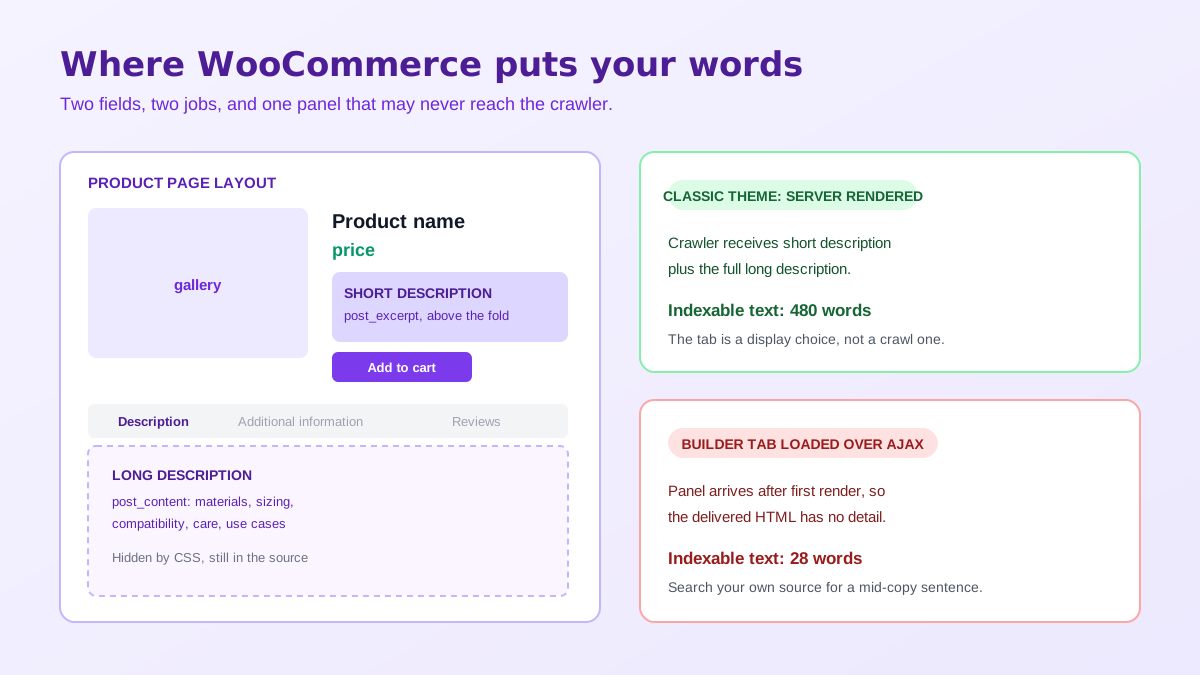
WooCommerce stores the long description in the WordPress post content field and the short description in the post excerpt field. They are not two sizes of the same text. The short description renders next to the price, above the fold, and most SEO plugins will fall back to it when no meta description is set, which means it is doing double duty as both the buying argument and the snippet a searcher reads before clicking.
The long description is where materials, dimensions, compatibility, care instructions and use cases belong. Sellers routinely get this backwards: they paste a paragraph of brand story into the short description, where it occupies the most valuable space on the page and says nothing, then leave the long description as three bullet points lifted from a supplier sheet. The result is a page with no unique substance in either field.
In a classic WooCommerce theme, the Description tab is rendered server side. The panel is hidden with CSS but the text is present in the HTML source, so it is crawled and indexed normally. The tab layout is not the problem people assume it is. What matters is whether the text exists when the page is delivered, not whether a human has to click to see it.
The failure case is a page builder or block theme that loads tab panels over AJAX after first render. Now the crawler receives a product page whose only body text is a two line excerpt, and the page is genuinely thin no matter how much you wrote. View source on your own product page and search for a distinctive sentence from the middle of your description. If it is not in the source, that is the whole diagnosis.
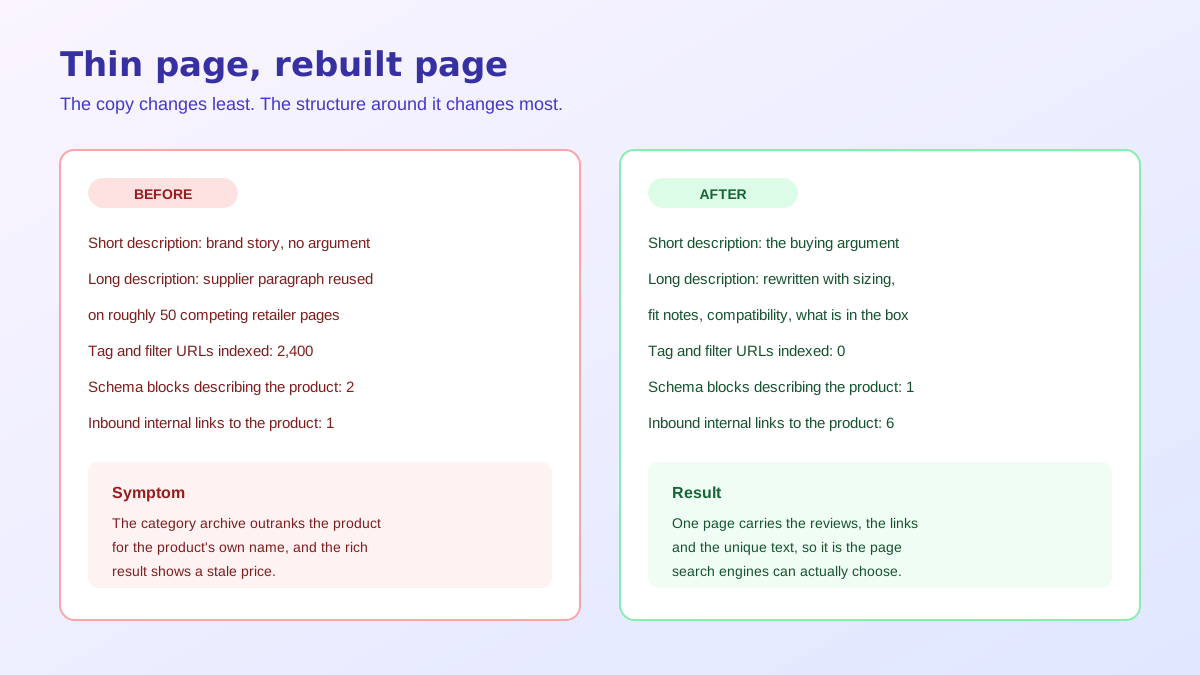
A stock WooCommerce install generates more URLs than you think. Every product category and product tag gets an archive. Every archive gets pagination. Layered navigation adds filter parameters, sorting adds an orderby parameter, and each combination is a crawlable URL carrying a reshuffled version of the same product grid. On a catalogue of 300 products it is common to find several thousand indexable URLs, almost none of which anyone searched for.
This matters for descriptions specifically because it changes where your internal links point. A product tag archive is linked from every product that carries the tag, so link equity flows toward pages with no content on them, while the product pages that actually deserve to rank receive one link from one category archive. The archives then outrank the products for the products' own terms, which is the pattern most stores misread as a copy problem.
The correction is boring and effective. Decide which archives are commercially useful, usually a handful of category pages, give those real introductory copy, and noindex the rest along with every filtered and sorted parameter URL. Then link from your product descriptions outward to related products and inward from buying guides, so the product page stops being a leaf node with a single inbound link.
If you dropship or resell, the supplier paragraph on your page is on fifty other pages. There is no penalty for this in any formal sense, but there is a selection problem: when several pages carry identical text, one of them gets shown, and a small store almost never wins that comparison against an established retailer. Your page is not being punished, it is being skipped, and no amount of woocommerce product description seo tuning changes an identical block of text into a distinctive one.
Rewriting is the only fix, and it is less work than it sounds because the raw material is already there. Take the specification table, then add what the supplier never writes: what it fits, what it does not fit, what the sizing runs like in practice, what customers ask before buying, what is in the box. That is the layer that makes a page selectable, and a WooCommerce product description generator is a reasonable way to get a first draft of it across a large catalogue.
WooCommerce outputs Product structured data of its own, and Yoast, Rank Math and most builder plugins output their own version too. When two blocks describe the same product with different values, you get an inconsistent picture in the source, and the practical symptom is a rich result that shows a price you have not charged since March or an availability status that contradicts the button. Pick one source of truth, disable the others, and validate the output rather than assuming it. Structured data is the part of woocommerce product description seo that fails silently, because nothing on the page looks broken while the markup contradicts itself.
The fields worth checking are the ones that drive visible enhancements: offers with price and priceCurrency, availability, aggregateRating when you have genuine reviews, and brand. Reviews are also the cheapest legitimate unique content on a product page, since every review adds text nobody else has. The same discipline of writing distinct, specific copy per page carries across platforms, which the ecommerce listing copy SEO guide covers in more depth.
A variable product serves every variation from one URL and appends attribute query strings as a shopper picks options. Sellers who want each colour to rank sometimes split the range into separate simple products, and it backfires reliably. Reviews, internal links and any external links now spread across ten near identical pages, so one page that could compete becomes ten that cannot, and the near identical descriptions create the duplicate problem internally.
Keep the variable product intact and let the description do the differentiating work. Name the colours and sizes in the long description text so the page can be found for those terms, use the attributes table for the structured version, and give each variation a correctly mapped image. Product URLs deserve the same care: pick a permalink structure early, because changing it later means every product redirects and the internal links in your own copy point at old paths.
If your catalogue also lives on a hosted storefront, the same class of mistake appears in a different costume there, with duplicate collection URLs and canonical tags fighting each other. The write up on the wrong Shopify URL indexing is a useful comparison, because the diagnosis method transfers even though the platform does not.
Worked in that order, woocommerce product description seo stops being a writing exercise and becomes a plumbing exercise with a writing step at the end. Most stores find that the first three items alone move rankings, because they were never competing on copy quality in the first place. They were competing with their own tag archives while half the description sat outside the HTML.
The last piece is what happens after the click. Copy gets a shopper to consider, images decide whether they trust the product enough to buy it, and product pages that answer questions in text but show one dim photograph still convert badly. Structured product data increasingly feeds answer engines as well as classic results, which is the argument the piece on product data for AI search lays out, and it applies to a self hosted store as much as a marketplace. Clean imagery is the other half of that, and a consistent set can be produced from a single reference shot with AI product photography rather than a reshoot per variation.
Not by itself. In a classic theme the long description sits in the page source and is crawled normally even though it is hidden behind a tab. It becomes a problem when a page builder or a block theme loads that panel over AJAX after the page renders, because then the crawler receives a product page whose only real text is a two line short description.
Both, with different jobs. The short description is the excerpt field that renders next to the price, so it carries the buying argument and is often what SEO plugins pull as a meta description fallback. The long description carries the detail, materials, sizing, compatibility and use cases that answer the questions a shopper would otherwise ask before buying.
Because the archive usually has more internal links pointing at it and the product pages are thin by comparison. A product category archive is linked from the menu, the breadcrumb and every product in it, while a product page is often linked from one archive and nothing else. Fix the imbalance with contextual internal links rather than by removing the archive.
No, and creating them is usually a mistake. WooCommerce serves every variation from one product URL and appends attribute query strings when a shopper selects options. Splitting a size run into separate products spreads reviews and links across many near identical pages, which is the classic way to turn one competitive page into ten weak ones.
It is less a penalty than a tie breaker you always lose. When fifty retailers publish the identical supplier paragraph, search engines pick whichever copy carries the strongest signals, and a small store rarely wins that comparison. Rewriting the same specification in your own words, with your own sizing notes and use cases, is what makes the page selectable.
There is no threshold that triggers ranking. What matters is whether the page answers the questions that stop a purchase, which for a simple accessory might be 120 words and for a technical product might be 600. Length only helps when the extra words carry specifications, compatibility, care instructions or sizing that a buyer would otherwise go looking for elsewhere.
On WooCommerce or WordPress? Do it inside your store.
Install the free ListingRVA AI plugin to generate studio product images and optimize listings right from your product screen. No API keys to copy: it connects your existing account and uses your plan credits.
Get the free plugin →ListingRVA AI now works inside Claude. Connect your workspace and ask Claude to generate listing copy and publish product images to your store, without leaving your editor. See the Claude connector →
Comments
No comments yet, be the first.
Leave a comment