
Google Indexing the Wrong Shopify Product URL? The Duplicate-Content Fix
July 1, 2026 · 9 min read · by Aashirvad Kumar
Your credits refresh every month for as long as ListingRVA AI exists. No renewals, no annual increases, nothing to cancel.
Available on select plans. No renewals, ever.
July 1, 2026 · 9 min read · by Aashirvad Kumar
You optimized a Shopify product page, gave it a clean title and a unique description, and it still is not ranking, or worse, when you check Search Console the URL Google indexed is not the one you optimized. It has /collections/something/ in the middle, or a ?variant= tail. This is one of the most-discussed and least-understood Shopify SEO problems, and it is almost never about your content. It is about how Shopify generates URLs.
This guide explains why Shopify quietly creates several URLs for one product, why the canonical tag does not always save you, and the specific fix, plus which Search Console warnings you can safely ignore.
Shopify serves the same product from more than one address. There is the clean canonical, /products/grey-suede-jacket. But Shopify's Liquid templates also build collection-aware links like /collections/jackets/products/grey-suede-jacket whenever a product is viewed inside a collection, and variant selections add parameter URLs like /products/grey-suede-jacket?variant=123. Put one product in four collections with a few variants and you can generate well over a dozen crawlable URLs, in one widely cited example, twenty-one separate URLs for a single product.
Every one of those is the same page to a shopper. But to Google they are competing addresses, and Google has to pick one to index and rank. When it picks wrong, the "page" you carefully optimized loses its authority to a near-duplicate that has none of your internal links or backlinks pointed at it consistently. Amazon draws those lines in different places, which the Amazon image requirements guide spells out field by field.
The reasonable objection is: "Shopify adds a canonical tag automatically, doesn't that solve it?" Partly. Shopify does point variant and collection URLs at the canonical /products/handle. The problem is that a canonical tag is a hint, not a command, and Google ignores it when other signals disagree, by many estimates Google disregards 30 to 40 percent of canonicals when internal links, sitemaps, and external links point somewhere else. If the argument needs evidence, the product image conversion statistics cover what actually shifts buyer behaviour.
And here is the kicker on Shopify: your own internal links often point at the non-canonical version. Because Liquid's product.url filter builds collection-aware links when a product is shown within a collection, every "shop the collection" grid on your site can be linking to /collections/x/products/y instead of the canonical. So you are telling Google, through hundreds of internal links, that the collection URL is the important one, while a lone canonical tag whispers the opposite. Google follows the louder signal. When a listing is optimized and still buried, the stuck Amazon listing diagnosis separates an indexing problem from a ranking one.
The root cause in one line: Shopify's canonical tag says "index /products/handle", but your internal links say "index /collections/x/products/handle". Conflicting signals, and Google often sides with the links. Fix the links and the conflict disappears.
The goal is simple, make your internal links agree with your canonical tag so Google has no conflict to resolve:
within: current_collection) so links resolve to /products/handle rather than /collections/x/products/handle. This is the single highest-impact change.?variant= canonical is correct. You are fixing the internal links that contradict it, not the tag.Open Search Console, go to Indexing, then Pages, and you will likely see scary-looking exclusions. Most are normal for Shopify:
/products/handle, an important product marked "Crawled, currently not indexed" (usually thin or duplicate content), or "Excluded by noindex" left on by a theme or app.Use the URL Inspection tool on a specific product to see exactly which URL Google treats as canonical. If it is not your clean product URL, your internal links are the likely culprit, and the fix above is what corrects it.
You do not need a tool to find out whether this is hurting you. Run this quick check:
/products/handle, you have the wrong-URL problem on that page./collections/, your theme is linking to the non-canonical version, that is the fix target.Ten minutes tells you whether your problem is URLs, content, or both, and which of the fixes above to run first.
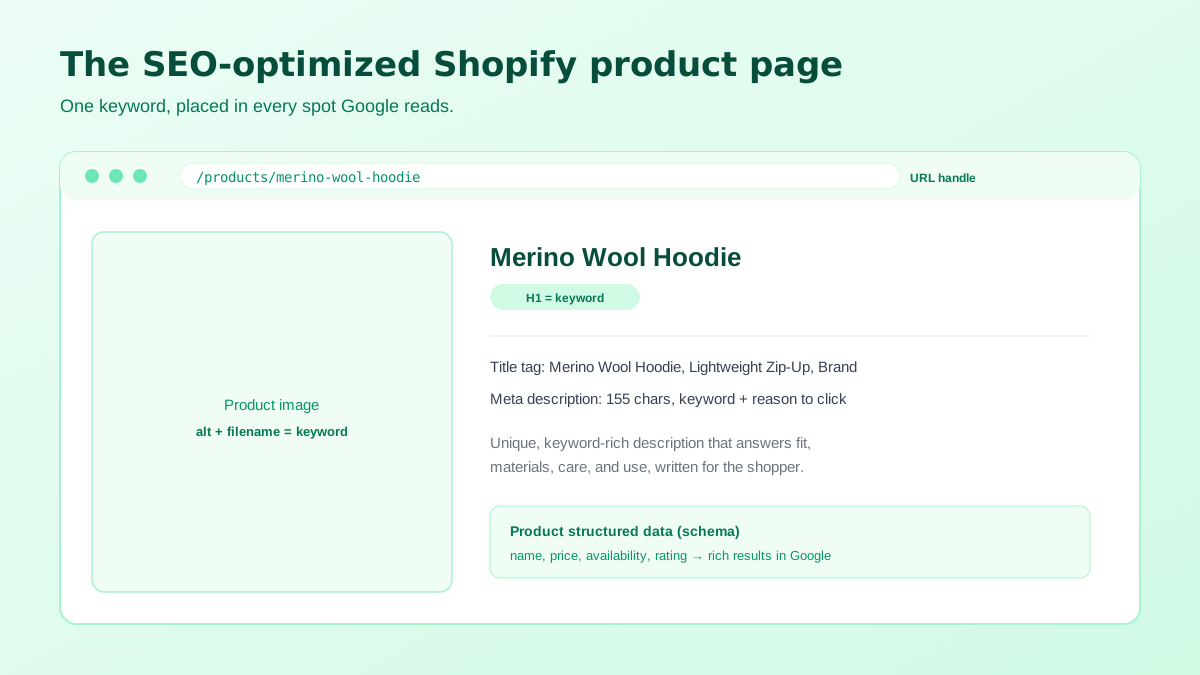
Fixing duplicate URLs makes Google index the right page. Making that Shopify product page rank is still about the fundamentals: one primary keyword per product in the title, meta description, H1, and first line of the description; a unique, genuinely useful description rather than supplier copy; descriptive image alt text and filenames; Product structured data for rich results; and internal links from collections and related products so the page has authority to rank. Duplicate-URL hygiene and strong on-page content work together, neither alone is enough. If the same catalogue also sits on Shopify, the Shopify product image size guide has the sizing that applies there.
There is a compounding reason to fix the URLs first, though: every backlink, share, and internal link that lands on a non-canonical version is authority leaking to a page that will never rank. Consolidate to one clean URL per product and all of that equity finally pools where it can lift you, which is why stores often see a delayed bump weeks after the internal-link fix, not the day they push it. Treat it as plumbing: unglamorous, but everything downstream depends on it.
Writing unique, keyword-rich descriptions and alt text for a whole catalog is the slow part, and it is exactly what strengthens your canonical pages. ListingRVA AI generates SEO product titles, meta descriptions, and unique descriptions for Shopify in seconds with our Shopify description generator, plus AI product photography with alt-text-ready images, and publishes straight to your store through our Shopify integration.
50 free credits, no credit card. Unique SEO descriptions and images from one product photo.
Start free →Shopify generates multiple URLs for one product, the canonical /products/handle, collection-aware /collections/x/products/handle versions, and ?variant= URLs. Shopify adds a canonical tag, but Google ignores 30 to 40 percent of canonicals when other signals conflict, and your internal links often point to the non-canonical collection version, so Google indexes that instead.
Make internal links point to the canonical product URL by removing the collection context (in Liquid, avoid within: collection so links resolve to /products/handle), keep unique product descriptions instead of manufacturer copy, and let Shopify's automatic canonical and variant handling do the rest. Then confirm in Search Console's Pages report that the canonical is the indexed URL.
They can. One product across a few collections and variants can spawn many crawlable URLs. Shopify points ?variant= URLs back to the canonical, but when internal links and other signals conflict, Google may still pick the wrong one. Consistent canonical internal linking is the fix, not deleting variants.
No. Many "Duplicate, Google chose a different canonical" and "Alternate page with proper canonical tag" notices on Shopify are expected and harmless. Focus on cases where the wrong URL is indexed for a product you care about, or important product pages are genuinely excluded.
Common causes are thin or manufacturer-duplicated descriptions, orphan products with no internal links pointing at them, a noindex left on by a theme or app, or pages blocked in robots. Give each product unique content, link it from collections and related products, and check its status in the Search Console URL inspector.
ListingRVA AI now works inside Claude. Connect your workspace and ask Claude to generate listing copy and publish product images to your store, without leaving your editor. See the Claude connector →
Comments
No comments yet, be the first.
Leave a comment