
Shopify Product Feed Errors That Quietly Block AI Shopping Surfaces
August 10, 2026 · 8 min read · by Aashirvad Kumar
Your credits refresh every month for as long as ListingRVA AI exists. No renewals, no annual increases, nothing to cancel.
Available on select plans. No renewals, ever.
August 10, 2026 · 8 min read · by Aashirvad Kumar
Your storefront is perfect. The product pages load, the prices are right, the photos are good, and every item is in stock. Then you open Merchant Center and four hundred of your twelve hundred items are disapproved, most of them for reasons that read like a foreign language. Shopify product feed errors are frustrating precisely because none of them are visible on the site, and the instinct to go and look at the product page tells you nothing, because approval is judged on the feed and on a crawl, not on what a human sees.
This used to be an advertising problem you could ignore if you did not run Shopping campaigns. It is not any more. The same structured product data now feeds the shopping surfaces inside search and the product comparisons assistants produce, so a disapproved item is absent from places that have nothing to do with paid media. A quiet feed problem has become a quiet visibility problem.
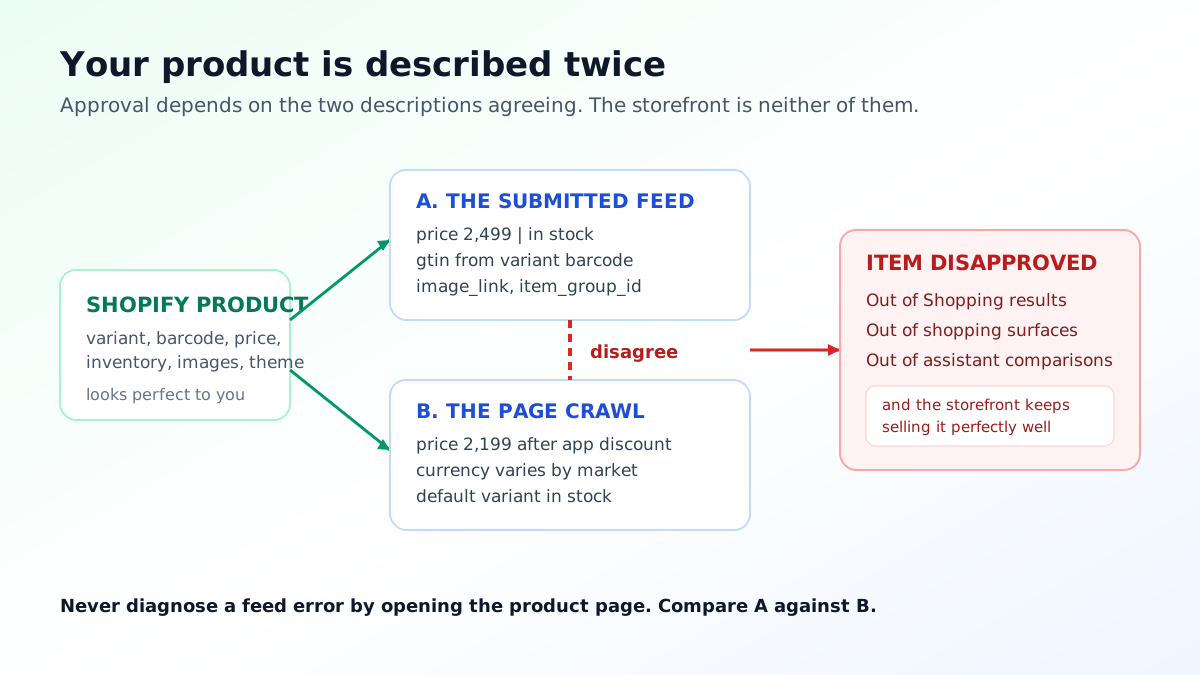
Understanding the failure mode makes most of the error messages obvious. Your item is described twice: once by the feed the sales channel submits, and once by a crawl of the landing page. When those two descriptions disagree about price, availability or currency, the item is held, because there is no way to tell which one is right and showing a shopper a price that changes on arrival is the worst possible outcome for the surface.
Most price mismatch reports come from this. A theme that renders a discounted price through a script the crawler does not execute, a market that serves a different currency depending on where the request came from, a subscription app that shows a lower price for a recurring option, or a country specific price list that the feed does not reflect. The page is not wrong and the feed is not wrong; they are answering different questions.
Availability behaves the same way. If inventory tracking is off, or the product is allowed to oversell, or a variant is out of stock while the product page defaults to a variant that is in stock, the crawl and the feed will report different states. Fixing this at the theme and inventory level rather than by overriding the feed value is the only durable answer, because an override drifts out of date the moment stock moves.
Shopify maps the variant barcode field to the manufacturer identifier that shopping surfaces expect. That single mapping causes an enormous share of disapprovals, because the barcode field is also the field most stores quietly use for something else: an internal SKU, a supplier code, a partial code copied from a spreadsheet, or a number that was correct for a discontinued variant. Any code that fails its check digit is worse than no code at all, because it looks like an identifier and resolves to nothing. If the channel connection itself is misconfigured, none of the field level fixes will hold, which is why it is worth confirming how your store connects to channels before auditing individual products.
Products that genuinely have no manufacturer identifier, which covers most handmade, custom and own brand goods, are not supposed to invent one. They are supposed to declare that no identifier exists, and to supply a brand plus a part number instead. Filling the barcode field with something plausible to make a warning disappear is the single most common self inflicted feed injury, and it produces items that are technically approved and functionally invisible in comparison surfaces because they cannot be matched to anything.
The other identifier issue is grouping. Every variant is submitted as its own item with its own id, and they are held together by a shared group identifier so the surfaces understand that these are one product in four colours rather than four products. When the grouping is missing or inconsistent, variants compete against each other, and a single disapproved variant becomes an invisible gap in an otherwise healthy product.
Feeds have image rules that storefronts do not, and Shopify stores trip over them more than most because the same asset library serves the homepage banner, the collection tile and the product image. Anything that reads as promotional is rejected: a sale badge, a discount flash, a free shipping ribbon, a watermark, a border, a logo bar across the bottom. These are perfectly good marketing assets and completely unusable as feed images.
Size is the second rejection. There is a minimum below which an image is refused outright, and there is a practical threshold well above it where the product actually looks credible in a crowded comparison grid. Shopify serves resized copies from one uploaded master, so the fix is at upload rather than in the theme, and the sizes worth targeting are covered in the guide to Shopify product image sizes.
The third is the placeholder problem, which is really an operations problem. A product created before its photography arrived carries a generic swatch or a coming soon graphic, the launch happens, and nobody goes back. It stays disapproved for months while the product sells perfectly well through the storefront, which is exactly why nobody notices.
Fixing all three at once means treating feed images as a separate deliverable from marketing images: clean product, no overlay, generous resolution, consistent framing across the catalogue. Producing that second set used to mean a second shoot, and it is the most obvious place where AI product photography pays for itself, because a compliant feed image can be generated from an existing photo rather than commissioned.
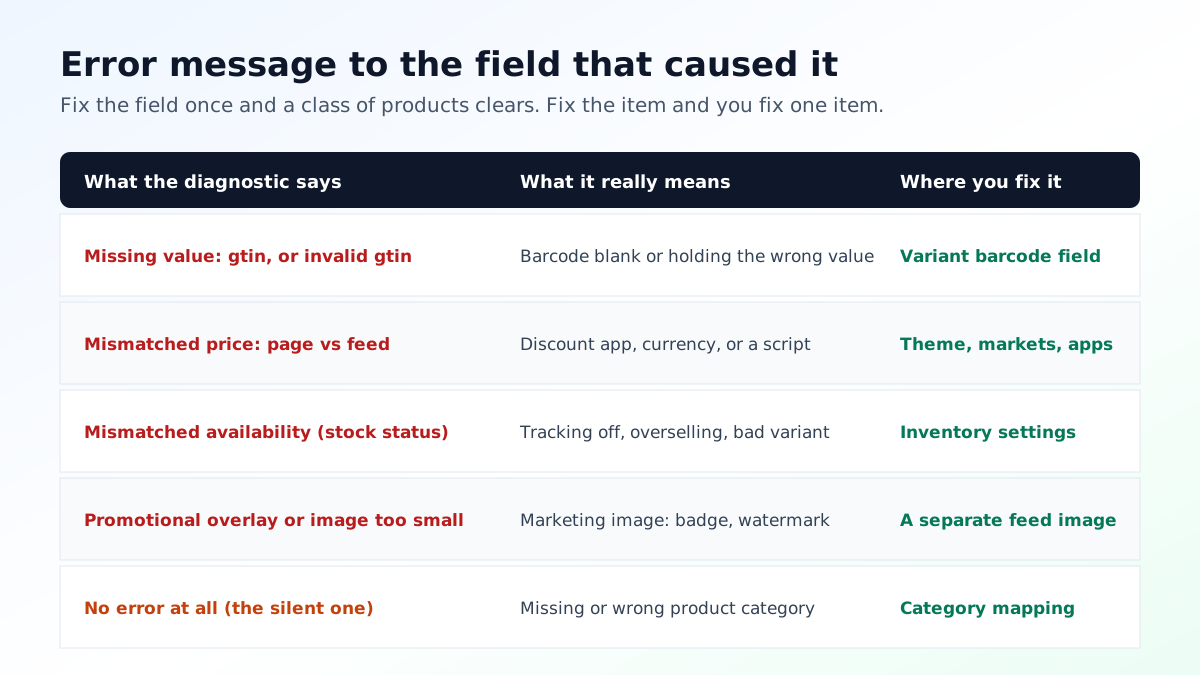
Category assignment is the quietest of the Shopify product feed errors, because a missing or wrong product category rarely disapproves an item outright. It just puts it in the wrong comparison set, where it competes against products it has nothing to do with and loses every time. A kitchen scale filed under general home goods is technically approved and effectively absent from the comparisons that would have sold it.
Descriptions matter more in feeds than most Shopify merchants expect, because the feed description is a plain text field that comparison and assistant surfaces read directly, without the layout, the accordions and the tabs that carry so much meaning on the page. If your product page explains the material in an accordion and the size in a table, the feed description may contain none of that, and generating clean feed ready copy from the product data is what a Shopify product description generator is genuinely useful for.
Shipping and tax attributes round out the set. An item without shipping information can be limited in some countries, and inconsistent shipping between the feed and the checkout produces exactly the same class of mismatch as a price disagreement. None of this is difficult, and all of it is invisible until you go looking.
Start with the diagnostics view and sort by affected item count rather than by severity. One error affecting three hundred items is almost always a single mapping or a single template decision, and one error affecting three items is usually genuine data entry. Fixing the first kind moves the number; fixing the second kind feels productive and does not.
Then trace each error to the field in Shopify that produced it rather than to the item. Missing identifier points at the barcode field on the variant. Price mismatch points at the theme, the markets configuration or a discount app. Image rejection points at the asset. Availability mismatch points at inventory settings. Once you have the field, you can fix a class of products at once instead of opening them one at a time.
Re-approval is not instant. The feed has to refresh and the landing page has to be crawled again, so give a fix a full day before deciding it did not work, and remember that a policy disapproval also needs a review request, which a plain data error does not. If items keep vanishing from AI generated comparisons after the feed is clean, the problem has moved from data to eligibility, which is the subject of the walkthrough on why Shopify products vanish.
The stores that never have feed problems do three unglamorous things. They treat the barcode field as reserved, so nothing but a real manufacturer identifier ever goes in it. They keep a feed safe image as a required asset on every product, separate from any image with a badge or a banner on it. And they review the diagnostics on a fixed day each month rather than when something looks wrong, because a feed degrades gradually as products are added by different people.
That last habit matters most as the surfaces multiply. A structured, complete, honest product record is now what gets quoted back to a shopper by an assistant, ranked in a shopping grid and matched against competing products, and it is the same record in all three cases. Treating it as an ongoing asset rather than a one time export is the practical takeaway, and the wider reasoning is set out in the guide to product data for AI search.
Because approval is judged on the feed and on a crawl of the product page, not on how the page looks to a person. A theme that renders a sale price through a script, a currency that changes by market, or an availability state driven by inventory rules can all read differently to a crawler than they do to you. The storefront being correct is not evidence the feed is.
From the barcode field on each variant. If that field is blank, carries an internal SKU, or holds a code that fails its check digit, the item is submitted without a valid identifier and gets flagged. Products that genuinely have no manufacturer identifier need the identifier exists attribute set to no rather than a made up number.
Images below the minimum size, placeholder or generic images, and any promotional overlay. Badges reading sale or free shipping, watermarks, borders and text banners are all treated as promotional content. This catches Shopify stores often because the same hero image is reused as the product image and it was designed for a banner.
Each variant is submitted as its own item with its own id, and they are tied together by a shared item group id so the surfaces know they are the same product in different sizes or colours. When that grouping is missing, every variant competes as a separate product and one disapproved variant can look like a healthy product with a mysterious gap.
Yes, and that is the change worth planning around. The structured product data that fills shopping surfaces is the same data that assistants draw on when they compare products, so a disapproved item is missing from both. Fixing the feed is now visibility work, not just advertising work.
It depends on when the feed next refreshes and when the product page is next crawled, so it is usually hours rather than minutes and can be a day or more. Requesting a review after a policy disapproval is a separate step from fixing a data error, and only the policy cases need it.
ListingRVA AI now works inside Claude. Connect your workspace and ask Claude to generate listing copy and publish product images to your store, without leaving your editor. See the Claude connector →
Comments
No comments yet, be the first.
Leave a comment