
WooCommerce Product Schema: Duplicate and Missing Markup Fixes
August 2, 2026 · 8 min read · by Aashirvad Kumar
Your credits refresh every month for as long as ListingRVA AI exists. No renewals, no annual increases, nothing to cancel.
Available on select plans. No renewals, ever.
August 2, 2026 · 8 min read · by Aashirvad Kumar
You run a product URL through the Rich Results Test and it reports two Product items on one page. Or Search Console lists the URL as invalid for a field you are certain is populated, while the product page in front of you shows the price, the stock status and the reviews exactly as expected. Broken woocommerce product schema almost never looks broken from the front end, which is why it survives for months on stores that are otherwise carefully maintained.
The underlying reason is that a WooCommerce product page usually has more than one thing trying to describe itself to Google, and none of them know about each other. Understanding which component emits what, and in what order, turns a vague validation error into a five minute fix.
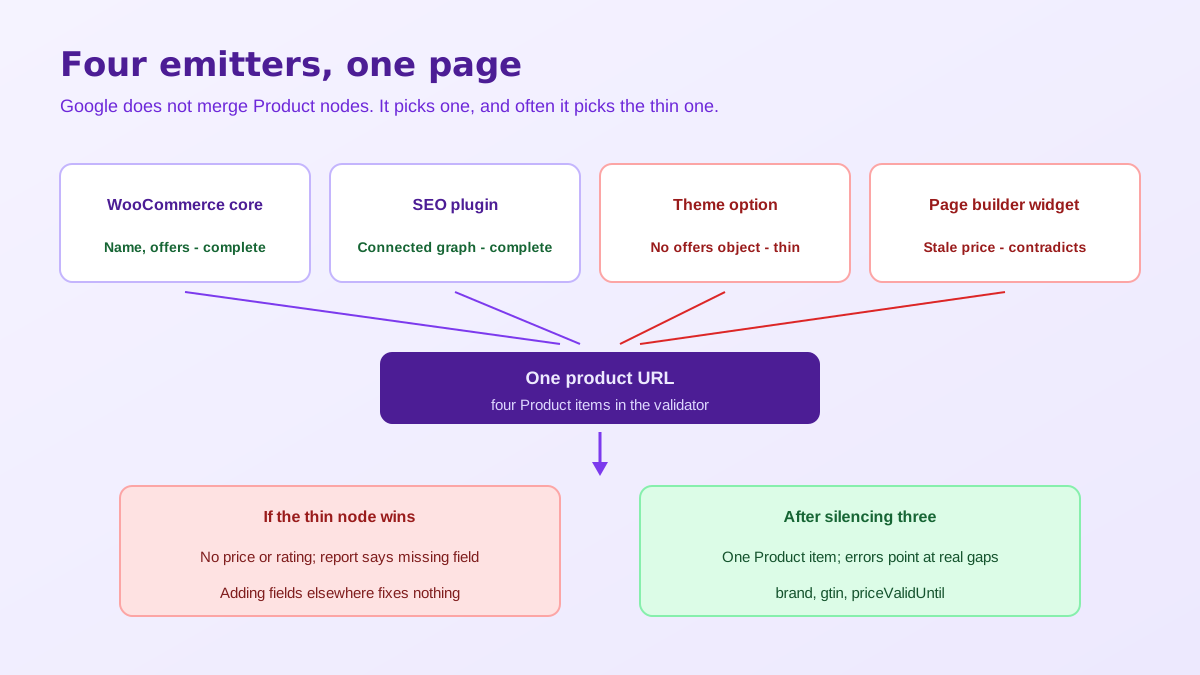
WooCommerce has emitted its own JSON-LD since version 3.0, through a structured data class that assembles a Product node during the single product template and prints the collected markup in the page footer. That block carries the name, the description, the main image, the sku, an offers object with price, currency, availability and the product URL, and, when the product has approved reviews, an aggregateRating plus individual review entries. No plugin is required for any of it.
This single fact invalidates most of the schema advice aimed at WooCommerce owners. Installing something to add Product markup to a store that already prints it does not upgrade the markup, it duplicates it. The correct question is never how to add woocommerce product schema, it is which of the components already on your site should be allowed to own it, and how to silence the rest.
Google does not merge two Product nodes into one better node. It evaluates what it finds and selects, and the selection frequently lands on the thinner block, because the two are usually built from different data. A theme option might emit a Product with a name and an image but no offers. An SEO plugin might emit one with full offer data connected to the organisation graph. Whichever gets picked defines what you are eligible to show, and if it is the empty one, you are eligible for nothing. This is why duplicated woocommerce product schema reads in reports as a missing field problem rather than a duplication problem, and why adding the missing field to the wrong block changes nothing at all.
Worse, contradictory nodes can look deliberate. Two different prices for the same URL, or one node saying InStock while another says OutOfStock, is exactly the pattern that makes a search engine distrust the whole page rather than one field. To see how many you have, open the page source and count occurrences of the Product type string, or paste the URL into the Schema Markup Validator, which lists every separate item it detects instead of only summarising errors the way the rich results tester does.
Work through them in a fixed order. First the SEO plugin: the major ones ship a WooCommerce integration that deliberately turns off the core output and rebuilds Product inside their own connected graph, which is usually the version worth keeping because the product node references the organisation and webpage nodes rather than floating on its own. If the integration is active, WooCommerce core is already quiet and your duplicate is coming from somewhere else.
Then the theme. A large share of commercial WooCommerce themes carry a general schema or structured data toggle in their options panel, added years ago when core output was thinner, and it is almost always still switched on. Then the page builder, where the product widget on a custom built template can add a third block that duplicates the first two. Switch off one emitter at a time and revalidate after each, so you learn which component produced which node. Resist the temptation to disable everything at once and turn things back on, because a store with no Product markup at all validates just as cleanly as a store with one good block, and you will not be able to tell the two states apart from the report alone.
Once there is exactly one node, the remaining errors are real. Brand is the most common: WooCommerce did not have a native brand taxonomy for most of its life, so a store that stores brand in a custom attribute publishes nothing Google recognises as a brand. Product identifiers are second, since gtin and mpn are what let a search engine connect your listing to the same physical item sold elsewhere, and an attribute called EAN is not an identifier until it is mapped into the markup. Products you manufacture yourself have no gtin, which is legitimate, but they still need an mpn and a brand or they arrive at the index with nothing to distinguish them from a hundred similar listings.
After that come the merchant listing fields that generate warnings rather than errors, and warnings are easy to dismiss for too long. A price with no priceValidUntil looks stale. A missing shipping detail or return policy removes you from the comparison surfaces where those values are displayed side by side. None of these block indexing, all of them reduce how prominently your result can be drawn, and the cumulative effect is a listing that validates cleanly and still appears as plain blue text.
Variable products deserve separate attention because they are where the model breaks down. One markup block for a product sold in five sizes at four prices flattens genuine differences in price, availability and identifier into a single node, so a shopper searching for a specific size can be shown a price for a variation that is out of stock. The stronger treatment describes the family as a group and gives each variation its own entry with its own sku, price and stock state.
Price mismatch is the last common failure and the most confusing, because the number in the markup and the number on the page look identical until you check what each includes. The figure written into schema follows the store tax display setting, so a shop that displays prices excluding tax while the markup carries the inclusive value fails a match check with no visible symptom. Expired sale prices held in a full page cache create exactly the same discrepancy, and a currency switcher that rewrites the displayed figure in the browser without touching the printed markup is the third variant of the same fault. In all three cases the markup is internally valid, which is why the validator stays green while the merchant report stays red.
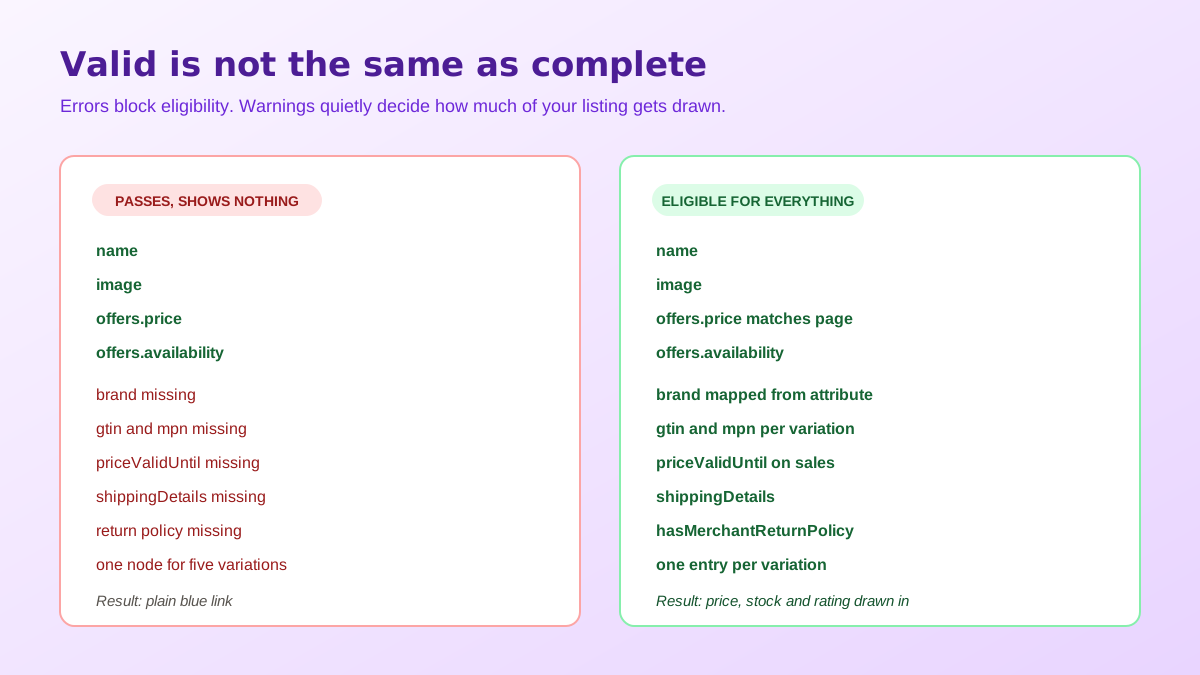
Test three URLs, not one. Pick a simple product, a variable product and a product currently on sale, because each exposes a different class of woocommerce product schema error and a store that validates on the first can still be failing on the other two. Run each through the rich results tester for eligibility and through the schema validator for a full item count, then compare the rendered price on the page against the price string in the source rather than trusting that they agree.
Then watch the Search Console reports over the following weeks rather than declaring victory on the day of the fix, since aggregate reports lag re-crawling by a noticeable margin. Structured data is only ever a description of the page, so it inherits every weakness in the page it describes, which is why thin or duplicated product copy limits results even when the markup is perfect. Filling those fields with something worth quoting is the job the WooCommerce product description generator handles at catalogue scale.
The reason this is worth an afternoon is that structured data has stopped being only about star ratings in blue links. Assistants and answer engines read the same nodes to decide which products are safe to quote, and a contradictory price or an absent identifier is a straightforward reason to skip you. The mechanics of that shift are covered in the guide to product data for AI search, and the wider ranking picture in ecommerce SEO for AI Overviews.
One last dependency is easy to overlook. Every Product node points at an image, and that image is what gets pulled into a rich result or a shopping panel, so a markup fix that resolves cleanly onto a badly cropped or undersized file has improved the plumbing and not the outcome. Sizing rules for the theme side of that are set out in the WooCommerce product image size guide, and consistent catalogue imagery is the part that AI product photography makes practical for stores with hundreds of SKUs and no studio.
Yes. WooCommerce has generated its own JSON-LD Product block since version 3.0 through its structured data class, and it prints on every single product page without any plugin involved. Name, description, image, sku, offers and, where reviews exist, aggregateRating and review are all included. Any advice that begins with adding Product schema to a WooCommerce store is starting from a false premise.
Because two things on the page are emitting one each. WooCommerce prints its own block, and an SEO plugin, a theme option or a page builder module prints a second. Google does not merge them, it evaluates them, and the one it selects is often the thinner of the two. Removing an emitter is the fix, never adding a third.
Keep whichever one produces the more complete block for your catalogue, then switch the other off deliberately. SEO plugins with a WooCommerce module usually disable the core output for you and place Product inside their own connected graph, which is generally the stronger option because the product node links to organisation and webpage nodes rather than floating alone.
Usually tax display. The price written into the markup follows your store display setting, so a shop showing prices excluding tax while the markup carries the inclusive figure will report a mismatch even though nothing is technically wrong. Sale prices that expired without a priceValidUntil value and cached pages serving an old figure produce the same symptom.
A variable product with one shared markup block collapses real differences in price, availability and identifier into a single node. The cleaner treatment gives each variation its own product entry tied to the parent group, with its own sku, price and availability, so that a shopper searching for one specific size or colour can be matched to the variation that actually exists in stock.
Valid markup makes eligibility possible, it does not guarantee display. Google treats rich results as discretionary and weighs page quality, the trustworthiness of the price and availability data, and whether the markup matches what a visitor sees. Fixing duplicates and missing fields removes the reasons to disqualify you, which is the only part of the decision you control.
On WooCommerce or WordPress? Do it inside your store.
Install the free ListingRVA AI plugin to generate studio product images and optimize listings right from your product screen. No API keys to copy: it connects your existing account and uses your plan credits.
Get the free plugin →ListingRVA AI now works inside Claude. Connect your workspace and ask Claude to generate listing copy and publish product images to your store, without leaving your editor. See the Claude connector →
Comments
No comments yet, be the first.
Leave a comment