
Seasonal Product Images Without Reshooting Your Catalogue
August 15, 2026 · 8 min read · by Aashirvad Kumar
Your credits refresh every month for as long as ListingRVA AI exists. No renewals, no annual increases, nothing to cancel.
Available on select plans. No renewals, ever.
August 15, 2026 · 8 min read · by Aashirvad Kumar
Every year the same thing happens. The gifting season is six weeks out, the plan is to shoot a seasonal set, the quote comes back for a hundred and forty products, and the plan quietly becomes a banner on the storefront and nothing else. The listings go into the busiest weeks of the year wearing photographs taken in a studio in March, on the same grey surface, in the same neutral light.
The useful realisation is that a seasonal refresh was never about the product. Seasonal product images differ from ordinary ones in four specific ways, all of them outside the object, which means the work can be done from photographs you already own rather than from a shoot you cannot afford.
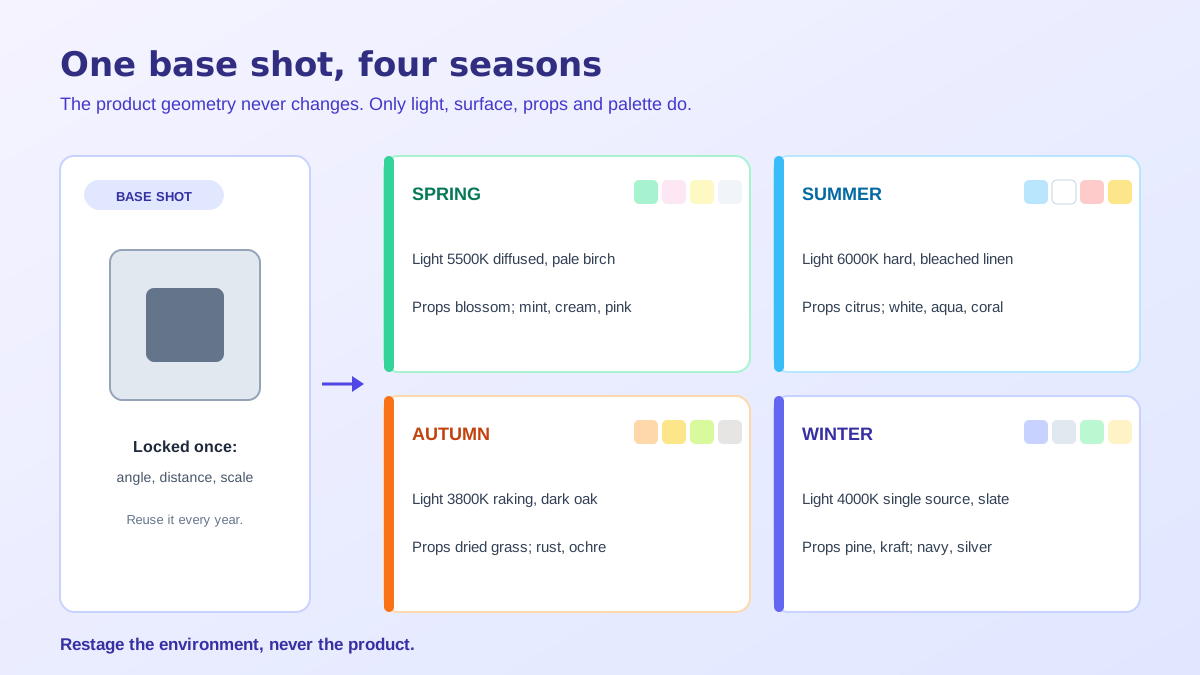
Light is the first and it does most of the work. A summer frame reads as summer because of hard, high, slightly warm light and crisp shadow edges. A winter frame reads as winter because the light is low, soft and cool, with long shadows and a blue tint in them. Autumn is warm and low. Spring is bright, diffuse and slightly cool. Change nothing else and people will still tell you which season they are looking at.
The surface is second. Pale linen and painted wood say spring, weathered timber and stone say autumn, a snow-dusted or frosted surface says winter, and a bright sand or tile surface says summer. The third lever is props, and the fourth is the palette of the whole frame, meaning the two or three colours everything in the shot is pulled towards. None of these four touches the product, which is what makes the whole approach viable.
The product has to be pixel-identical across every seasonal version you publish. Not similar, identical. A buyer who saw an autumn version and receives the item is comparing against that specific frame, and if the finish looks warmer or the fabric looks softer they will read the difference as a defect. Season is context around an object, and the moment it starts modifying the object it becomes a misdescription.
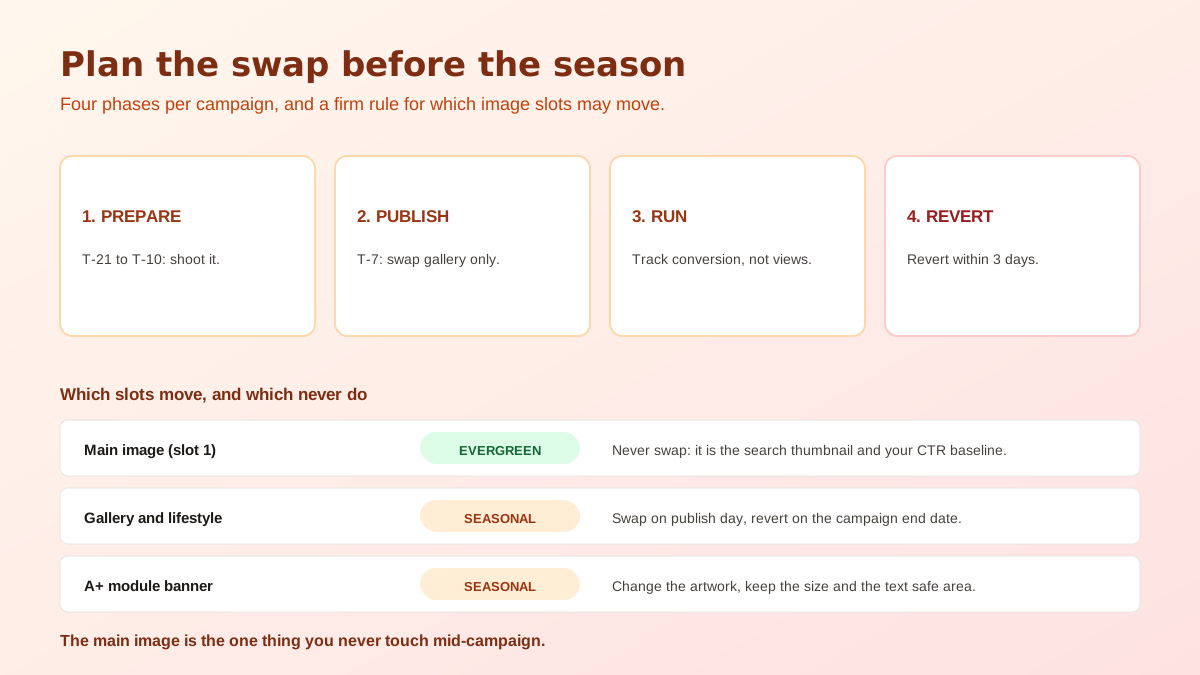
The main image is the second thing that must not change. On most marketplaces it has to be the product alone on a pure white background with nothing added, so a seasonal main image is either rejected or spends the one universal slot on something that expires. Keep it evergreen and put the seasonal work into the secondary slots, the enhanced content and the advertising creative, where the rules are looser and the payoff is larger.
Prop honesty is the third boundary and the one that generates returns. A sprig of pine beside a candle is styling and everybody reads it as styling. Gift wrap, ribbon, a presentation box or a second product in the frame reads as something you ship, and it will be treated as part of the order. If a prop could plausibly be in the parcel, either put it in the parcel or take it out of the picture, and the marketplace limits on overlays and added elements are worth reading in the Amazon image requirements guide.
The whole method depends on one thing: a single clean base photograph per product, sharp across the object, correctly exposed, with a generous margin and no clipped highlights. That base is the asset, and every seasonal version inherits its faults as well as its virtues. If the base is soft or blown out, no amount of restaging fixes it, so the audit comes before the refresh rather than after.
From there the work is subtractive first. Cut the product away from whatever it was originally sitting on, which both removes the March studio surface and gives you a reusable element for the year, and a clean edge from the free background remover tool is what stops the seasonal versions from looking pasted together.
Then build each season as a recipe rather than as a one-off. Write down the light direction, the colour temperature, the surface, the two or three props and the palette for each campaign, and apply the same recipe across the catalogue. Consistency is the thing that makes a refresh look like a brand decision instead of a random assortment, and it is far easier to hold when the parameters are written down.
Generation is what makes the arithmetic work at catalogue scale. Restaging one product into four seasons by hand is an afternoon; restaging a hundred and forty is a project nobody starts. Producing the same recipe against every base file is exactly the kind of repetitive staging that AI product photography handles well, and the quality ceiling is set by your base photographs rather than by the tool.
Work outward from the least constrained. Advertising creative and social assets change first, because there is no approval delay and no risk to the listing. Then the storefront and the enhanced content modules, which carry the mood and where a seasonal palette does the most for perceived effort. Then the secondary listing images, which are the last to change and the first to revert.
Leave the evidence frames alone entirely. Dimension overlays, close-ups of material and construction, interior or capacity shots and anything showing scale are answering questions, and a seasonal treatment only makes them harder to read. A useful split is that mood frames are seasonal and information frames are permanent, which also happens to reduce the number of files you need to maintain. Home and interiors sellers get the most from this split, as the home decor product photography guide shows.
Publish ahead of the buying window rather than ahead of the date, since gift research starts long before orders do. Leave time for the marketplace to process the files, check the results on a phone rather than a desktop, and confirm that the new images still crop sensibly in the thumbnail. Nothing on this list is difficult, and all of it takes longer than sellers expect when a hundred products are involved.
Then build the revert set on the same day you build the seasonal set. This is the step that gets skipped and it is why so many listings are still showing snow in March, which does more damage than never having refreshed at all, because it signals an abandoned shop. Scheduling the swap back alongside the rest of your catalogue operations is the reliable fix, and this is ordinary listing automation across marketplaces rather than anything exotic.
Seasonal traffic rises on its own, so total sales will go up whether your refresh helped, did nothing or hurt. The only honest read is conversion rate on a holdout: refresh part of the catalogue, deliberately leave a comparable part untouched, and compare the two groups across the same window. Do it once and you will know whether seasonal product images are worth repeating for your category, rather than assuming it forever.
The result is usually category dependent. Gifting, home, food and apparel tend to respond; industrial, spare parts and pure utility items tend not to, because nobody buys a replacement filter in a festive mood. Either way it is worth measuring rather than guessing, since imagery carries a large share of the purchase decision, which is the point the product image conversion statistics keep making. Seasonal product images are a cheap experiment when the base files already exist, and an expensive one when they do not.
No. The main image on most marketplaces has to be the product alone on a pure white background with no props, no badges and no promotional text, so a seasonal version of it either breaks the rules or wastes the one slot that has to work all year. Seasonal treatment belongs in the secondary slots, the enhanced content and the ads.
Ahead of the buying window rather than the date itself, because people research gifts well before they order them. Give yourself enough lead time to publish, let the marketplace finish processing the files, and check them on a phone before the traffic arrives. Build the revert set at the same time, not afterwards, since that is the step everyone forgets.
Four things, and none of them is the product: the quality and colour of the light, the surface and setting the item sits on, the props around it, and the palette of the whole frame. The product must be identical across every seasonal version, because the buyer is comparing what arrives with what they saw and the season is context, not a variation.
It is misleading when a prop looks like something you ship. Pine sprigs and a wooden table are styling. Gift wrap, ribbon, a gift box or an extra accessory in the frame reads as included, and that is the fastest route to a return and a poor review. If a prop could plausibly be part of the order, either ship it or leave it out.
Yes, and this is the case where generation is most clearly worth it. One clean, sharp base photograph per product can be restaged into as many seasonal settings as the year has campaigns, at consistent quality across the whole catalogue. The base photo has to be good, since every seasonal version inherits its sharpness, exposure and colour accuracy.
Compare conversion rate rather than sales, because seasonal traffic rises on its own and would flatter any change. Refresh part of the catalogue and leave a comparable part untouched, then look at conversion on the two groups over the same window. Without a holdout group you will credit the season to the images and repeat something that did nothing.
ListingRVA AI now works inside Claude. Connect your workspace and ask Claude to generate listing copy and publish product images to your store, without leaving your editor. See the Claude connector →
Comments
No comments yet, be the first.
Leave a comment