
When to Reshoot Product Photos and When AI Can Rescue Them
August 5, 2026 · 8 min read · by Aashirvad Kumar
Your credits refresh every month for as long as ListingRVA AI exists. No renewals, no annual increases, nothing to cancel.
Available on select plans. No renewals, ever.
August 5, 2026 · 8 min read · by Aashirvad Kumar
You have a folder of photographs you are not happy with. Some came from a supplier, some you took yourself on a kitchen counter two years ago, and all of them are holding your listings back. Booking a shoot for the whole catalogue is not realistic, and running everything through a generator produces one or two results that look excellent and several that come back subtly broken. The useful skill is telling which file belongs in which pile.
That decision has a clean underlying rule, and it is not about how bad the photo looks. It is about whether the information is still in the file. Knowing when to reshoot product photos comes down to a short list of faults that destroy data permanently, against a much longer list of faults that only affect presentation and can therefore be replaced.
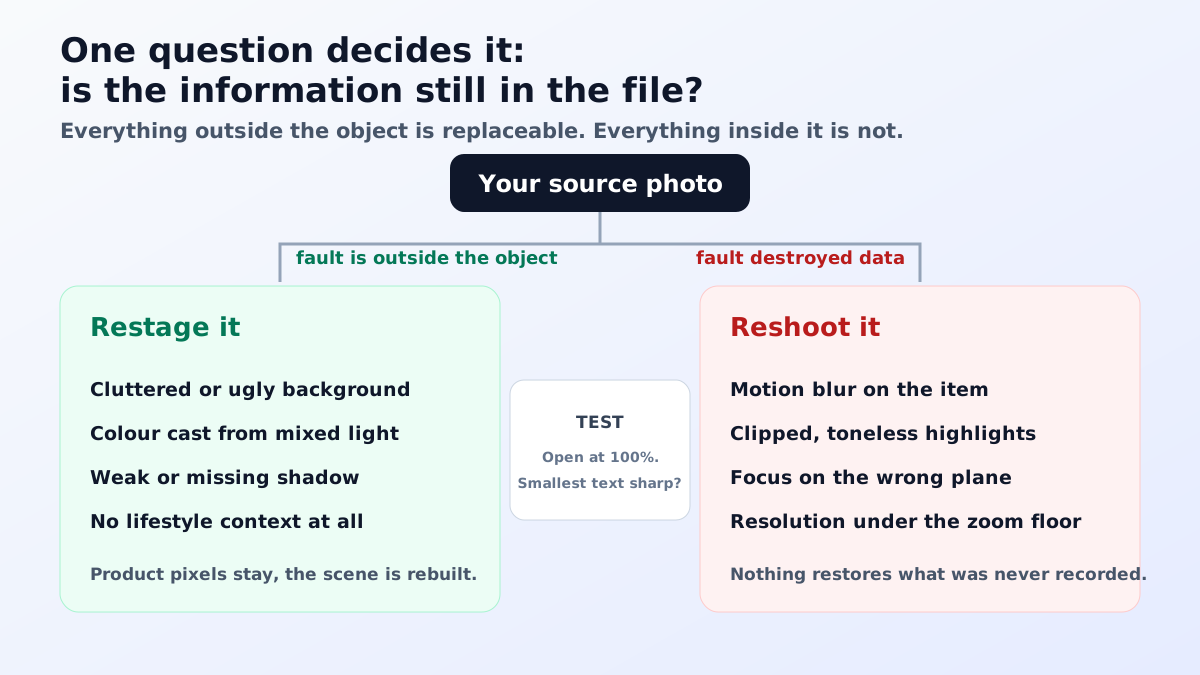
A restaging tool does not understand your product. It reads the pixels that describe it, keeps them as the anchor, and builds a new scene around and behind them. Everything outside the object is free: the surface, the wall, the light direction, the mood, the props, the shadow. Everything inside the object is constrained by what the camera recorded, because the tool has no independent knowledge of what your item looks like from the side it never saw.
That single distinction predicts almost every outcome. Ask a tool to move a bottle onto a marble counter in warm afternoon light and it will do it convincingly, because none of that is inside the object. Ask it to recover the embossed logo that was lost in a blown highlight and it will paint something logo-shaped there, because it has nothing else to work with. The first is a restage. The second is a fabrication that will be visible to anyone who owns the product.
Cluttered or ugly backgrounds are the easiest, and they are also the single most common fault in supplier files. A washing machine in the corner, a domestic skirting board, a wrinkled bedsheet as a backdrop: all of it is outside the object and all of it is replaceable. The same goes for the surface the item sits on, which is why a product shot on a laminate table can end up on stone, wood or a seamless white sweep with no loss of truth.
Colour casts are the second, provided they are casts and not clipping. A photograph taken under a warm bulb has all its detail intact, just shifted, and shifting it back is arithmetic rather than invention. The same is true of a mildly dark exposure, where the shadows still hold values that can be lifted. Both of these are recoverable precisely because the sensor recorded a range of values rather than saturating at one end of it.
Weak, missing or unconvincing shadows are the third. A cutout that floats can be grounded again by generating a contact shadow that matches the lighting already visible on the product, and this is usually better than adding a shadow by hand. Removing the original background cleanly is the step that makes the rest possible, and it takes seconds with the free background remover tool.
Missing context is the fourth and the most valuable. A sharp product on a boring white sweep has all the data anyone needs, it simply has no story, so putting it in a kitchen, a bathroom or a styled flat lay adds information without touching the object. This is the case where a restage genuinely outperforms an average studio shoot, and it is the strongest everyday use of AI product photography for a small catalogue.
Motion blur is first and it is absolute. Blur is not a veil over the detail, it is the detail smeared across neighbouring pixels, and that mixing cannot be reversed because many different scenes produce the same blurred result. Sharpening raises local contrast so the image feels crisper, and an upscaler will invent edges that look plausible at a glance, but neither is recovering your product. On text, logos and stitching the invention is obvious.
Clipped highlights are second. When a pixel saturates, all three channels record the maximum value and the gradient that described the surface is gone. There is nothing underneath to pull back, so anything painted into that region is a guess about a shape the camera never measured. White packaging, chrome, glass and gloss white plastic are where this happens, and it is why those categories are the least forgiving to shoot casually.
Focus on the wrong plane is third and it fools people, because the photo looks sharp overall. If the depth of field landed on the front edge of a box and the label is soft, the label cannot be brought forward, and a generator asked to clean it up will rewrite the text into something that reads as text but is not your text. That failure is much worse than a soft label, because it is confidently wrong rather than visibly imperfect.
Resolution below a working floor is fourth. Marketplace zoom generally wants at least sixteen hundred pixels on the longest side, so a source of five or six hundred pixels is already short before anything is done to it. Upscaling multiplies pixels, not information, and the invented detail lands first on the parts buyers inspect: fabric weave, brushed metal grain, small print. Fabric is the least tolerant of all, which the clothing product photography guide goes into.
The fifth is not technical at all. If the photograph shows the wrong colourway, a superseded revision, a scuffed sample or a face of the product you no longer sell, then the file is accurate about the wrong thing and no amount of processing fixes that. This is the most expensive fault in the list because it survives every quality check and only surfaces as returns.
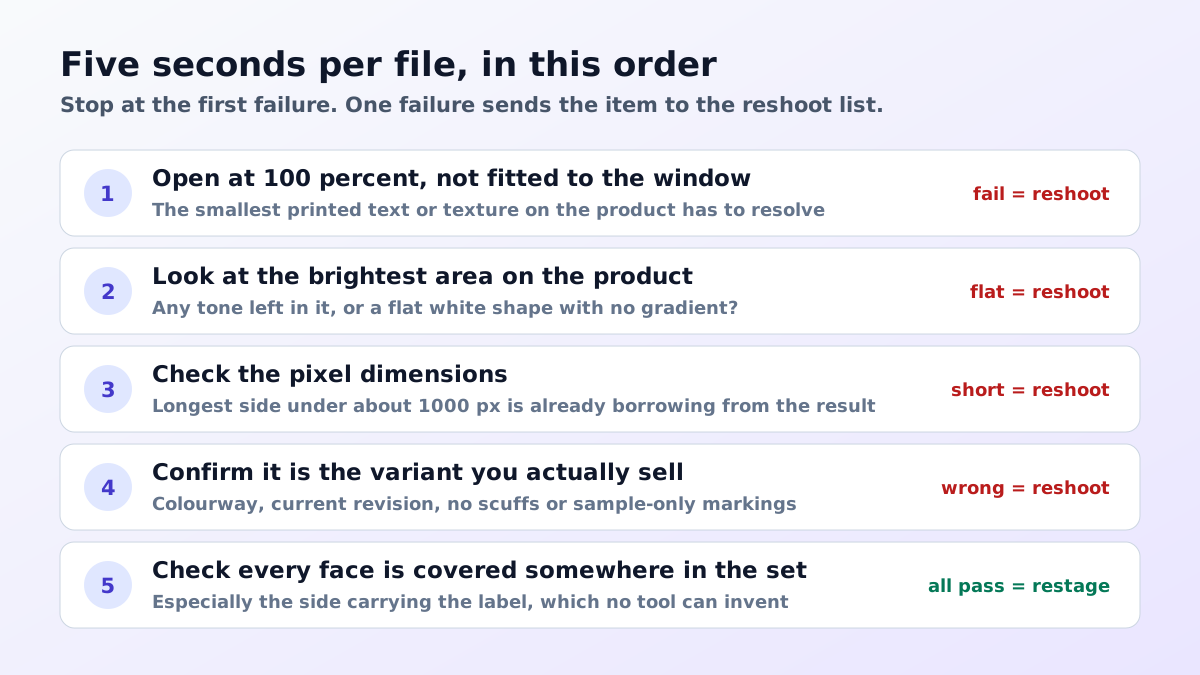
Open the image at one hundred percent, not fitted to the window, and look at the smallest text or texture on the product. If it resolves, the file is sharp enough. Then look at the brightest area and ask whether it has any tone in it at all or whether it is a flat white shape. Then check the pixel dimensions against your marketplace target. Three checks, and they catch nearly everything that matters.
Anything that passes those three goes into the restage pile regardless of how unattractive it is, and anything that fails goes onto the reshoot list. It is worth writing that list down per product rather than per photograph, because the shoot you eventually book is organised by item. Marketplace-specific limits on pixel size, aspect ratio and framing are set out in the Amazon image requirements guide.
Triage per file is right for your top sellers and wrong for the tail. Sort the catalogue by revenue, handle the top twenty items individually, and treat everything below that as a batch where the default is a restage. The reason is opportunity cost: the alternative for a long tail is not a better photograph, it is the supplier photograph staying up untouched for another two years, which is the outcome that actually loses money.
The arithmetic for the top of the list is different. A product earning real revenue justifies a proper shoot, and the return on a good source file compounds because every future restage inherits its quality. The trade-off between studio time and generated staging is examined in more depth in the AI and traditional photography comparison, and the honest answer for most sellers is a mix rather than one or the other.
Once you know when to reshoot product photos, the reshoot itself gets easier, because you only have to protect the things that cannot be replaced. Sharp focus across the whole product, an exposure that clips nothing, the largest file the camera will write, generous margin around the subject, and every face of the item covered including the one carrying the label. Backgrounds, surfaces, lighting mood and styling can all be handled later.
That reordering of priorities is the real change of the last few years. It used to make sense to spend most of a shoot day building a set, and now that time is better spent on coverage and technical cleanliness, because the set is the cheap part. Deciding when to reshoot product photos is mostly a question of which faults deleted information, and that judgement is what keeps the images honest and the returns down. Conversion is where the effect shows up, and the product image conversion statistics give a sense of the scale of it.
It can sharpen the appearance, but it cannot recover the detail, because motion blur spread the information for one point across many pixels and that mixing is not reversible. What upscalers do instead is invent plausible edges, which is fine on a leaf and disastrous on a logo, a stitch pattern or printed text. A blurred product photo is a reshoot.
Work back from where the image ends up. Amazon only enables zoom once the longest side reaches 1000 pixels, so a source below roughly that size is already borrowing from the final result. Below that the detail simply is not there and upscaling substitutes invention for evidence, which shows first on text and fine texture.
No. A fully clipped highlight is recorded at the maximum value across all three channels, so there is no gradient underneath to pull back. Anything a tool paints into that area is a guess about a surface it never saw. This is why white and chrome products are the least forgiving things to photograph and the most common reason a set has to be shot again.
Often yes, provided the product itself is sharp, correctly exposed and shows the variant you actually sell. The background, the surface, the lighting mood and the missing context can all be replaced. Check your rights to the file first, and check that the item in the photo matches the current revision, because a superseded model is the fault nobody notices until the returns arrive.
Sort the catalogue by revenue and triage the top sellers individually, then treat the tail as a batch. For the tail, a restage of anything that passes the sharpness and exposure test is nearly always the right call, because the alternative is that those listings keep the supplier photograph forever. Reserve a real shoot for the small set that fails triage and earns enough to justify it.
Sharp focus on the whole product, exposure that clips nothing, the largest file your camera makes, a margin of empty space around the subject, and every face of the product covered including the one with the label. Everything else, including the background, the surface and the mood, is replaceable, so spend your care on the parts that are not.
ListingRVA AI now works inside Claude. Connect your workspace and ask Claude to generate listing copy and publish product images to your store, without leaving your editor. See the Claude connector →
Comments
No comments yet, be the first.
Leave a comment