
Realistic Product Shadow: Why Your Cutouts Look Like They Float
July 26, 2026 · 8 min read · by Aashirvad Kumar
Your credits refresh every month for as long as ListingRVA AI exists. No renewals, no annual increases, nothing to cancel.
Available on select plans. No renewals, ever.
July 26, 2026 · 8 min read · by Aashirvad Kumar
You run the photo through a background remover, the edge comes back clean, the product is sharp, and the result still looks wrong. Not blurry, not badly cut, just wrong in a way that is hard to name. The bottle appears to hover a centimetre above the white rather than stand on it. Buyers do not articulate this either, they simply register the image as an advert rather than a photograph of a real object.
What went missing was the shadow, and specifically the small dark band where the product met the surface. A realistic product shadow is doing more work in an ecommerce image than most sellers realise, and once you know what it is made of you can tell in about five seconds whether a shadow was photographed or invented.
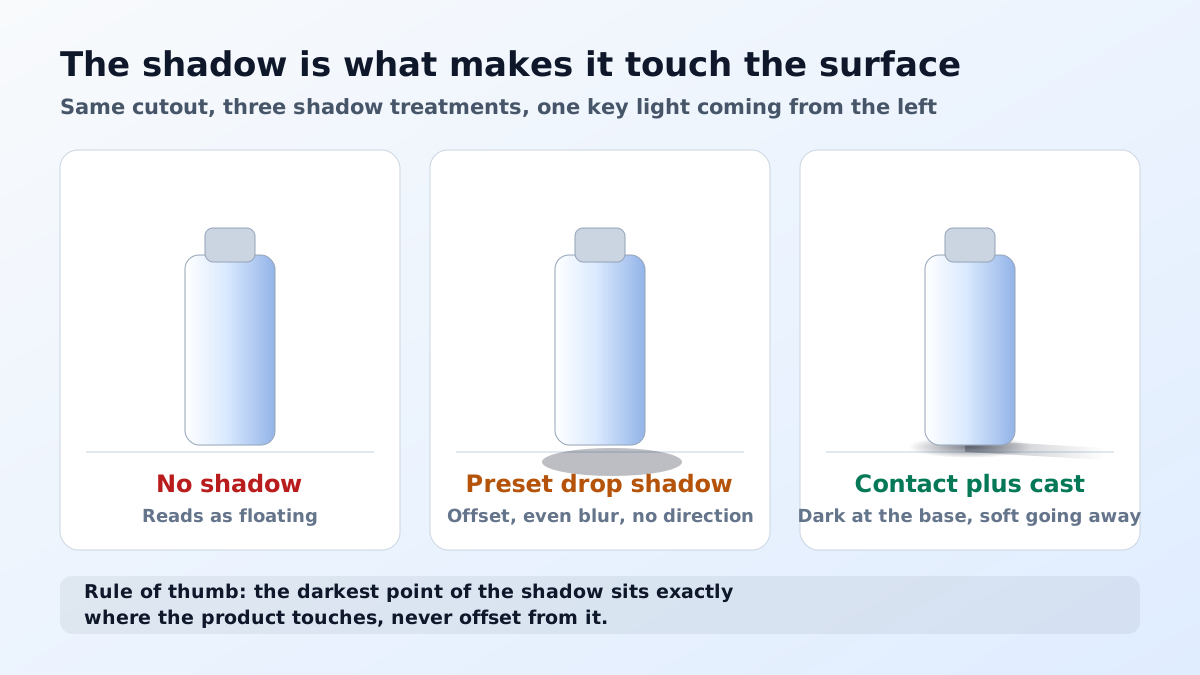
Light in any real room arrives from everywhere. Even with one lamp switched on, the walls, the ceiling and the table are all bouncing a weak, diffuse glow back into the scene. When a solid object sits on a surface, it blocks that ambient glow from reaching the few millimetres of surface immediately around its base. Those millimetres therefore receive less light from more directions than anywhere else in the frame, and they go dark. That is the contact shadow, and it exists whether or not you have a key light at all.
This matters because the human visual system uses that dark band as its single strongest depth cue for objects at rest. It is not decorative. Remove it and the eye has literally no evidence that the product is touching anything, so it defaults to reading the object as separate from the background. That is the floating effect, and it is why a technically perfect cutout can still convert worse than a scruffy original photograph shot on a kitchen counter.
The contact shadow, sometimes called the occlusion shadow, is the tightest and darkest of the three. It hugs the base of the product, it fades out within a short distance, and it has almost no directional bias because it comes from blocked ambient light rather than from one lamp. If a product has feet, a rim or a recess, the contact shadow follows that geometry precisely instead of following the silhouette.
The cast shadow is the long one, the shape thrown away from the key light. It is lighter than the contact shadow, its edge softens as it travels because the light source has physical size, and its direction is fixed by where the lamp was. A cast shadow tells the viewer about the room, not about the contact. On its own it does nothing to stop the floating problem, which is why the default drop shadow in every editor fails.
The third one is not a shadow at all, it is reflection. On a glossy sweep or a polished counter the product also throws a faint mirrored version of itself downward, compressed and fading fast. Sellers often add a reflection and skip the shadow, which produces an object that appears to hover above a puddle. The order of importance is fixed: contact first, cast second, reflection only if the surface genuinely warrants it.
The first tell is a gap. Software drop shadows are usually offset by a few pixels down and to the right, which leaves a hairline of clean background between the base of the product and the start of the shadow. In a real photograph that gap cannot exist, because the darkest point is exactly at the contact line. Zoom to two hundred percent on the bottom edge of any suspicious image and this one shows up instantly.
The second is uniform softness. A real cast shadow is comparatively crisp where it leaves the object and progressively blurrier further away, because the further the shadow travels the more of the light source it can see. A single blur radius applied across the whole shape gives you a shadow that is equally fuzzy at the contact point and at the tip, which no lamp in the physical world produces.
The third is disagreement with the product's own lighting. Look at where the highlight sits on the product, then look at where the shadow goes. If the bright side of the bottle is on the left, the shadow has to fall to the right. This sounds too obvious to get wrong, and it is the most common error in composited listing images, because the shadow is usually added by someone who is thinking about layout rather than about the light.
The fourth is silhouette copying. Many generated shadows are simply the outline of the object, flattened and blurred. That is only correct for a solid block. A chair with legs casts four separate pools, a mug with a handle casts a shadow with a hole in it, and a bottle with a tapered neck casts something narrower than its widest point. When the shadow is a featureless blob of the outline, the object stops looking three dimensional.
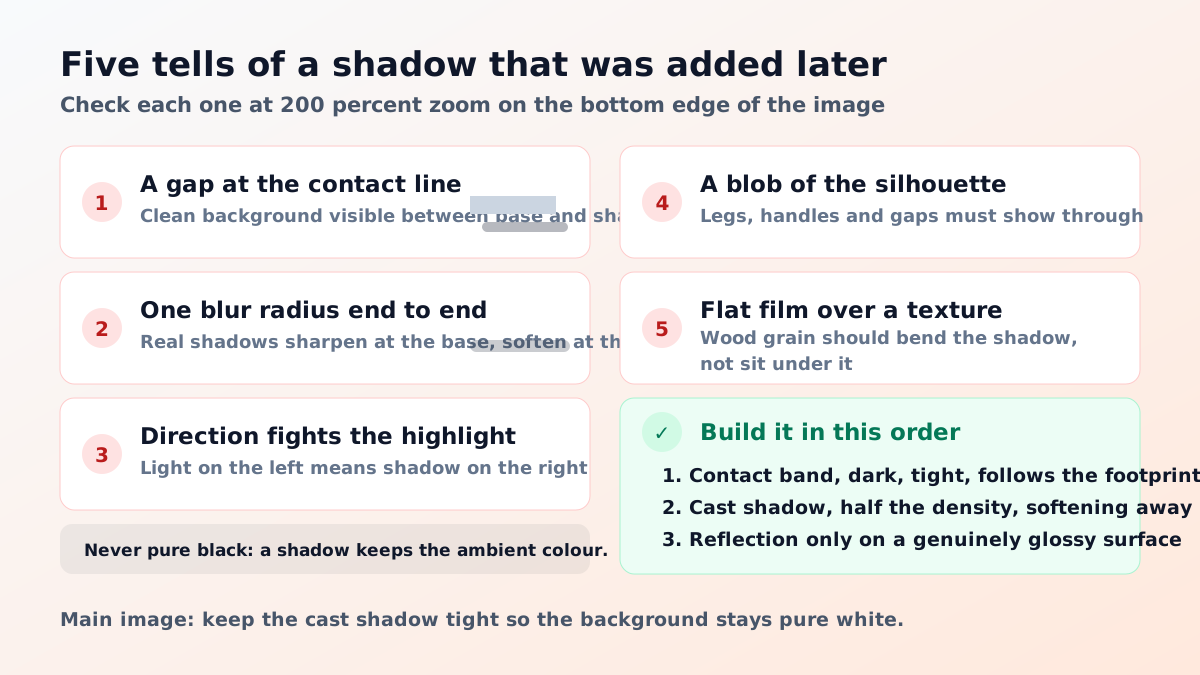
The fifth only appears in lifestyle staging. When a product is placed on wood, stone or fabric, a real shadow bends over the texture and picks up the grain and the small height differences underneath it. A pasted shadow sits flat on top of the texture as an even grey film. This is the tell that gives away most quick composites onto a wooden table, and a realistic product shadow on a textured surface has to interact with that texture or the whole staging collapses.
The cheapest fix is upstream. Photograph the product on a genuinely white surface with the key light off to one side and slightly above, so the cast shadow travels sideways across the frame rather than being hidden underneath the object. Leave breathing room around the product when you frame, because a crop that hugs the silhouette gives a background remover nothing to keep, and the contact band is the first casualty of a tight cut.
Then shoot one insurance frame. Lift the product on a small clear acrylic block or a glass sheet, keep the camera and the light exactly where they were, and take a second exposure. You now hold two versions of the same scene, one with the object grounded and one with the shadow separated from it, and blending the shadow layer back onto a clean plate afterwards becomes trivial. The choice between doing this and generating the whole scene is the practical core of the AI and traditional photography question.
If the original is already flat, you are rebuilding rather than recovering. Start with the contact band and nothing else: a narrow, dark, slightly irregular smear following the actual footprint of the object, at high opacity, fading within a short distance. Add the cast shadow second, at maybe forty to sixty percent of the contact shadow's density, softening as it travels. Most images look right at that point and never need a third layer.
Generation tools do this better than a manual drop shadow because they infer the lighting from the product itself instead of applying a fixed offset, which means the direction agrees by default. The step before it still has to be clean, since a shadow drawn onto a ragged mask inherits every ragged edge, and a careful cut with the free background remover tool is what makes the rest of it hold together.
What you should not do is reach for a preset. Every editor ships with a drop shadow that is offset, uniformly blurred, pure black and applied to the silhouette, which means it fails four of the five tests above simultaneously. Restaging the product into a lit scene where the shadow is generated as part of the render sidesteps that whole class of error, and it is the strongest practical argument for AI product photography over layer effects.
Main images have a hard constraint that lifestyle images do not. The background must be pure white, RGB two five five across all channels, and an automated check samples the frame to confirm it. A tight contact shadow is safe under that rule because the surrounding pixels stay untouched. A large soft cast shadow spreading across a third of the frame is not, because it lifts a wide area off pure white and reads as a grey backdrop rather than as a shadow. The exact tolerances are set out field by field in the Amazon image requirements guide.
Secondary and lifestyle slots invert that advice. There the cast shadow is doing useful work, because it tells the buyer the size of the room, the height of the light and the material of the surface, all of which help with scale judgement. Large items benefit the most from this, which is why a sofa shot without a floor shadow reads as a render, a point covered in the furniture product photography guide.
The summary is short. A realistic product shadow is two layers and no more: one dark contact band buys you almost all of the realism, one soft directional cast shadow buys you the rest, and every other shadow effect is decoration that can only cost you. Check the direction against the highlights, check for a gap at the base, and check that the shape follows the object rather than the outline. Do that on the main image and the floating problem disappears for good.
Because the cut removed the contact shadow along with the background. The small dark band where an object meets a surface is the only cue the eye has that the two are touching, and once it is gone the brain reads the product as suspended above the white rather than resting on it. Nothing about the product itself has to look wrong for the image to feel wrong.
It is the very dark, very tight shadow in the millimetres where the product touches the surface, caused by the object blocking ambient light from every direction at once. It is darker and sharper than the cast shadow that stretches away from the light, and it is the part that sells the contact. A cast shadow without a contact shadow still looks pasted on.
Amazon requires the main image to sit on a pure white background, meaning RGB 255, 255, 255. A tight contact shadow directly beneath the product leaves the surrounding frame at pure white, so it does not disturb that requirement. A wide soft cast shadow does, because it lifts a large area off pure white and the automated white background check reads that as a grey backdrop.
Shoot the product on a white surface with the key light off to one side, so the shadow falls sideways and the contact edge stays visible, then crop with a margin rather than tight to the silhouette. If you can, take one extra frame with the product lifted on a clear stand, which gives you a clean plate of the surface to blend the shadow back onto later.
Yes, and it is usually better at it than a manual drop shadow, because it places the shadow using the lighting it can already see on the product. The one thing to check every time is agreement: the shadow must fall away from the same side as the highlights on the product. If the highlight is on the left and the shadow also goes left, the image will read as fake even to a buyer who cannot say why.
No. A shadow is not an absence of colour, it is the surface with the direct light removed and only ambient light remaining, so it keeps the hue of whatever is lighting it. On a white sweep that means a soft neutral grey, often very slightly cool, not black. Pure black at high opacity is the single most recognisable signature of a shadow that was added in software.
ListingRVA AI now works inside Claude. Connect your workspace and ask Claude to generate listing copy and publish product images to your store, without leaving your editor. See the Claude connector →
Comments
No comments yet, be the first.
Leave a comment