
White Background Not Pure White? How to Verify True White
July 28, 2026 · 8 min read · by Aashirvad Kumar
Your credits refresh every month for as long as ListingRVA AI exists. No renewals, no annual increases, nothing to cancel.
Available on select plans. No renewals, ever.
July 28, 2026 · 8 min read · by Aashirvad Kumar
You upload a main image that looks white, and on the live listing it sits inside a faint grey rectangle. The page is white, your photo is nearly white, and the seam between them is visible from across the room. Sample it with an eyedropper and you get 244, 244, 244 rather than 255, 255, 255. That is a white background not pure white, and it is one of the few image problems that is completely invisible in your own editor and completely obvious to a shopper.
The frustrating part is how quiet the failure is. Nothing bounces. No error email arrives. Your image is simply slightly darker than the page it is printed on, and every competitor whose backdrop clips properly looks cleaner than yours in the same search grid.
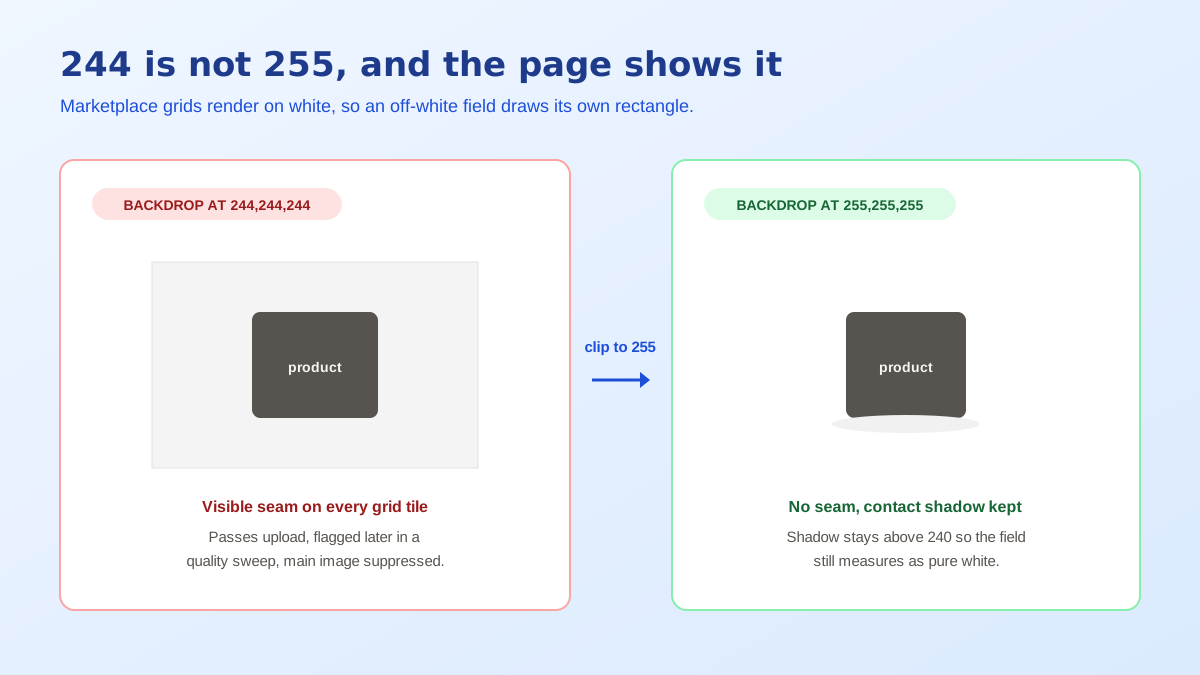
Nothing you photograph comes out at 255 by default. A camera exposes for an average scene, so a frame dominated by a white sweep gets pulled down until that white lands near middle grey, and even after you correct the exposure the backdrop typically settles in the 230s or 240s rather than clipping. That is a correctly exposed photograph. It is also, by marketplace definition, off white. The gap between a good exposure and a compliant one is the whole problem, and it catches careful photographers more often than careless ones.
Two other things push the value down. Paper and fabric sweeps are not spectrally neutral, so a roll of white seamless usually reads slightly warm or slightly blue depending on the light hitting it. And the product itself bounces colour back onto the backdrop: shoot a red kettle close to the sweep and the paper behind it picks up a red tint you will never notice by eye but the eyedropper will report immediately. Both effects leave you with a white background not pure white by numbers that are small enough to ignore and large enough to matter.
Amazon is explicit that main images require a pure white background, meaning RGB 255, 255, 255. What people misread is the enforcement. Ingestion rarely blocks a 244 backdrop at upload time, so sellers conclude the rule is soft. It is not soft, it is deferred. Images pass in, sit live for weeks, and then get flagged during a catalogue quality sweep or when a competitor reports the listing, at which point the main image is suppressed and the ASIN drops out of search until it is replaced.
The commercial damage arrives much earlier than the enforcement does. Search results, category grids and the buy box are all rendered on white. An image whose field is a few points below white draws a visible rectangle around itself in every one of those surfaces. Shoppers do not consciously register the reason, but they register that one thumbnail looks like a photograph pasted onto the page and the ones beside it look like the product is floating on it. That perception gap is measurable in click-through long before any policy team gets involved, and it is one of several image faults worth catching in a pre-upload pass with an Amazon listing quality checker.
Other channels handle it differently, which is worth knowing before you build one asset for everywhere. Flipkart runs an automated quality gate that scores images on background purity among other things, and it will reject rather than defer, which is at least honest feedback. Shopify and other own-storefront platforms will not object at all, because there is no reviewer, but a themed page with a coloured section background makes an off-white photo look even worse than a marketplace does. If you sell across several, the safest asset is one that clips cleanly, and the platform-by-platform specs in the Shopify product image size guide map where the other limits sit.
Do not judge this with your eyes. Human brightness perception is relative, so a 244 field beside a dark product on a screen at full brightness in a dim room reads as unambiguously white. It is the same illusion that makes a grey card look white when nothing whiter is in frame. The only trustworthy method is to read the stored pixel values, and every image editor including free ones has an eyedropper that reports them.
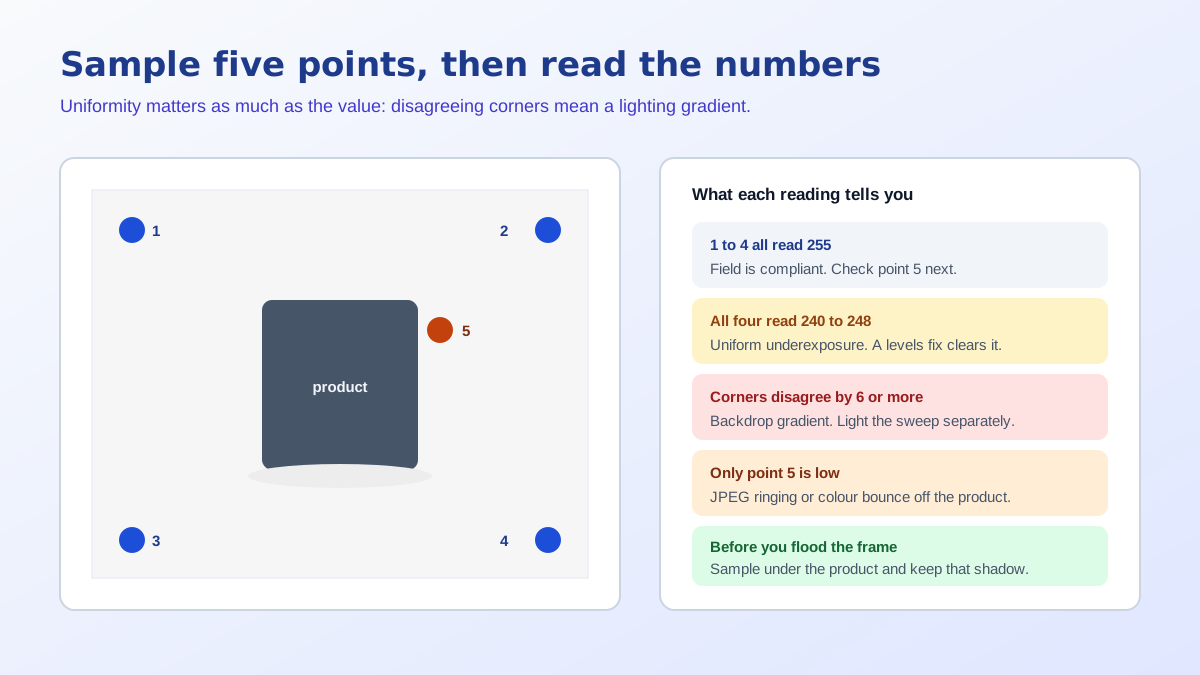
Sample at least five points and compare them against each other, not just against 255. Uniformity matters as much as the absolute number, because a backdrop that reads 255 in the top corners and 248 near the base is telling you the sweep is falling into shadow where it curves, and flooding the frame with white will not fix a gradient, it will only clip the top of it.
If every sample reads 255 and the halo is absent, you are done. If the corners are clean but the area next to the product is not, the cause is compression or bounce rather than exposure, and re-saving at a higher JPEG quality often removes half of it. If everything is uniformly a few points low, that is a straightforward levels correction. If the values drift across the frame, you have a lighting problem on the backdrop itself, and the fixes for that live in the product photo lighting mistakes breakdown rather than in any editor.
The crude fix is to select everything outside the product and fill it with white. It works, and it also flattens the two things that made the photo look like a photograph: the soft transition at the product edge and the contact shadow underneath. An object dropped onto an absolutely flat field with a hard cut edge reads as a sticker, which is why so many corrected main images look worse than the originals they replaced even though they now measure correctly.
The sequence that keeps the photograph intact is different. Cut the product out with a mask that preserves a pixel or two of soft edge, place it on a canvas that is genuinely 255 across every pixel, then rebuild a light contact shadow beneath it so the object sits on a surface instead of hovering above one. A shadow that stays above roughly 240 in its darkest point still reads as grounded without breaking the pure white requirement, because reviewers look at the field, not at the small gradient the product casts.
That whole sequence is mechanical enough to automate, which is why it is the first thing most sellers hand off. Cutting out the subject, laying it on a true 255 canvas and keeping the edge soft takes seconds in the free background remover tool, and the output is white by construction rather than white by approximation. If the source photo is weak in other ways as well, generating a fresh clean plate is often faster than repairing one, and that is the practical case for AI product photography in a listing workflow.
Preventing a white background not pure white is cheaper than correcting one, and it comes down to separation and exposure. Move the product further from the sweep so the light falling on the backdrop is independent of the light shaping the product, and put a light on the backdrop specifically, aiming to overexpose it by roughly one stop relative to the product. That deliberately clips the field to 255 while the product itself stays properly exposed, which is exactly the split you want.
Then check before you batch. A single eyedropper reading on the first frame of a shoot costs five seconds and saves reprocessing forty images later. Sellers who skip that step almost always discover the white background not pure white issue after the whole catalogue is live, which converts a lighting adjustment into a re-edit of every SKU. The habit worth building is simple: expose, sample, then shoot the set.
Pure white is 255, 255, 255 in RGB, which is #FFFFFF in hex. Amazon states plainly that main images need a pure white background, and that is the value it means. Anything below 255 on any of the three channels is a light grey or a tinted white, even when your eye reads it as white on a bright screen.
Open the image at 100 percent, pick the eyedropper tool, and sample at least five points: all four corners and one spot immediately beside the product. Read the RGB numbers rather than trusting the preview. If any sample comes back below 255 on any channel, or if the corners disagree with each other, the background is not uniform white.
Because your eye judges brightness relative to what surrounds it. A backdrop at 244 next to a dark product looks white, and on a screen at full brightness in a dim room it looks whiter still. The eyedropper is the only reliable judge, since it reports the stored pixel value rather than your perception of it.
Not always immediately, and that is the trap. Some images pass ingestion and then get flagged later during a quality sweep, and others are accepted but look visibly boxed against the marketplace page, which is white. The commercial damage from the visible box usually arrives long before any formal rejection does.
Flooding the whole frame with white also erases the contact shadow and any soft edge on the product, which is what makes an object look placed rather than pasted. The better sequence is to cut the product out cleanly, put it on a true white canvas, and rebuild a light shadow underneath it so the object still sits on a surface.
It can. JPEG works in blocks, so a hard edge between a dark product and a white field produces faint ringing in the pixels around the product, which reads as a halo of values just under 255. Saving at a high quality setting keeps that small, but it is a reason to sample beside the product and not only in the corners.
ListingRVA AI now works inside Claude. Connect your workspace and ask Claude to generate listing copy and publish product images to your store, without leaving your editor. See the Claude connector →
Comments
No comments yet, be the first.
Leave a comment