
Magento Product Description SEO: You Are Filling the Wrong Field
August 20, 2026 · 8 min read · by Aashirvad Kumar
Your credits refresh every month for as long as ListingRVA AI exists. No renewals, no annual increases, nothing to cancel.
Available on select plans. No renewals, ever.
August 20, 2026 · 8 min read · by Aashirvad Kumar
Someone on your team writes six hundred careful words for a product, pastes them into the admin, saves, and the storefront shows two lines above the add to cart button and nothing else until you scroll into a tab. Meanwhile the search snippet Google shows is a sentence fragment that ends halfway through a word. Magento product description SEO goes wrong at this exact point, before anyone has written anything bad: the copy is correct and it is sitting in the wrong field.
Magento 2 and Adobe Commerce split product copy across two attributes and a separate set of meta fields, and each of the four is read by a different consumer. On top of that, the catalog can publish the same product under several addresses at once, so even copy that is placed correctly can end up competing with itself. Both problems have settings level fixes, and neither of them is a writing problem.
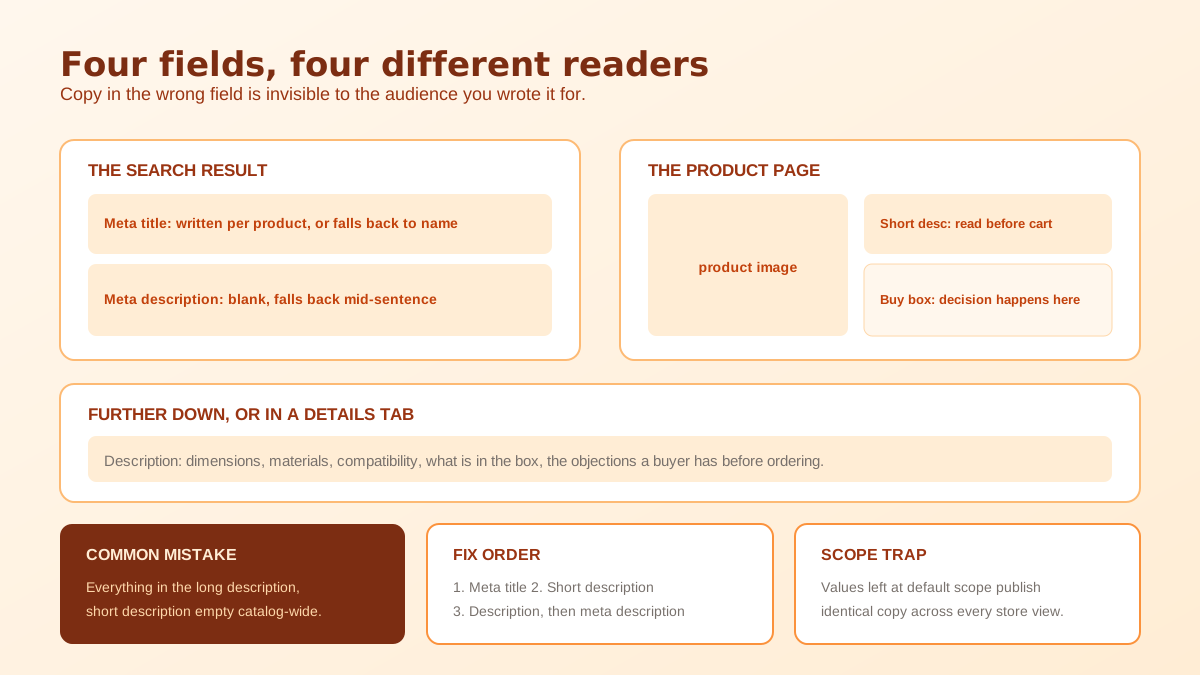
Short description is a separate attribute from description, not a preview of it. Themes typically place the short description high on the product page, in the block beside or beneath the price, where it is one of the few pieces of text a shopper actually reads before deciding. The description attribute is the long body, rendered further down or inside a details tab depending on the theme, and it is where specifications, materials, sizing and use cases belong. Filling one and leaving the other empty is the most common single mistake in a Magento catalog.
The other two fields sit in the Search Engine Optimization section of the product form: URL key, meta title, meta keywords and meta description. Those are what a search engine reads first. Meta keywords have been ignored by every major engine for years and cost you nothing either way. Meta title and meta description are the ones that matter, and leaving the meta description blank does not mean no description gets published: a stock install falls back to a truncated slice of your long description, which is exactly why so many Magento snippets end mid sentence.
The defaults are built for a catalog to function, not for a catalog to rank. A product imported from a supplier feed usually arrives with a description, no short description, no meta title and no meta description, and it will render and sell in that state. Nothing in the admin flags it. The product page then publishes a title derived from the product name, a snippet cut from the middle of a paragraph, and a page where the first two hundred words a crawler meets are navigation rather than anything about the product.
Fixing that is per product work, which is why it goes undone on catalogs of any size. The order of value is fairly consistent though. Meta title first, because it is the strongest single field and the one shoppers see in the results page. Short description second, because it is the copy that converts the visitors you already have. Description third, because it is where the specific language a buyer searches with can live without cramping the layout. Getting the sequence right matters more than getting any one page perfect, and the same priority order applies to ecommerce listing copy that ranks on any platform.
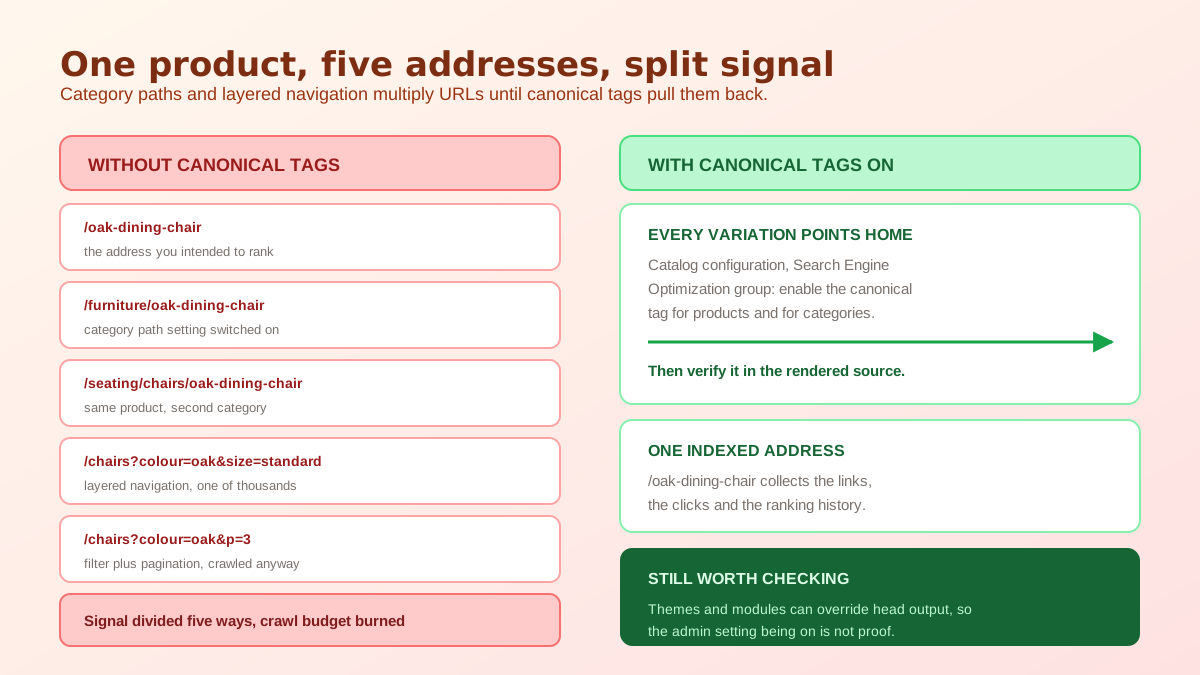
Magento has a catalog setting that adds the category path to product URLs. Turn it on and a product that belongs to three categories becomes reachable at three addresses, each serving the same page. Internal links, breadcrumbs and sitemaps then distribute links across all of them. Nothing is broken from a shopper's point of view, which is why this survives for years in stores that are otherwise carefully maintained, but the ranking signal for that product is now split three ways instead of pointing at one address.
Layered navigation compounds it. Every filter a crawler follows appends parameters to the category URL, and combinations multiply quickly: colour, then colour plus size, then colour plus size plus a sort order and a page number. A category with five filter attributes can generate thousands of crawlable addresses that show subsets of the same products. The crawl budget spent on those is budget not spent on your actual product pages, and on a large Adobe Commerce catalog that trade is not small.
Two settings in the Search Engine Optimization group of the catalog configuration do most of the work. The canonical link meta tag for products makes every variation of a product URL point back to one address. The equivalent setting for categories does the same for category pages, which is what brings the filtered and paginated variations back under control. Both are commonly left at their default in stores that were set up quickly, and turning them on is usually a one line change with a disproportionate effect.
After enabling them, view the source of a filtered category page and a product reached through two different category paths, and confirm the canonical points where you expect. This is the step people skip. Themes and third party modules can override head output, so the setting being on in the admin is not proof that the tag is correct in the markup. Search engines choosing their own canonical over yours is a symptom worth watching for, and it shows up in the same way it does when Google indexes the wrong URL on other platforms.
Once the plumbing is right, the copy split becomes simple. The short description answers one question: what is this and who is it for, in about forty words, in the buyer's own vocabulary rather than the manufacturer's. The description carries everything that would otherwise clutter that answer: dimensions, materials, compatibility, what is in the box, care instructions, the two or three genuine objections a buyer has before ordering. Repeating the short description at the top of the long one wastes the strongest position on the page.
Work through that on your twenty best selling products before touching anything else. The distribution of revenue in a Magento catalog is steep enough that a handful of pages usually carry most of it, and those pages are also the ones with enough traffic for a change to show a measurable result within a few weeks. Product data written this way also travels better into answer engines and AI shopping surfaces, which read structured specifics far more happily than they read marketing adjectives, something the guide to structuring product data for AI search covers in detail.
The obvious objection to all of this is volume. Writing four fields by hand for five thousand SKUs is not a project anyone finishes, and half filled attempts are how catalogs end up with a mix of careful pages and supplier boilerplate. Generating a first draft from the product data you already hold, then editing the top sellers by hand, is the only version of this that gets completed. A bulk product description generator takes the attributes and images you already have and produces the short and long copy as separate outputs.
Our Magento 2 and Adobe Commerce connection imports your catalog through a REST integration access token created in the admin, so the source data for that drafting is the real product record rather than a spreadsheet someone exported last quarter. Generated copy and images come back for you to place through the admin or your usual import routine, and the platform by platform detail sits on the store integrations page. Text is only half of a product page, and the imagery around it is where AI product photography does the rest of the lifting.
They are two separate attributes with two separate jobs. Short description is a brief summary that themes place near the price and the add to cart button, and description is the long body that themes render further down the page or inside a details tab. Both are indexed when the page is crawled, but only one of them is read before a shopper decides.
Neither of them directly. The snippet is built from the meta description field in the Search Engine Optimization section of the product, and from whatever text on the page Google judges to answer the query. If the meta description field is left blank, a stock install falls back to a truncated slice of your long description, which is why so many snippets stop mid sentence.
Usually two causes. The setting that adds the category path to product URLs makes the same product reachable under every category it belongs to, and layered navigation appends filter parameters that create a fresh URL for each combination a crawler follows. Both split the ranking signal across addresses that show effectively the same content.
For products, yes in almost every store. The canonical setting for products and categories sits under the Search Engine Optimization group in the catalog configuration, and switching the product one on points every variation of a product URL back to a single address. Check the output after enabling it, because layered navigation URLs are the case that most often still needs attention.
It can, but only if the attribute is set to be used in search in the attribute properties, and its search weight decides how much it counts against the product name and SKU. This is internal site search rather than Google. Shoppers who use your own search box convert well, so it is worth checking rather than assuming.
Each store view that is publicly reachable should have its own text, because a store view is a separate URL serving a separate page. Leaving values at the default scope means several addresses publish identical copy. If the store views are different languages, that is expected and is handled with language annotations rather than by rewriting the copy.
ListingRVA AI now works inside Claude. Connect your workspace and ask Claude to generate listing copy and publish product images to your store, without leaving your editor. See the Claude connector →
Comments
No comments yet, be the first.
Leave a comment