
Magento Image Cache: Why the Storefront Still Shows the Old Photo
August 19, 2026 · 8 min read · by Aashirvad Kumar
Your credits refresh every month for as long as ListingRVA AI exists. No renewals, no annual increases, nothing to cancel.
Available on select plans. No renewals, ever.
August 19, 2026 · 8 min read · by Aashirvad Kumar
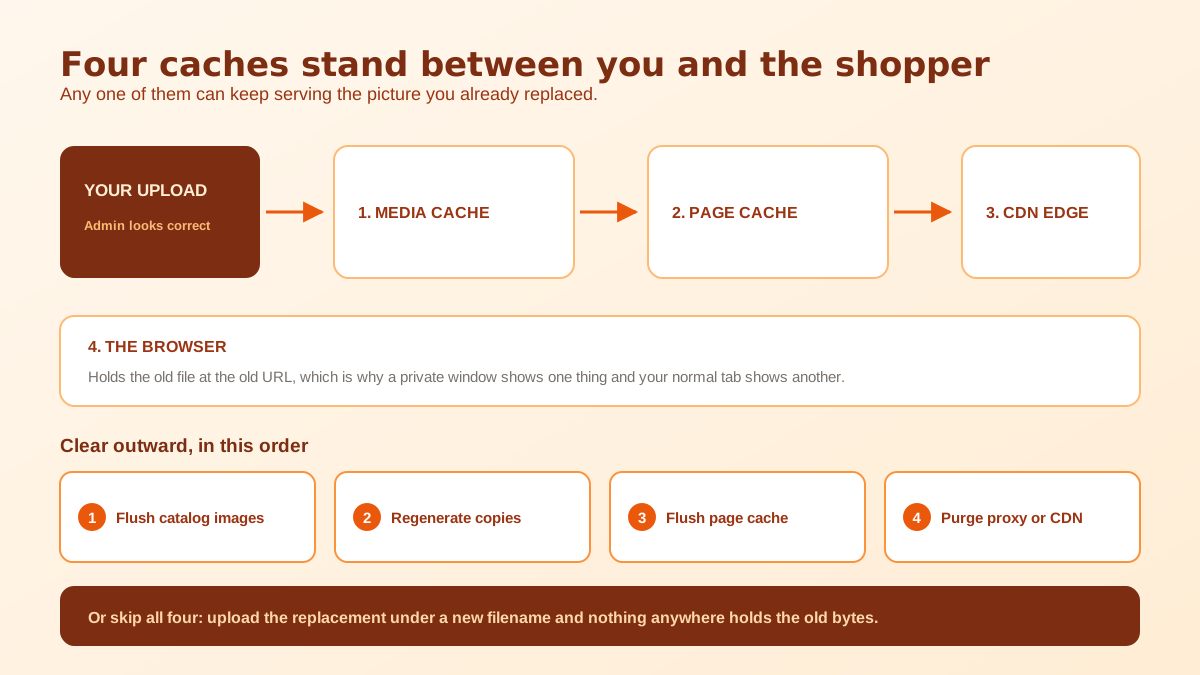
You shoot a better photo, replace the file on the product, save, and the admin thumbnail updates immediately. Then you open the storefront and the old picture is still there. You reload. Still there. You open a private window, and now it is correct, so you go back to your normal browser and it is wrong again. A colleague in another city says it looks fine. Everything about this points at the Magento image cache, and the reason it is so confusing is that there is not one cache involved, there are usually four.
Magento 2 and Adobe Commerce never link a storefront page to the file you uploaded. The upload is a source master. What the browser downloads is a pre-generated copy, produced once at the size a given page needs and then reused indefinitely. Once you accept that, the stale image stops being a mystery and becomes a question of which layer is holding the old bytes and in what order to clear them.
Your original lands in the catalog product media directory, filed into nested folders derived from the filename so that a large catalog does not end up with a hundred thousand files in one place. Alongside it sits a cache subfolder, and that is where the served files live. Each generated copy is stored under a hashed folder name that encodes the size that was requested along with the image settings in force when it was made, things like compression quality, whether frames are padded to a fixed shape, and whether a watermark applies.
So one uploaded picture routinely produces four or five files on disk: one for the product page, one for the zoom view, one for the category grid, one for the cart thumbnail. This is also why the folder grows relentlessly. Changing a size, a watermark or a quality setting does not replace the old copies, it produces a new set beside them, and stores that have been running for years commonly carry many gigabytes of generated images that nothing will ever request again.
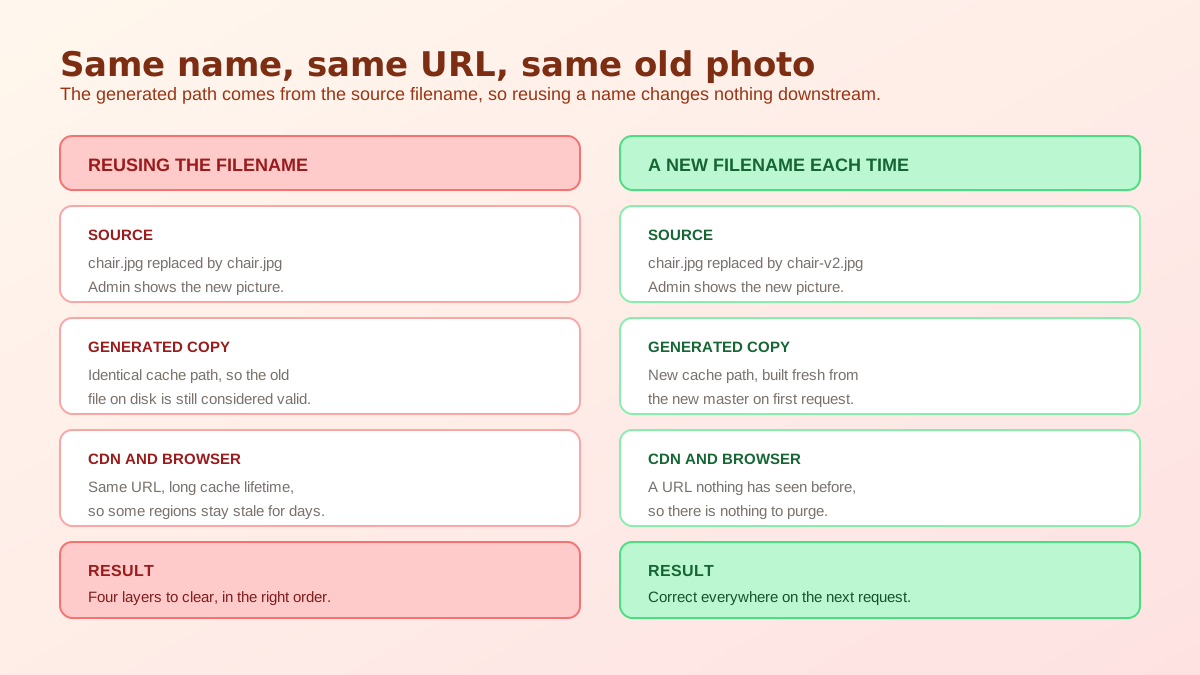
The generated path is derived from the source filename. Upload a new photo called the same thing as the old one and the derived path is identical, so the pre-existing copy at that path is still perfectly valid as far as every layer above is concerned. Magento does not compare file contents, the page cache has no reason to rebuild markup that has not changed, and a CDN sitting in front of you is holding bytes for a URL that did not move. From every one of their points of view, nothing happened.
This is the single most useful thing to know about the Magento image cache, because it also gives you the cheapest fix available. If a replacement is uploaded under a new filename, the derived path is new, the URL is new, and there is nothing anywhere in the chain that could serve the old picture at that address. It costs nothing at upload time and it removes the entire problem class rather than treating it after the fact.
These two operations get used interchangeably in forum answers and they do completely different work. Flushing Magento's cache types clears rendered page and block output, so the HTML is built again on the next request. That is what people mean by clearing the cache, and on its own it does absolutely nothing to a stale picture: the markup gets rebuilt and points at exactly the same generated file it pointed at before.
Regenerating cached images is the other operation. The command line resize routine, run as bin/magento catalog:images:resize, walks the catalog and produces the derived files for every size the theme declares, so shoppers are not paying for that work on first visit. What it will not reliably do is overwrite a copy that already exists at the expected path, which is why the admin also exposes a flush catalog images cache action under cache management. That action deletes the generated files so the resize run has something to actually do.
Everything so far happens on your own server. In front of it there are usually one or two more layers that you cannot clear from the Magento admin at all. A reverse proxy such as Varnish, or a CDN, will have fetched the image once and be answering for it from an edge node close to the visitor. Because images are served with long cache lifetimes by design, a copy at the edge can outlive several deployments.
This produces the symptom that convinces people the platform is broken: the picture is correct for you, correct in a private window, correct for the developer, and wrong for a customer two countries away. Nothing is inconsistent, they are simply being answered by a node that was never purged. The fix is a purge at that layer, either the whole path or the specific URL, and if your purge tooling is awkward then the new filename approach quietly sidesteps it. Browsers add the final layer, which is why a hard reload behaves differently from a normal one.
Sequence matters, because clearing in the wrong order means regenerating files that you are about to delete, or purging an edge node before your own server has the new picture to give it. Work outward from the disk. Delete the generated copies, rebuild them, clear the rendered page output, then purge anything sitting in front. Verifying between steps saves a lot of guessing, and the fastest check is to open the image URL itself rather than the product page, because a URL containing a cache path tells you immediately which layer you are looking at.
On a catalog of any size, plan for the regeneration step to take real time, because it is doing image processing for every product and every declared size. Running it during trading hours on a busy store is a reasonable way to make the site slow for an hour. The one time it is genuinely unavoidable is after a theme change that alters the requested dimensions, and if you are auditing those numbers it is worth checking the values against what other channels expect, which the Shopify product image size guide lays out clearly for comparison.
Two habits remove most future incidents. The first is the naming convention already mentioned: never reuse a filename for different content, and put a version marker or a date in the name so a replacement is always a new object. The second is to treat the generated folder as disposable rather than precious, and to check its size occasionally, because a store that has changed themes twice is carrying copies at dimensions nothing has requested in years.
It is also worth being deliberate about how often images change at all. A catalog where photography is replaced piecemeal, one SKU at a time, generates a steady trickle of exactly these incidents, whereas a store that refreshes a whole category at once pays the cache cost once. That argues for producing imagery in batches rather than continuously, and consistency across a category does more for conversion than any individual picture, which the product image conversion statistics support.
Most of the time a store owner is fighting the Magento image cache because they finally got round to improving photography that was never good enough, and the improvement is arriving one product at a time because a shoot is expensive. Generating new imagery from the product shots you already hold changes that rhythm, and it makes a whole category refresh a realistic afternoon rather than a quarterly project. That is what AI product photography is genuinely useful for at catalog scale.
Our Magento 2 and Adobe Commerce connection uses a REST integration access token created in the admin, imports the catalog into a workspace, and generates images per SKU that you then upload through the admin or your usual media import. Publishing directly back into Magento is not part of it today, so placement stays in your hands, and the per platform detail is set out on the store integrations page. If all you need is a clean cutout of an existing photo before re-uploading it under a fresh filename, the free background remover tool does that on its own.
Because the storefront never links to your upload. Magento pre-generates resized copies of every catalog picture into a cache folder and serves those, and the path of a generated copy is derived from the source filename. Replace a file with a new one that carries the same name and every layer above it, the media cache, the page cache and any CDN, has no reason to think anything changed.
They act on different things. Flushing Magento cache types clears rendered page and block output so the HTML is rebuilt. Regenerating cached images rewrites the actual resized image files on disk. Clearing page cache alone leaves the stale picture in place, because the markup is rebuilt and then points at the same generated file it pointed at before.
Under the catalog product media directory, in a cache subfolder at pub/media/catalog/product/cache. Inside it, generated files are filed under hashed folder names that encode the requested size and the image settings in force when they were created, which is why one source picture produces several copies and why the folder grows steadily over the life of a store.
Yes, in the sense that it contains only derived files that Magento can rebuild from the originals. The admin exposes this as a flush catalog images cache action in cache management. Do it in a quiet window on a live store, because until the copies are regenerated the site rebuilds them on demand and pages get slower for a while.
That is a caching layer in front of Magento holding its own copy. A CDN edge node, a reverse proxy such as Varnish, or a visitor browser can each serve an image it fetched earlier without asking your server again. Visitors routed to a node that has not been purged keep seeing the old file until it expires.
Give every replacement a new filename. A different source name produces a different generated path and a different URL, so no cache anywhere is holding the previous bytes under that address. It costs nothing at upload time and removes the entire class of problem, which matters most on stores sitting behind a CDN.
ListingRVA AI now works inside Claude. Connect your workspace and ask Claude to generate listing copy and publish product images to your store, without leaving your editor. See the Claude connector →
Comments
No comments yet, be the first.
Leave a comment