
Magento Bulk Product Listing: Why Half Your Import Vanished
August 20, 2026 · 8 min read · by Aashirvad Kumar
Your credits refresh every month for as long as ListingRVA AI exists. No renewals, no annual increases, nothing to cancel.
Available on select plans. No renewals, ever.
August 20, 2026 · 8 min read · by Aashirvad Kumar
You prepare a file with 3,000 rows, run it through the import screen, get a green message, and then find 2,140 products in the catalog. No error was shown that you can remember. Or every row imported, but a third of them have empty specification fields, and a different third exist in the admin grid while returning a 404 on the storefront. Magento bulk product listing fails in this partial way far more often than it fails outright, and that is precisely what makes it hard to debug: nothing announces itself as broken.
The underlying reason is that a product import touches four systems that each have their own rules. The import engine validates rows and is permitted to discard the ones it dislikes. The attribute set decides which of your columns can hold data at all. Website assignment, status, visibility and stock decide whether a valid product is publicly reachable. And the indexers decide whether a reachable product appears in listings. A row has to satisfy all four to become a product a shopper can buy.
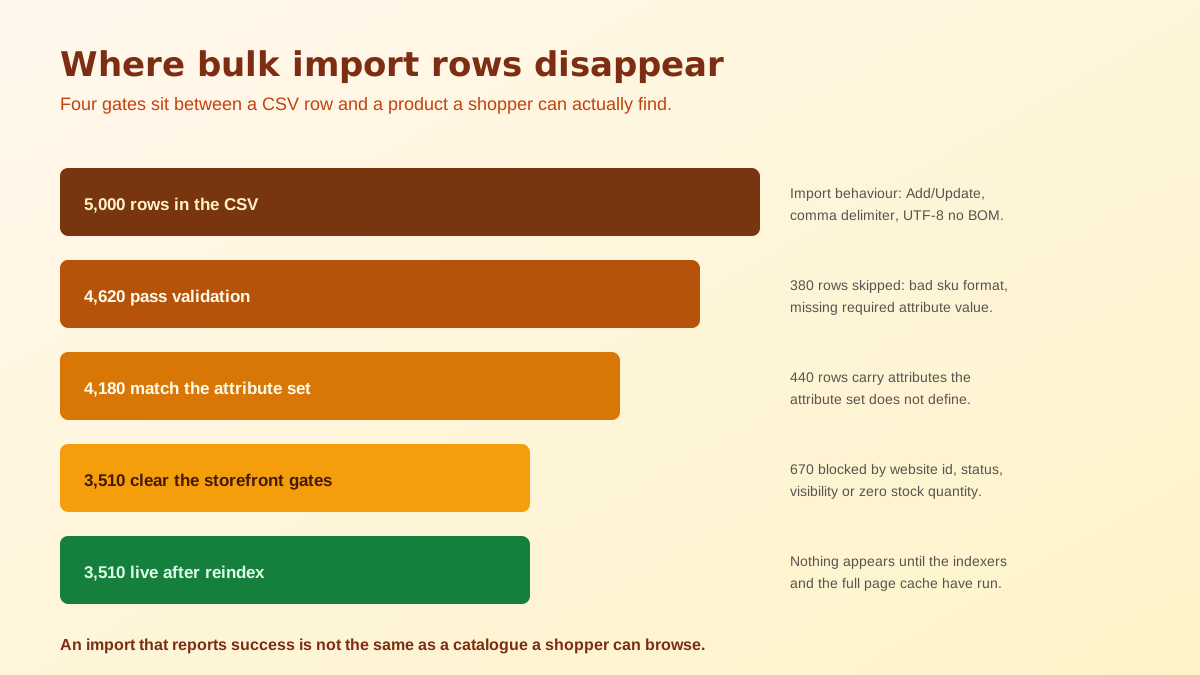
The import screen in the data transfer section runs a check before it commits anything, and that check is the most informative screen in the whole process. It reports how many rows it found, how many it considers valid, and how many errors it hit, grouped by type. People skim it because it looks like a formality and the import button appears immediately afterwards. The detail underneath is what tells you a thousand rows were rejected for one reason that a single column change would fix.
Two settings control what happens next. There is an allowed errors count, and there is a choice between stopping the import when errors occur and skipping the entries that failed. The default combination is designed so that a mostly good file still lands, which is convenient right up to the point where it silently drops the rows you cared about. On any serious Magento bulk product listing job, set it to stop on error while you are still testing, so the file has to be genuinely clean before anything is written.
Every product belongs to an attribute set, named in the file by its code, and the set determines which attributes that product is allowed to hold. This is the mechanism behind the second failure mode, the one where the import reports complete success and the products come out with empty specification fields. The columns were read, the values had nowhere to live, and no error was raised because the file was not wrong so much as mismatched.
Custom attributes travel in an additional attributes column as key and value pairs rather than as columns of their own, which adds a second place for the same mismatch to hide. Before a large run, take three representative rows, import them alone, and open the resulting products in the admin to confirm every field you expect is populated. Three rows takes five minutes and finds nearly every structural problem that three thousand rows would take a day to unpick.
This is the complaint that generates the most support tickets, and it has four ordinary causes that are worth checking in order. The product may not be assigned to a website, which is a separate column from anything else and is easy to omit in a file assembled from a supplier feed. The product may be disabled, because the status column was blank or carried a value the importer read as off. Both produce a complete, healthy looking record in the admin grid and no public page at all.
The third cause is visibility. A product set to not visible individually is deliberately excluded from catalog and search listings, which is correct for the simple products that sit underneath a configurable parent and completely wrong for a standalone item. Feeds built for a configurable structure frequently carry that value on every row. The fourth is stock: a product with no saleable quantity is hidden entirely unless the store is configured to display out of stock products, so an import that omitted quantity produces a catalog that looks empty.
Product data written by an import lands in the catalog tables. Category listings, price display, stock status and catalog search do not read those tables directly, they read index tables that are rebuilt as a separate operation. Until the relevant indexers have run, an imported product can be entirely absent from its category page while its own product page looks perfect, which sends people hunting for a category assignment problem that does not exist.
The indexer mode matters as much as the reindex itself. Update on save makes every single write trigger index work immediately, which turns a large import into a punishingly slow one and can take a busy site down with it. Update by schedule hands the work to cron in batches instead, which is the correct setting for any store that does regular bulk work, and which also means cron genuinely has to be running. A surprising number of stale catalog problems on Adobe Commerce come down to a cron job that stopped weeks ago and nobody noticed.
The reliable pattern is boring and it does not change much between stores. Export a handful of existing products that already look the way you want the new ones to look, and use that export as the column template rather than building a file from a supplier spreadsheet. It guarantees the column names, the attribute set code and the value formats match what this specific installation expects, and it removes the largest source of guesswork before you have written a single row.
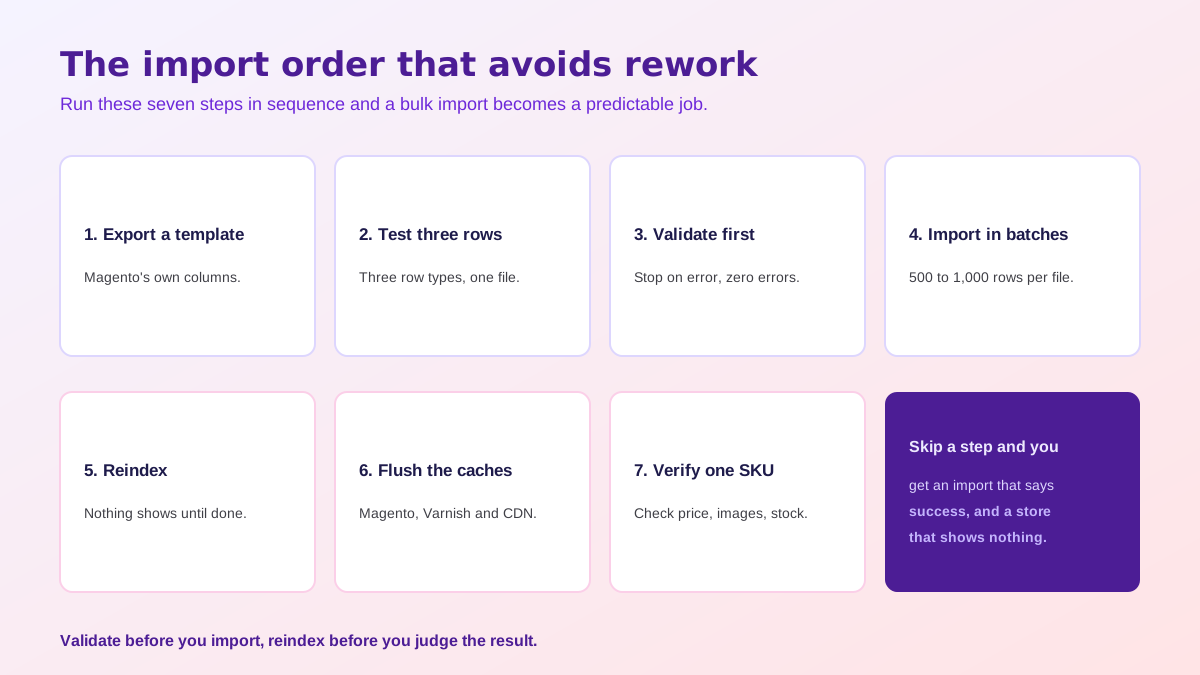
The verification step at the end is not optional busywork. Every failure mode described above produces a catalog that looks correct in the admin, so the admin cannot be the thing you check. One product page and one category page take thirty seconds and catch all four gates at once. Teams that run this routine on every batch stop having import incidents almost entirely, which is the same discipline that makes automated multi-channel listing workflows survive contact with real catalogs.
Solving the mechanics does not solve the harder half. A file that imports cleanly can still be full of supplier boilerplate, missing short descriptions and one low resolution photo per SKU, and that catalog will rank and convert exactly as badly as its content deserves. This is the point in a Magento bulk product listing project where most teams stall, because writing and photographing three thousand products by hand is not a task anyone finishes, and half finished is how catalogs end up inconsistent.
Generating that content from the product data you already hold is the practical way through. Draft copy per SKU from real attributes, then edit the top sellers by hand, and use the field split that suits Magento rather than one block of text, which the guide to Magento product description SEO sets out. A bulk product description generator gets a catalog to a consistent baseline in a fraction of the time hand writing takes.
Imagery is the other half, and it is usually the worse half on an imported catalog, because supplier photography arrives at inconsistent sizes on inconsistent backgrounds. Our Magento 2 and Adobe Commerce connection imports your catalog through a REST integration access token created in the admin, generates images per SKU in a workspace, and hands them back for you to place through the admin or your usual media import, which the store integrations page details platform by platform. Making three thousand SKUs look like they belong to one brand is the job that AI product photography is best suited to.
Because the import screen is allowed to skip bad rows rather than stop. There is an allowed errors count and a choice between stopping on error and skipping the entries that failed, and the default combination lets an import finish while quietly dropping rows. Read the validation summary rather than the success message, since the summary is where the skipped count appears.
Almost always one of four things: the product is not assigned to a website, it is disabled, its visibility is set to not visible individually, or it has no saleable stock while the store hides out of stock products. All four produce a perfectly healthy looking record in the admin grid and nothing at all on the storefront.
It decides which attributes the product can hold. A value in a column for an attribute that is not in that product's attribute set has nowhere to go, so the row imports and the data does not appear. If a large import comes back with empty specification fields, compare the attribute set named in the file against the set that actually contains those attributes.
Yes. Product data lands in the catalog tables, but category listings, price display, stock status and catalog search all read from index tables that are rebuilt separately. Until the relevant indexers have run, imported products can be entirely absent from category pages while looking complete on their own product page.
Update by schedule for any store doing regular bulk work. Update on save makes every write trigger index work immediately, which turns a large import into a very slow one and can lock the site up. Update by schedule hands the work to cron in batches, which also means cron genuinely has to be running.
Two products in the same store are competing for one address. It happens when a file contains two similar product names that generate the same URL key, or when an earlier deleted product left its rewrite behind. Setting an explicit url key column per row rather than letting Magento derive one from the name avoids most of it.
ListingRVA AI now works inside Claude. Connect your workspace and ask Claude to generate listing copy and publish product images to your store, without leaving your editor. See the Claude connector →
Comments
No comments yet, be the first.
Leave a comment