
AI Product Listing Optimization: A Real Before and After
July 23, 2026 · 8 min read · by Aashirvad Kumar
Your credits refresh every month for as long as ListingRVA AI exists. No renewals, no annual increases, nothing to cancel.
Available on select plans. No renewals, ever.
July 23, 2026 · 8 min read · by Aashirvad Kumar
Most articles about AI product listing optimization show you a polished result and skip the part where you find out what it actually changed, and what it quietly left broken. So we took a real listing from a home decor seller, ran it through, and wrote down everything. The brand name is withheld, but every character quoted below is the real data.
The listing was a rattan storage basket. It is a useful test case precisely because it was not a disaster of bad writing. It was something far more common: a listing where most of the fields were simply never filled in.
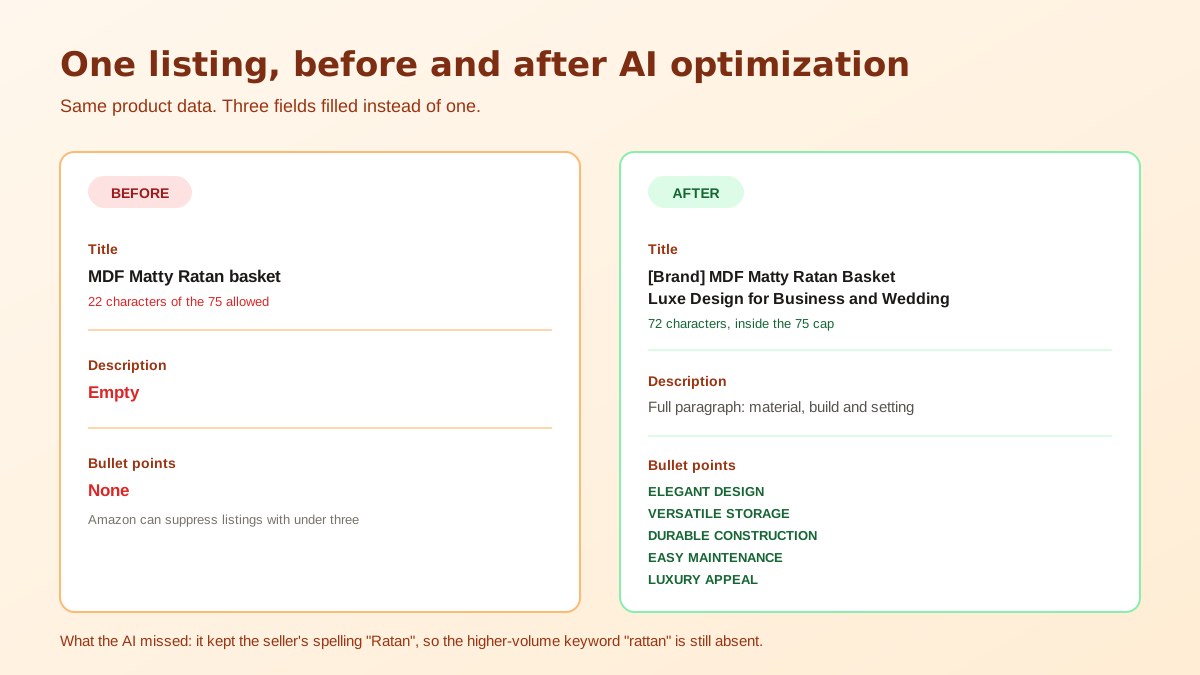
Here is the entire listing as the seller had it:
This is the single most common shape of a weak listing, and it is worth being precise about why it fails. It is not that the words are bad. It is that there are almost no words at all, so there is nothing for Amazon to index and nothing for a shopper to be persuaded by. The product image conversion statistics put a number on how much of that decision the images are really carrying.
Look at what a 22-character title leaves on the table. Amazon allows up to 75 characters, so the seller used under a third of the space that carries the heaviest ranking weight. There is no brand, no material framing beyond "MDF", no size, no colour, and above all no use case. Nobody searches for "MDF Matty Ratan basket". They search for a rattan storage basket for a shelf, a gift hamper basket, a wedding hamper basket.
The empty description and missing bullets compound it. Amazon can suppress listings with fewer than three bullets, and a shopper who lands on a page with no bullets has nothing to read in the one place they actually look. The listing was not competing badly. It was barely competing at all.
We ran it through the listing optimizer, which scores the listing first and then rewrites each weak section from the product data. Three things came back.
The rewritten title, with the brand withheld, was:
"[Brand] MDF Matty Ratan Basket Luxe Design for Business and Wedding"
Two changes matter here. First, it added the brand at the front, which is the convention Amazon expects and which the original was missing entirely. Second, and more valuable, it added use cases: "for Business and Wedding". Those are the phrases that pull in long-tail searches from people buying hamper baskets for events, which is a real buying occasion for this product and was completely invisible before.
The length landed at 72 characters. That matters more than it used to, because Amazon now caps titles at 75 characters and rewrites anything longer with its own AI. Coming in at 72 means the seller keeps control of their own title.
The empty description was replaced with a full opening paragraph covering the material, the construction and the intended setting. In pure SEO terms this is the least valuable of the three fields, because the description carries less indexing weight than the title. In conversion terms it is the difference between a page that answers questions and a page that does not.
The optimizer produced five bullets in the standard front-loaded format, an uppercase benefit label followed by the detail:
Structurally these are correct. They use all five slots, they front-load a scannable label, and importantly none of them contain the words that get bullets suppressed. There is no "best", no "guaranteed", no "#1", no special characters. That is not a small thing, because those are exactly the words sellers reach for when writing bullets by hand.
This is the part the case studies leave out, and it is the more useful half of the exercise.
The source data said "Ratan". The correct spelling, and the one with vastly more search volume, is "rattan". The AI preserved "Ratan" in the rewritten title.
That is defensible behaviour. A tool that silently rewrites your product wording cannot tell an intentional brand spelling from a typo, and sellers would rightly be furious if it renamed their product line. But the consequence is real: the optimized title still misses the main keyword for the category. The AI made the listing dramatically better and left the single highest-value fix untouched.
The lesson generalises. AI product listing optimization works from the data you give it. If a keyword is misspelled at the source, it stays misspelled at the output. Audit your product titles for spelling before you optimize, not after.
"LUXURY APPEAL" and "ELEGANT DESIGN" are the kind of labels that could sit on any home decor product. They are not wrong, and they are certainly better than blank, but they do not say anything a competitor could not also say. A human who knows this product would put the wedding and gifting use case in bullet one, because that is the buying occasion with the clearest intent, rather than leaving it in bullet two behind a generic design claim.
This is the honest division of labour. The AI covers the structural work reliably and fast: filling every field, respecting length limits, avoiding the words that trigger suppression, front-loading benefits. The judgement about which benefit deserves the top slot is still worth a human minute per listing.
Before, this listing had one indexable field with 22 characters in it. After, it had a 72-character title carrying brand and two use cases, a description, and five compliant bullets. The listing went from almost no surface area in Amazon's index to a normal amount, and from nothing to read to something that answers a shopper's questions.
What it did not do is guarantee a ranking. Copy fixes two of the three levers, indexing and conversion. Images carry the click, and sales velocity carries rank. A listing with good copy and a weak main image still loses, which is why the copy and the AI product photography are worth fixing in the same pass rather than months apart.
You can do this in a few minutes without paying anyone:
If you would rather not do it field by field across a whole catalogue, our AI product listing optimization tool scores and rewrites every section in one pass, and you approve each change before it goes live. For the manual framework behind it, the 10-step Amazon listing optimization playbook walks through each field in order, and the Amazon title generator handles the 75-character problem on its own.
50 free credits, no credit card. Title, bullets, description and images from one product photo.
Start free →It is using an AI model to rewrite the parts of a listing that drive ranking and conversion, the title, bullets, description and backend search terms, from the product data you already have. The useful versions score the listing first so you can see which section is weak instead of rewriting everything blindly. If you would rather pull the terms yourself first, a free keyword tool for Amazon returns your primary and long-tail keywords in seconds.
Usually not, and that is deliberate. A good tool will not silently rewrite your brand or product wording, because it cannot tell an intentional brand spelling from a typo. In our test the source said "Ratan" and the AI kept it, which preserved the seller's wording and also preserved a missed keyword. Check your source data for spelling before you optimize.
From July 27, 2026, Amazon caps titles at 75 characters including spaces in most categories, and anything longer gets rewritten by Amazon's own AI. The rewritten title in our test came in at 72 characters, which fits, but length only helps if the words are ones buyers actually search.
It reliably avoids the obvious triggers such as "best", "guaranteed" and "#1", and it front-loads a benefit label, which is the structure shoppers scan. What it will not do reliably is know which two benefits matter most to your specific buyer, so treat the output as a strong first draft and reorder the top two yourself.
No. Copy fixes indexing and conversion, which are two of the three levers, but images carry the click and sales velocity carries rank. A listing with perfect copy and a weak main image will still lose. Fix the copy and the images together, then give the listing time to gather conversion data.
ListingRVA AI now works inside Claude. Connect your workspace and ask Claude to generate listing copy and publish product images to your store, without leaving your editor. See the Claude connector →


Comments
No comments yet, be the first.
Leave a comment