
Why Your Amazon Backend Keywords Aren't Getting Indexed
July 1, 2026 · 8 min read · by Aashirvad Kumar
Your credits refresh every month for as long as ListingRVA AI exists. No renewals, no annual increases, nothing to cancel.
Available on select plans. No renewals, ever.
July 1, 2026 · 8 min read · by Aashirvad Kumar
You did the work. You researched synonyms, added spellings, filled the search terms field in Seller Central, and waited. Then you searched Amazon for one of those exact keywords and your product was nowhere. This is one of the most common and most frustrating issues sellers raise, on Seller Central and Web Retailer alike, because the field looks fine and Amazon gives you no error. The keywords are simply being ignored.
Here is the uncomfortable truth: filling the backend field does not mean Amazon indexed it. This guide walks through why search terms silently fail to index, the mistake that voids the entire field at once, and exactly how to check whether a keyword is really working.
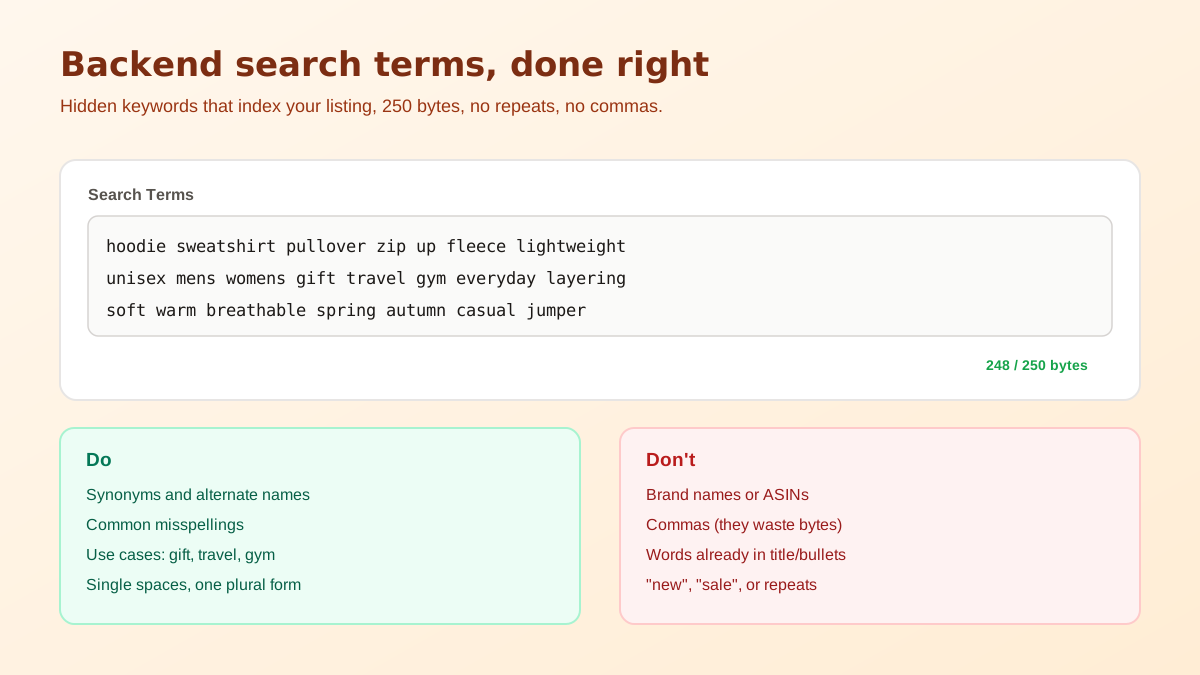
The single biggest reason backend keywords do not index is that sellers exceed the byte limit. The search terms field holds about 249 to 250 bytes, and the part almost everyone misses is what happens when you go over: Amazon does not just drop the overflow, it can ignore the entire field. Stuff it with 400 bytes of keywords and you may index for none of them.
And it is bytes, not characters. Standard English letters are one byte each, but accented characters and many non-Latin scripts take two or more, so a field that looks short can still overflow. The fix is simple and strict: count bytes, keep the field comfortably under the limit, and treat every byte as a keyword you are choosing to keep or cut. When in doubt, trim, an under-filled field that indexes beats a stuffed field that indexes nothing. If the argument needs evidence, the product image conversion statistics cover what actually shifts buyer behaviour.
Do this first: before hunting for exotic reasons, confirm your search terms field is under ~249 bytes. If it is over, that alone can explain why none of your backend keywords are indexing. Trim it under the limit and re-check before changing anything else.
Even under the limit, poor formatting burns the space you have and can stop terms indexing:
Sometimes the field is the right size and cleanly formatted, and a keyword still will not index. That usually means a policy or content flag:
A lot of backend-keyword advice makes the problem worse. Three beliefs to drop:
Do not assume, verify. There is a simple manual test and a scalable one:
B0XXXXXXXX wide mouth. If your product appears, that exact term is indexed. If it does not, the term is not being picked up and you have a problem to fix.Say your title is "HydraMax Stainless Steel Water Bottle 32oz Insulated Leak-Proof." Those words are already indexed, so you never repeat them. A clean backend field catches the gaps instead:
thermos flask canteen tumbler gym sports hydration reusable eco friendly camping hiking travel wide mouth bpa free cold hot drinks vaccum insualted bottel
That is synonyms Amazon would not otherwise connect (thermos, flask, canteen, tumbler), use cases (gym, camping, hiking, travel), attributes not in the title (wide mouth, bpa free, reusable), and two deliberate misspellings buyers actually type (vaccum, bottel). No commas, no repeats, no brand, no fluff, single spaces, and comfortably under the byte limit so the whole thing indexes.
You are looking for real demand you are not already capturing. Amazon's own autocomplete shows ranked buyer searches, start typing your product and note the suggestions you are not indexed for. Your competitors' titles reveal framings you missed. Your reviews and customer questions show the words buyers use for your product in their own language, which is often exactly what other shoppers search. Add the ones that genuinely fit, and check each with the ASIN test.
Researching, byte-counting, and index-checking search terms for every SKU by hand is tedious and error-prone. Our free Amazon keyword generator produces clean, backend-ready search terms and long-tail keywords from your product in seconds. Then make the visible side pull its weight with strong bullet points and a listing built to rank on Amazon, and pair it with AI product photography that wins the click. When you would rather fix every section in one pass, our Amazon listing optimization tool scores and rewrites the full listing. If you are weighing that against hiring help, we compared the listing optimization cost comparison.
Free Amazon keyword generator, no login. Backend search terms plus long-tail keywords, ready to paste.
Try the free tool →Search Amazon for your ASIN followed by a keyword you added, for example "B0XXXXXXXX wide mouth". If your product appears, that term is indexed. If not, it is not being picked up, usually a byte overflow, a flagged word, or an ignored term. Third-party tools can batch-check many keywords at once.
The search terms field allows up to 249 to 250 bytes. The critical part: if you go over, Amazon can ignore the entire field, not just the overflow, so a stuffed field may index nothing. Count bytes, not words, and stay comfortably under.
Usually exceeding the 249-byte limit (which can void the whole field), using commas or extra spaces, repeating words already in your title and bullets, including a competitor brand or an accidentally "adult"-flagged word, or waiting less than 24 to 48 hours. Fix the field, then verify with an ASIN-plus-keyword search.
Yes. Separate terms with single spaces only. Commas, semicolons, and double spaces waste your limited bytes and add nothing, since Amazon treats separators as spaces anyway. Every wasted byte is a real keyword you could not fit.
Amazon usually re-indexes within 15 minutes to 24 hours, and a listing recovering from suppression can take up to 48 hours. If a term still is not indexed after 48 hours, the problem is the content of the field, not the wait.
ListingRVA AI now works inside Claude. Connect your workspace and ask Claude to generate listing copy and publish product images to your store, without leaving your editor. See the Claude connector →
Comments
No comments yet, be the first.
Leave a comment