
The Amazon Bullet Point Character Limit Differs by Category
August 3, 2026 · 8 min read · by Aashirvad Kumar
Your credits refresh every month for as long as ListingRVA AI exists. No renewals, no annual increases, nothing to cancel.
Available on select plans. No renewals, ever.
August 3, 2026 · 8 min read · by Aashirvad Kumar
You write five bullets, the upload succeeds, and then you open the listing on your phone and the second one stops mid-sentence. Or the opposite happens: the flat file throws a length error on a bullet that is shorter than one you published last month on a different product. Both are the same confusion. The amazon bullet point character limit is not a single number that applies to your account, it is a value declared per product type, and the number that governs whether a shopper reads your bullet is different again.
There are three separate ceilings in play and they almost never match. The template limit decides whether your upload validates. The category style guide states what Amazon would prefer. The rendered layout decides what a human eye actually receives. Bullets are only one field, so treating them as part of a full amazon product listing optimization keeps the title, images and backend terms moving in step with them. Optimising for the first one and ignoring the third is how sellers end up with technically valid bullets that communicate nothing.
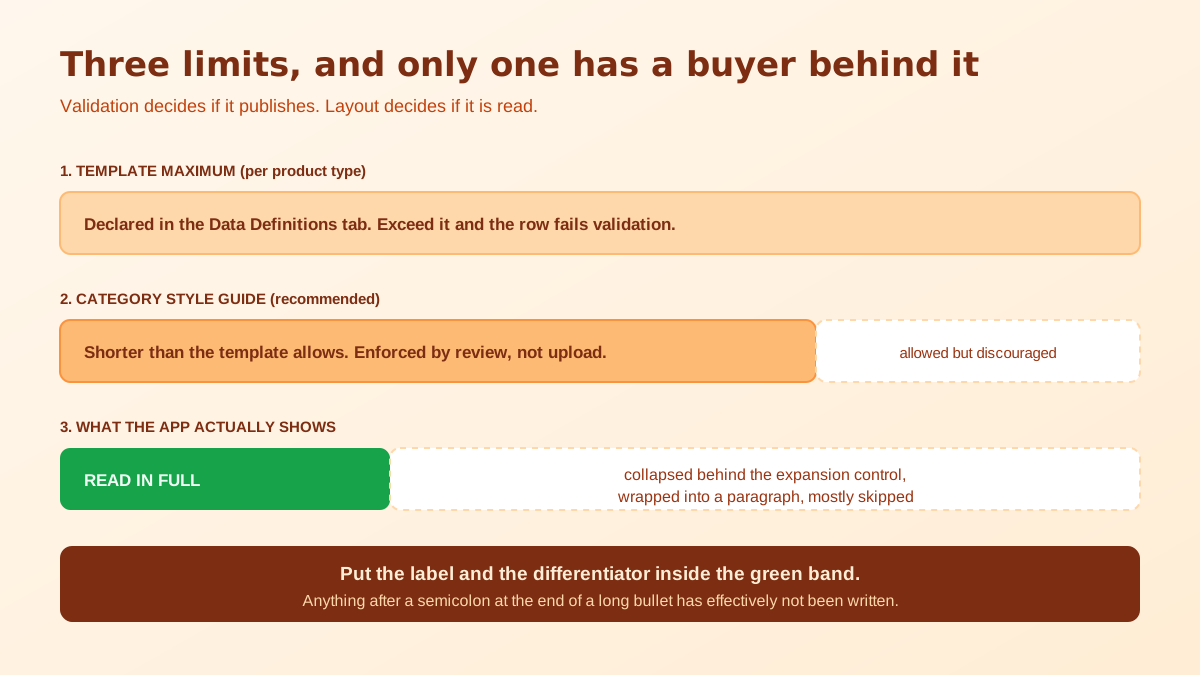
Stop looking for the answer in forum threads. Every product type on Amazon has its own listing template, and inside that workbook there is a Data Definitions tab that lists each attribute with its type and its maximum length. Find bullet_point in that tab and you have the number your upload will actually be validated against for that product type, in that marketplace. It is authoritative in a way that no general guidance is, and it takes about two minutes to check.
Do it per product type rather than once. Sellers who list across several categories routinely find different maximums, which is precisely why a bullet that published cleanly on one ASIN gets rejected on another. It is also marketplace specific: the same product type can carry different constraints on a European marketplace than on the North American one, so a copy-paste expansion into a new region is a good moment to re-check rather than assume.
The spread is wider than most sellers expect. Across product types you will see maximums in the low hundreds of characters and maximums several times that, sitting side by side in the same account. Neither is a mistake and neither is a target. A generous ceiling is permission, not instruction, and the categories that allow the most tend to be the ones where shoppers are comparing dense specifications rather than skimming. Read the ceiling as information about your buyer, then decide independently how much of it to use.
Alongside the template there is the category style guide, and it often asks for something considerably shorter than the template physically permits. That is not a contradiction, it is a recommendation sitting inside a technical ceiling. Style guides also carry the rules that are easy to breach without noticing, including bans on price references, promotional language, competitor mentions and contact details, which are enforced through listing quality review rather than at upload.
Most Amazon shopping happens on a phone. In the app, the About This Item block does not present five bullets as a tidy list the way desktop does. It shows the opening portion of the section and collapses the rest behind an expansion control, and each line wraps across a narrow column so a long bullet becomes a paragraph. A shopper scanning that screen is reading the first line of each bullet and very little else.
The practical consequence is that the front of the bullet carries all the weight. Whatever differentiator you buried at the end of a 480 character sentence has effectively not been written. This is why the strongest pattern is a short capitalised label followed by one clear sentence: the label survives every truncation point, and the sentence rewards the shopper who expands. Write the label so it makes sense read alone, because on mobile it frequently is.
Test this on your own listing rather than trusting a preview. Open the live ASIN in the Amazon app, not the mobile browser and not the desktop preview in Seller Central, and note where each bullet visually stops. That single check reorders most people's bullets within a minute, and it costs nothing. Desktop previews are the reason so many sellers believe their bullets read well when the majority of their audience never sees the second half.
It is worth noticing what sits above the bullets on that same screen. On a phone the image carousel occupies most of the first view, the title wraps to several lines, and the bullets arrive after a scroll that many shoppers never make. That ordering means a specification you could not fit into a surviving bullet is often better placed on an image, where it is read before any text at all. Sizing diagrams, compatibility charts and in-the-box shots do more work on mobile than a sixth bullet ever would.
Once you accept that the mobile cut is the operative constraint, the amazon bullet point character limit becomes a writing problem rather than a compliance problem. You have five slots, each of which realistically delivers one idea. Spending two of them on the same benefit phrased differently wastes 40 percent of the block. Spending one on a specification a buyer cannot evaluate, like an internal model code, wastes another.
A workable allocation for most physical products is one bullet for the primary benefit, one for the material or build quality, one for fit, size or compatibility, one for a use case that answers the most common pre-purchase question, and one for what is in the box or how it is cared for. Compatibility and sizing deserve their own slot because they are the single largest driver of returns, and returns cost far more than the conversion the extra adjective might have won. The full ordering of these decisions is worked through in the Amazon listing optimization playbook.
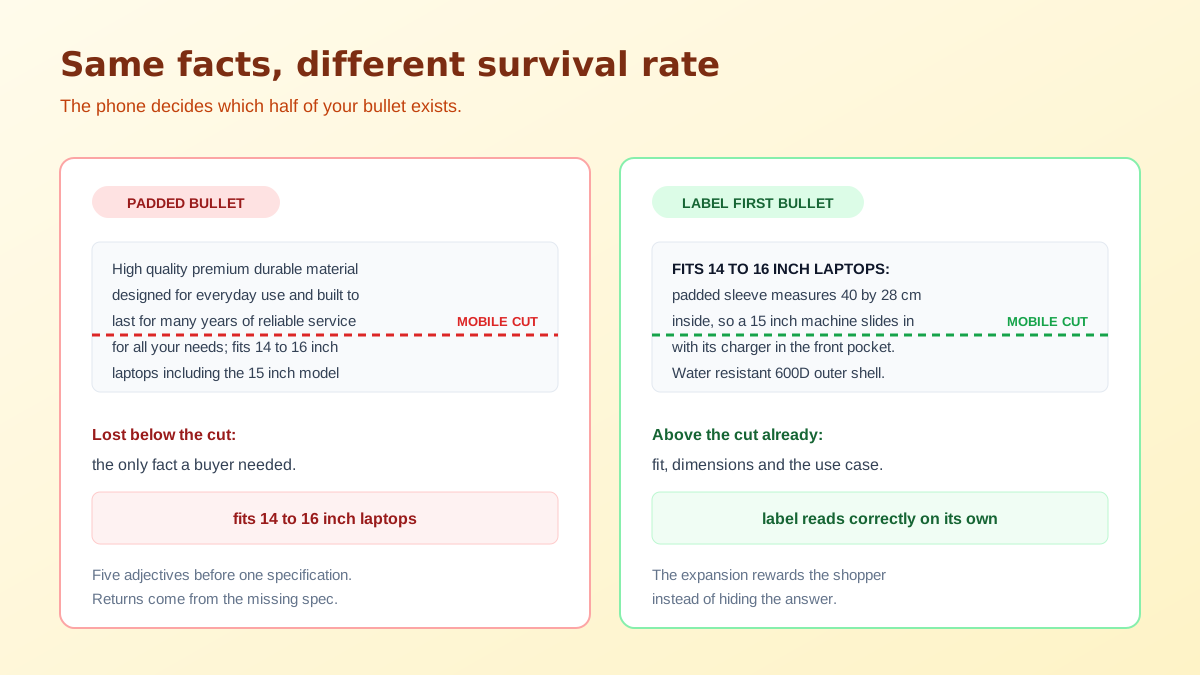
A persistent belief is that longer bullets rank better because they hold more keywords. Treat that with suspicion. Repeating a term you already carry in the title and the backend fields does not compound, and the space it consumes comes directly out of the part of the bullet a shopper reads. Coverage across five bullets beats density inside one, which means five distinct concepts rather than one concept restated in five registers.
It also matters that bullets are not your only indexing surface, and they are the most expensive one to abuse because a human is reading them. Terms that have no natural place in customer-facing copy belong in the structured fields built for them, and if those fields are not working the problem is usually formatting rather than volume, which the guide on Amazon backend keyword indexing covers in detail. Getting found and getting chosen are separate jobs, and the difference is laid out in indexed but not ranking.
Working through that list once per category is enough. The template value rarely changes, so the amazon bullet point character limit for your product type is a fact you can record and reuse, and the mobile cut is a habit rather than a lookup. If you are producing bullets at any volume, drafting them against the label-first structure is the part worth automating, and the Amazon bullet points generator writes to that shape. Titles operate under a tighter and more recently changed ceiling, which the piece on the Amazon title character limit goes through separately.
There is no single number. The listing template for your product type declares the maximum for the bullet_point attribute, and category style guides frequently ask for something shorter than the template will physically accept. Download the template for your exact product type and read the Data Definitions tab, because that value is the one the upload validates against.
Acceptance and display are two separate systems. The template validates length on upload, while the detail page renders whatever fits the layout for that device and category. A bullet can pass validation at full length and still be visually truncated in the app, which is why the last clause of a long bullet is the least reliable place to put anything important.
Five is the standard display for most categories. Some product types accept more values in the template than the detail page will show, so the extra ones exist in your data without ever reaching a buyer. Check what actually renders on a live page in your category before you write ten of them.
Not reliably, and length is the wrong lever. Repeating a keyword you already cover in the title and backend fields adds nothing, and padding pushes the useful specifics past the point where a shopper stops reading. Distinct terms across five bullets do more than volume inside one.
Lead with a short capitalised label, then a normal sentence. A fully capitalised bullet is harder to scan and several category style guides discourage it. The label is doing the work on mobile, because it may be the only part of the bullet a shopper actually reads before deciding to expand.
The row fails validation and the attribute is rejected, which in a partial update can leave the listing with the previous bullets or with none at all. Fix the length and resubmit rather than assuming the change went through, and confirm on the live detail page instead of in the processing report.
ListingRVA AI now works inside Claude. Connect your workspace and ask Claude to generate listing copy and publish product images to your store, without leaving your editor. See the Claude connector →
Comments
No comments yet, be the first.
Leave a comment