
Amazon Backend Search Terms: Stop Wasting Half of Your 250 Bytes
August 7, 2026 · 8 min read · by Aashirvad Kumar
Your credits refresh every month for as long as ListingRVA AI exists. No renewals, no annual increases, nothing to cancel.
Available on select plans. No renewals, ever.
August 7, 2026 · 8 min read · by Aashirvad Kumar
Open the search terms field on any listing that has been live for a year and read it out loud. There will be commas. There will be the brand name, which is already in the brand field. There will be the words for and with and the, and there will be both bottle and bottles, and at least a third of it will be words that appear in the title two inches higher up the page. Amazon backend search terms are the smallest field on the listing and the one most reliably filled with things that cannot possibly help.
The field allows 250 bytes in most categories. That is not a lot of room, it is a hard ceiling rather than a guideline, and the single most useful mental shift is to treat it as a budget you are spending rather than a box you are filling.
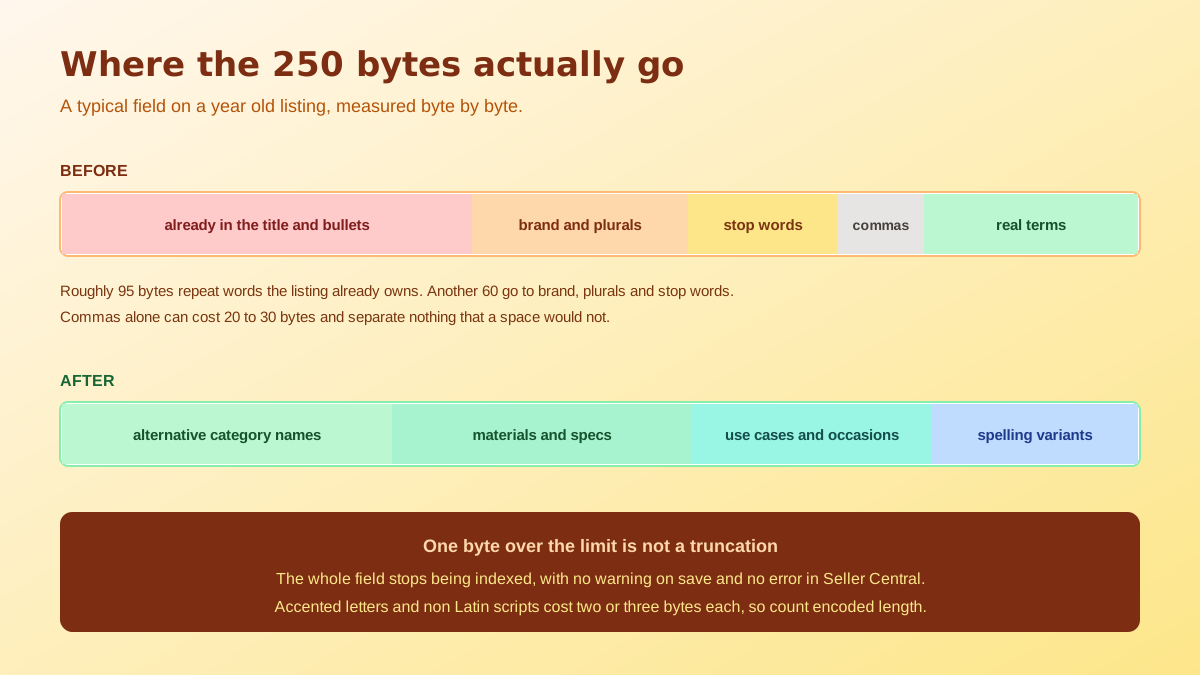
A plain Latin letter costs one byte. An accented character, a currency symbol, an em space or anything in a non Latin script costs two or three. So a field that a text editor tells you is 240 characters long can be comfortably over the limit once encoded, which is a trap for sellers listing in markets where the language uses accents or a different script entirely. Count bytes, in a byte counter, before you paste anything into Seller Central, because amazon backend search terms are validated on the encoded length and nothing else. Backend terms are only one field, so it pays to treat them as part of a wider amazon product listing optimization pass across the title, bullets and description.
The consequence of going over is harsher than most people assume. The field is not truncated at the boundary with the earlier part kept, it stops being indexed, so a field one byte too long contributes nothing rather than contributing most of itself. Nothing in Seller Central flags it, no error appears on save, and the listing carries on looking entirely healthy while its hidden keywords do absolutely nothing.
Start with punctuation. Commas, semicolons and quotation marks are all bytes, and none of them are needed, because a single space is the recommended separator and the field is read as a set of individual words rather than a list of phrases. Quotation marks are actively harmful, since wrapping a phrase in quotes narrows the matching rather than reinforcing it. A field with thirty comma separated terms is throwing away thirty bytes on nothing at all, which is more than a tenth of the budget spent on typography. Hyphens are the one debatable case, since a hyphenated compound is sometimes searched with the hyphen and sometimes without, but even there you are usually better off writing the two words separately and letting the recombination do the work.
Then stop words. Words such as a, an, and, by, for, of, the and with are ignored during indexing, so every one of them is dead weight. Then plurals and case: the field is not case sensitive and the singular and plural forms of a word are handled together, so writing both bottle and bottles is buying the same term twice. The same is true for common misspellings, which are handled on the query side and do not need to be carried in your field.
The largest single source of waste, though, is repetition of words that already exist elsewhere on the listing. Indexing looks at the whole record. A word present in the title, the bullet points, the brand field or the product description is already attached to the ASIN, and copying it into the hidden field adds no new association. This is where the brand name goes, and the main product noun, and half the title, and on a typical listing that is well over a hundred bytes gone before the field has done anything useful. The instinct behind it is understandable, because the field feels like a place to reinforce your most important keywords, and reinforcement is exactly the thing it cannot do. Repetition is a weighting idea borrowed from old web SEO, and it has never applied here, since an association either exists on the record or it does not.
Word order is the last misconception worth killing. Amazon builds phrase combinations from the individual words in the field, so writing a phrase in its natural reading order does not reserve that phrase and scrambling it does not break anything. That is precisely why duplication is so expensive: the second copy of a word cannot create a combination that the first copy did not already permit.
Once you subtract everything above, the purpose of the field becomes narrow and clear. It exists to attach terms to the listing that a shopper might plausibly search but that you cannot reasonably put in customer facing copy. That means the vocabulary gap, not more of the same vocabulary you already used. Customer facing copy has to read well to a human, so it cannot list six synonyms for the same object or spell out every technical standard the product meets. The hidden field has no such duty, and that difference is the entire justification for its existence.
In practice that is four things. Alternative names for the product category, including regional variants, such as the word torch alongside the word flashlight. Materials, standards and specifications that never fit in a title, such as a fabric weight or a plug type. Use cases and occasions expressed the way buyers phrase them rather than the way a catalogue does. And spelling or transliteration variants that are genuinely different words rather than simple typos, which matters most for products whose names arrive from another language and settle into two or three accepted English forms.
Finding those terms is a research problem rather than a writing problem, because by definition they are the words you would not have thought of, which is the whole reason they are missing from your copy in the first place. A quick way to build that list without paying for a tool is the free Amazon keyword generator, and the broader research method sits in the walkthrough on how to generate Amazon keywords.
There are also terms that must never go in, and these are policy rather than efficiency. Competitor brand names and trademarks you do not own, ASINs, subjective claims such as best or number one, temporary statements such as new or on sale, and anything abusive or misleading. Using them does not simply fail to help, it exposes the listing to suppression, which is a poor trade for a handful of bytes.
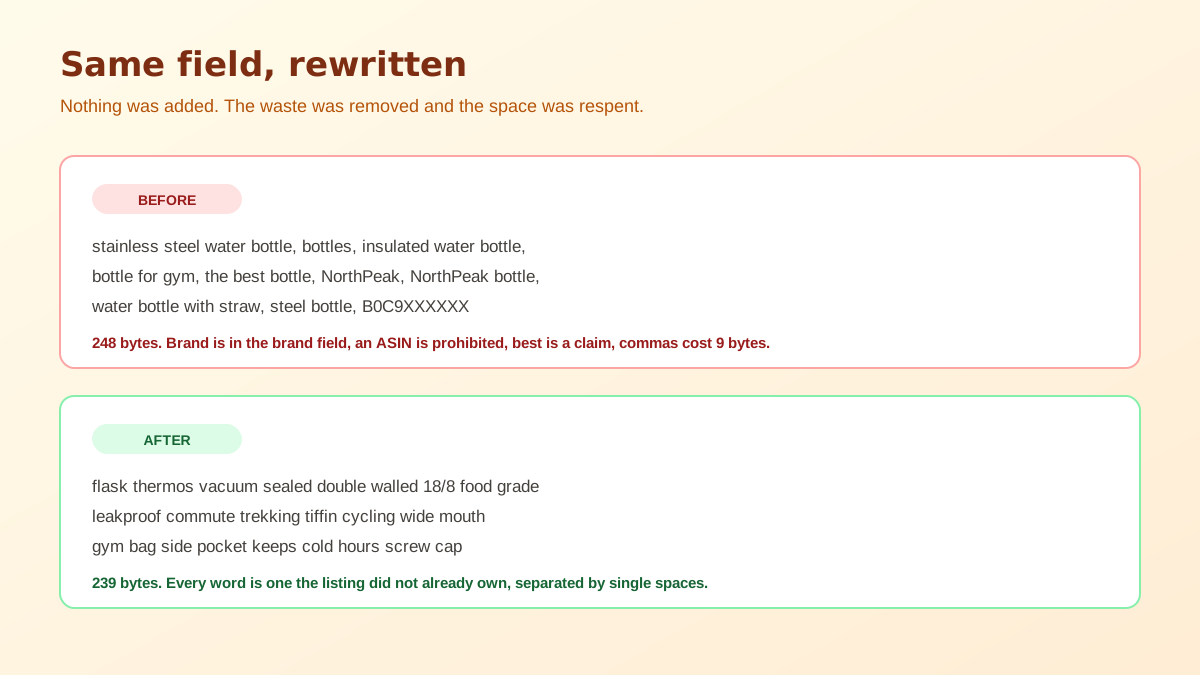
Do that once and the difference in what a set of amazon backend search terms contains is usually dramatic. Then verify rather than assume: search the exact new phrase together with the ASIN in the Amazon search box, and a result means the term is now attached to the record while silence means it is not. Give the change a day or two before testing, since the field is not reindexed the instant you press save, and if nothing at all indexes it is worth checking the failure modes in the guide to backend keywords not indexing.
Keep the expectation proportionate. Amazon backend search terms decide which queries can retrieve you, not which position you take once retrieved, and those are separate problems with separate levers. A term newly attached to a listing that converts badly will surface once and then quietly settle far down the results, which is the pattern described in the piece on being indexed but not ranking. Retrieval is upstream of everything, which is why the field is worth ten careful minutes even though it is invisible.
The other half of retrieval is what happens after the impression, and that is decided by the image before it is decided by anything you wrote. A shopper reaching you through a newly indexed term has no brand familiarity and no reason to be patient, so the hero image carries the entire first judgement. Building a full set of compliant, consistent images without a shoot is what AI product photography is now genuinely good at, and it pairs naturally with keyword work because both are about being chosen rather than merely being found.
Bytes, and the distinction matters the moment you leave plain English. A standard Latin letter costs one byte, but accented characters, currency symbols and any non Latin script cost two or three each, so a field that counts as 240 characters in a text editor can be well past the limit as far as Amazon is concerned. Count in a byte counter, not a word processor.
The field stops being indexed. Amazon does not truncate at the boundary and keep the first part, so a field one byte over contributes nothing at all rather than contributing most of itself. This is the worst failure in the whole exercise because nothing in Seller Central reports it and the listing continues to look completely normal.
No. Single spaces are the recommended separator and commas simply consume bytes you could have spent on words. The same goes for semicolons and quotation marks. Quotation marks are worse than neutral, since wrapping a phrase in quotes restricts matching rather than strengthening it, and the field is read as a bag of terms in any case.
Not in the way it does in a title. Amazon recombines the individual words in the field into phrases, so writing a phrase in its natural order does not reserve it and writing it backwards does not break it. What that means practically is that every duplicated word is pure waste, because the second copy adds no combination the first copy did not already allow.
No. Indexing considers the whole record, so a word already present in the title, the bullets, the brand or the description is attached to the listing whether or not it appears again in the hidden field. Repeating it buys nothing and costs bytes, which is where most of the wasted space in a typical field goes.
Competitor brand names and other trademarked terms you do not own, ASINs, subjective claims such as best or cheapest, temporary statements such as new or on sale, and abusive or misleading terms. These are policy violations rather than wasted space, and they can put the listing at risk of suppression rather than simply failing to help it.
ListingRVA AI now works inside Claude. Connect your workspace and ask Claude to generate listing copy and publish product images to your store, without leaving your editor. See the Claude connector →
Comments
No comments yet, be the first.
Leave a comment