
Shopify Collection Page SEO: When Collections Eat Your Product Pages
August 4, 2026 · 8 min read · by Aashirvad Kumar
Your credits refresh every month for as long as ListingRVA AI exists. No renewals, no annual increases, nothing to cancel.
Available on select plans. No renewals, ever.
August 4, 2026 · 8 min read · by Aashirvad Kumar
Search Console shows the collection page pulling impressions for a term you wrote a product page for. The product page gets a handful of impressions on the same query and sits at position 30. A week later they swap, then swap back, and neither one ever settles into the top ten. This is the most common failure mode in shopify collection page seo, and it is not caused by weak content on either URL. It is caused by two URLs applying for the same job.
Google will pick one page per query in almost every case. When your store gives it two candidates that are equally plausible, it keeps re-evaluating rather than committing, and the ranking you get is the average of two half-signals instead of the full strength of one. The fix is not more words on either page. It is deciding, explicitly, which template owns which kind of query.
A Shopify collection page starts with structural advantages that no individual product page can match. It sits closer to the home page in the link graph, it is usually linked from the main navigation on every single page of the store, and it accumulates internal links from every product that belongs to it. It also carries more text-adjacent signal than people assume, because every product title in the grid contributes topical vocabulary to the page.
So when a collection and a product both aim at the same phrase, the collection normally takes it. That would be fine if the collection converted as well, but it rarely does for a specific query. Someone searching for a precise item lands on a grid of thirty things, has to identify theirs, and a measurable share of them leave instead. You gained a ranking and lost the sale, which is the part that makes cannibalisation expensive rather than merely untidy.
Open the Search Console performance report, switch to the queries view, then filter to one query and look at the pages tab. Healthy pages look boring: one URL takes almost all the impressions for a query and holds a steady average position. Cannibalisation looks unstable. Two URLs share the impressions, the split moves week to week, and average position for both hovers in the teens or twenties without improving no matter what you publish.
Be careful not to over-diagnose. Two pages appearing for one query is not automatically a problem, because a query with mixed intent can legitimately support both a browsing result and a specific result. The signal that matters is instability over time combined with a ceiling neither page breaks. If one page consistently ranks and the other occasionally appears at position 60, nothing is wrong and nothing needs fixing.
The other symptom worth checking is which URL Google actually chose to index. Use the URL inspection tool on the product page and read the Google-selected canonical. If Google is reporting a different canonical than the one your theme emits, the two pages are not just competing, they are being treated as near-duplicates, which is a much deeper problem than intent overlap and is covered in the wrong Shopify URL indexed walkthrough.
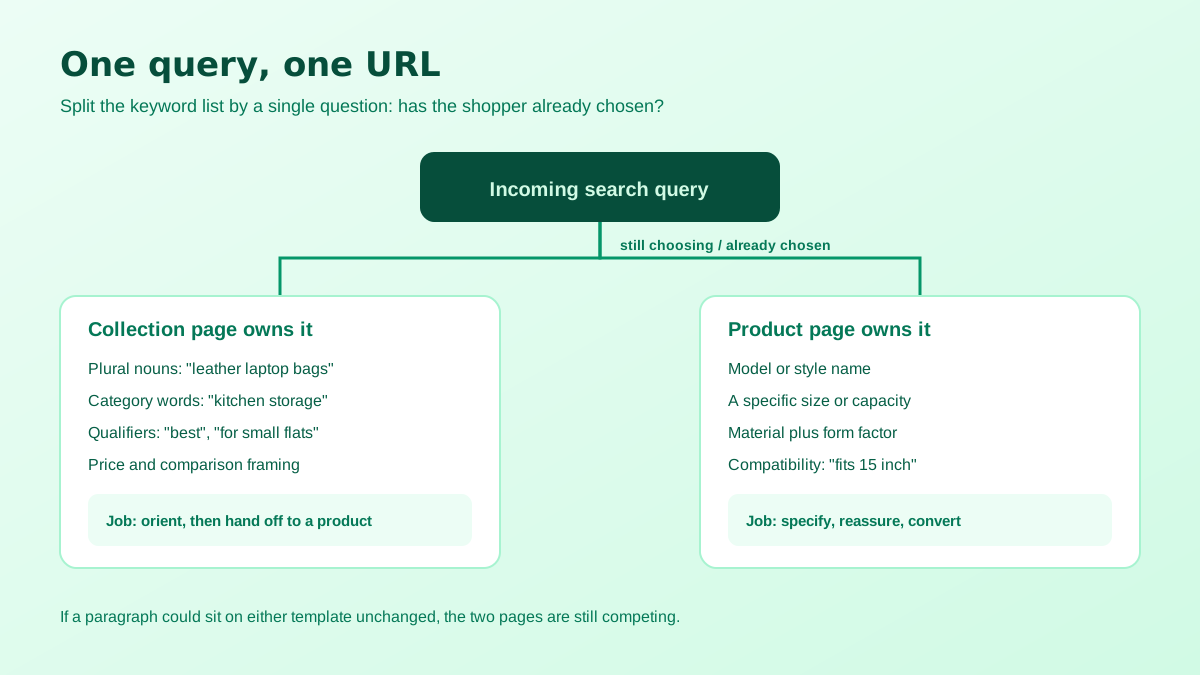
Split your keyword list along a single line: has the searcher already chosen the product, or are they still choosing? Plural nouns, category words, comparative and qualifier phrasing such as best, cheap, for small kitchens, under a certain price: all of that is still-choosing language and belongs to the collection. A model name, a specific size, a material plus a form factor, a compatibility phrase: that is already-chosen language and belongs to the product page.
Once the split exists, enforce it in the copy. The collection title tag, H1 and opening paragraph should use the browsing phrase and should not repeat any single product's exact name pattern. The product title tag and H1 should carry the specific attributes and should avoid the bare category phrase on its own. Most stores get this wrong in the same direction: every product page opens with the category name because the theme puts it there, which hands Google forty pages that all look like weak versions of the collection.
The internal links matter as much as the on-page text. If every product in the grid is linked with the same anchor as the collection itself, you are telling Google that the pages are interchangeable. Link products from the collection using their distinguishing attributes, and link back to the collection from product pages with the browsing phrase, so each anchor reinforces one page rather than blurring both. That single change often resolves the swapping within a crawl cycle or two.
Then there is the text that only the product page can own. A collection cannot describe fit, weight, what is in the box, what the material feels like after six months, or which of two variants suits which use case. That is the material that makes a product page win a specific query on merit, and it is also the material most stores are missing because writing it forty times is tedious. Generating a first draft per SKU from the product data with a Shopify product description generator removes the excuse, and the edit pass afterwards is far quicker than writing from nothing.
Keep the two texts structurally different as well as topically different. A collection page reads best as orientation: what is in this category, how the options differ, what to consider before choosing. A product page reads best as specification and reassurance. If you can swap paragraphs between the two templates without anything sounding odd, they are still competing, and the wider argument for writing them differently is in the ecommerce listing copy guide.
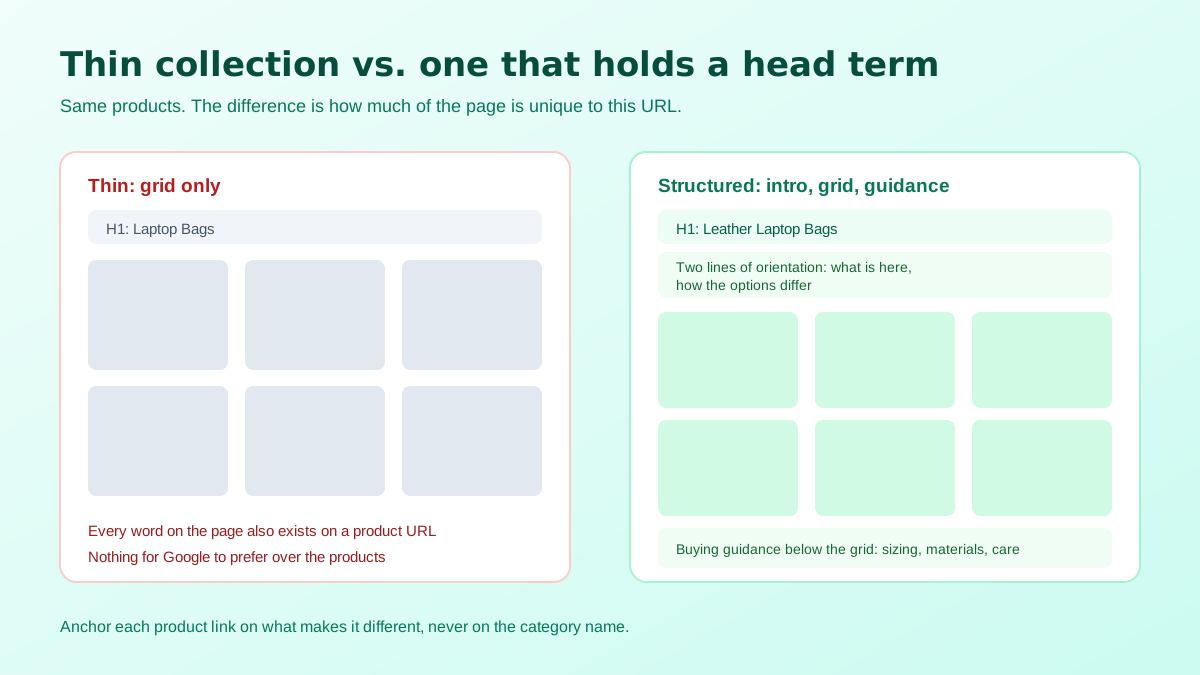
One more thing worth deciding deliberately is how many collections you actually want indexed. Stores accumulate them: one per tag, one per campaign, one per supplier, several created by apps. Each one that exists purely to power a filter or a menu is another candidate competing for the same terms, and thin collections built around a single keyword rarely hold a ranking anyway because they offer nothing to choose between. Pick the collections that map to real buying categories, invest in those, and keep the rest out of the index rather than letting them dilute the set.
Shopify makes every product reachable at two paths: the plain product URL, and a longer one that includes the collection handle before the product handle. The platform sets the canonical on both to the plain product URL, so the duplication is handled by default. What is not handled is your own linking. Themes and apps frequently emit the long version, which means crawlers spend requests on URLs that only ever resolve back to the short one, and any link equity you place on them takes a detour.
Faceted navigation is the second source. Sorting and tag filtering append parameters that generate an effectively unlimited number of collection variants, and Shopify's default robots file blocks the common sort and filter patterns for exactly this reason. If you have edited that file, or if an app generates filtered URLs in a pattern the defaults do not cover, check that those variants are not being crawled and indexed as competitors to the clean collection URL.
That last point is the one most often skipped and the easiest to see. A collection grid where each tile was shot differently reads as a marketplace of unrelated sellers rather than a brand, and it suppresses click-through from the grid into the products, which is the behaviour signal you most need on a browsing page. Consistent tiles are a production problem rather than a design problem, and restaging existing photography into one uniform look is one of the practical uses of AI product photography in an established catalogue. The dimensions that keep those tiles sharp are set out in the Shopify product image specs reference.
Done properly, shopify collection page seo stops being a competition between your own URLs and becomes a funnel: the collection catches the broad query and hands the visitor to the product page that answers their specific one. It is also increasingly what generative results reward, because a page that clearly states what a category contains and how the options differ is straightforward to summarise, a point developed further in the Google AI Overviews SEO guide.
Whichever one answers the query better. Plural, comparative and category phrasing belongs to the collection because the searcher still wants to choose. Singular queries with a model name, a size or a material belong to the product page because the searcher has already chosen. Assign every keyword to one template and write the other one so it cannot compete.
Open the Search Console performance report, filter by the query, and look at the pages that received impressions for it. Cannibalisation looks like two or more URLs swapping positions for the same query across weeks, with neither one holding a stable rank. A single URL that consistently ranks is not cannibalisation even if other pages occasionally appear.
Yes. A product is reachable both at the plain product path and at the longer path that includes the collection handle. Shopify sets the canonical on both to the plain product URL, so the duplication is handled, but your internal links and any sitemaps you generate should still point at the canonical version so crawl budget is not spent on the longer path.
A short orienting paragraph above the grid and the longer buying guidance below it. Pushing a full essay above the products delays the thing the visitor came for and hurts engagement, while putting everything below means the page opens with no unique text at all. Two blocks with different jobs beats one block in either position.
Enough that the collection reads as a real category, which usually means at least eight to twelve items on the first page. Very thin collections built for a single keyword tend not to hold rankings because they offer no choice, and very long infinite-scroll collections hide most of the inventory from crawlers entirely.
On every collection you want to rank, yes. A collection whose only text is its title and a product grid is largely made of content that already exists on other URLs. If you cannot write anything genuinely useful about a collection, that is a strong signal it should not be a separate indexable page at all.
ListingRVA AI now works inside Claude. Connect your workspace and ask Claude to generate listing copy and publish product images to your store, without leaving your editor. See the Claude connector →
Comments
No comments yet, be the first.
Leave a comment