
Ghost-Mannequin Product Photography: The Invisible Mannequin Look
June 26, 2026 · 8 min read · by Aashirvad Kumar
Your credits refresh every month for as long as ListingRVA AI exists. No renewals, no annual increases, nothing to cancel.
Available on select plans. No renewals, ever.
June 26, 2026 · 8 min read · by Aashirvad Kumar
Open almost any clothing catalog on Amazon, Zalando or a brand's own store and you will see it: a shirt that holds the exact shape of a body with nobody inside it. The collar stands, the sleeves fill out, the hem sits where a waist would be, and yet there is no model and no mannequin. That is ghost-mannequin photography, sometimes called the invisible mannequin or hollow-man effect, and it has quietly become the default look for apparel that needs to scale across hundreds of SKUs.
This is a deep dive into that one technique: what it is, why apparel brands lean on it, how it has traditionally been made the hard way, and how AI product photography now produces the same hollow-garment look from a single flat or on-hanger photo without a studio.
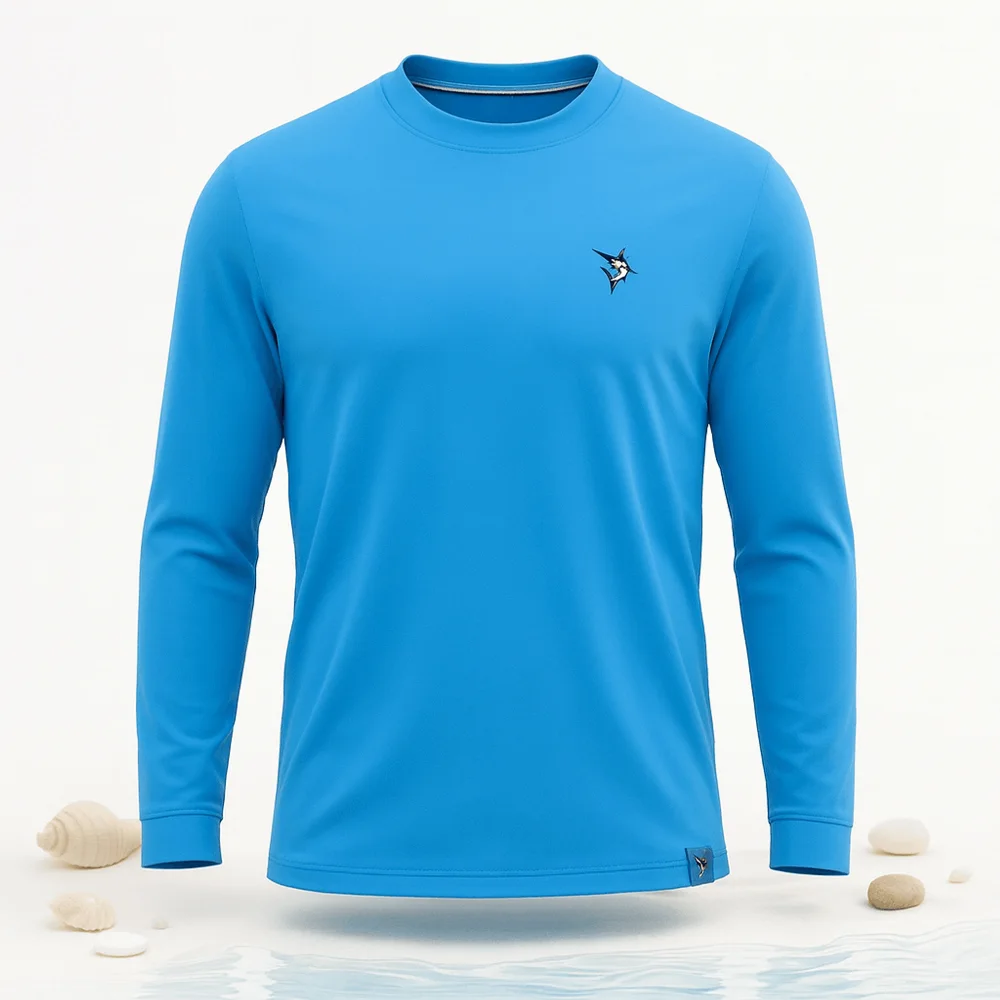
Ghost-mannequin photography shows a garment filled out into a full three-dimensional body shape, with the mannequin or model edited out so the clothing appears to float in the pose of an invisible wearer. The shoulders have width, the chest has volume, the collar opens to reveal a hint of the inner back neckline. The buyer reads the cut and fit instantly, but the only thing in the frame is the product itself.
That combination is the whole appeal. Unlike a garment on a hanger or crumpled in a flat-lay, the ghost-mannequin shows true shape and structure. Unlike an on-model shot, there is no face, no skin tone, no body type and no styling that could distract from the piece or accidentally signal who the brand is or is not for. It is shape without a person, which is exactly what a clean catalog image needs to be. The product image conversion statistics put a number on how much of that decision the images are really carrying.
Three reasons make ghost-mannequin the workhorse format for clothing catalogs:
For a brand with a deep catalog, that consistency is the real prize. A storefront where every product floats in the same neutral shape looks deliberate and premium; a storefront stitched together from mismatched shoots looks improvised.
None of these formats is strictly better. Each answers a different buyer question, and the smart move is knowing when each one wins:
In practice many apparel listings lead with a clean ghost-mannequin main image to earn the click, then use on-model shots deeper in the gallery to prove fit. The ghost-mannequin sets the neutral, trustworthy first impression; the on-model shots answer the fit question that closes the order. Amazon draws those lines in different places, which the Amazon image requirements guide spells out field by field.
The classic ghost-mannequin effect is not a single photo. It is a composite. The standard workflow goes like this: dress the garment on a physical mannequin and light it, shoot the main exterior frame, then remove the garment and shoot the inner back neckline or collar separately on a smaller form. An editor then opens both frames in Photoshop, masks out the mannequin, and stitches the inner-collar shot into the hollow neckline so the inside looks real where the body would have been.
Done well it looks flawless. The problem is the cost per SKU. Every garment needs the mannequin time, at least two careful exposures, and then ten to thirty minutes of skilled compositing and cleanup. Multiply that by a catalog of hundreds of styles and several colorways each, and ghost-mannequin becomes one of the slowest and most expensive line items in an apparel operation. Reshoots for a new drop mean the whole pipeline runs again.
This is where AI changes the math. Instead of a mannequin, two exposures and manual compositing, you start with a single photo of the garment, a flat-lay or an on-hanger shot, and the AI renders the hollow-garment or clean on-form look directly. It builds the body shape the garment would hold, opens out the collar, and removes any hanger or surface, producing the invisible-mannequin result in one step.
The part that matters most for apparel is fidelity. A ghost-mannequin image is useless if the print shifts, the logo smudges or the knit changes texture, because the entire point is to show the buyer the exact piece they will receive. ListingRVA AI is built to preserve what you give it: it reads your real garment photo and keeps the fabric, the print, the color and the label intact while it forms the shape and cleans the background. It never invents a different garment, and it never fabricates on-image text, badges or claims.
The reason ghost-mannequin exists at scale is consistency, so the AI approach has to honor that. The strongest workflow is to feed source photos that are themselves consistent: same framing, same orientation, garment laid flat and squared up. When the inputs are uniform, the generated set comes out uniform, every product holding the same body shape on the same clean background. When you are still choosing between ghost-mannequin, on-model and flat-lay for a whole range, the clothing product photography guide compares all three side by side.
That uniformity is also what lets a brand add a new style or a new colorway later without breaking the catalog. You generate the new piece in the same setup, it drops into the grid, and the storefront still reads as one continuous shoot rather than a patchwork. For brands shipping frequent drops, that is the difference between a catalog that stays coherent and one that drifts over time.
Ghost-mannequin and marketplace rules are a natural fit. Amazon and Flipkart want a main image that is a clean product hero on a pure white background, garment centered and filling the frame, with no model, no props, no watermark and no extra text. A hollow-garment shot on white checks every one of those boxes: it shows the product clearly, it has no person in it, and it sits cleanly on white.
So the practical pattern is to generate a compliant white-background ghost-mannequin main image for the marketplace slot, then use richer on-model and lifestyle shots for the rest of the gallery where the rules relax. See AI Product Photography Pricing for the plan math, or the full AI Product Photography Software feature set. For the wider apparel picture beyond this one technique, the AI clothing product photography page covers on-model, flat-lay and colorways together.
A studio ghost-mannequin shoot is accurate and beautiful, but it is built on real time and real labor. Per garment you are paying for mannequin setup, multiple exposures and skilled compositing, which lands somewhere in the range of fifteen to forty dollars a piece once everything is counted, and far more for a full catalog with colorways and reshoots. The look is excellent; the throughput is the bottleneck.
AI does not make the studio obsolete for hero campaigns or hyper-precise reference work. What it does is collapse the per-SKU cost and time for the bulk of a catalog, bringing the same hollow-garment look to a few dollars per product and minutes instead of days. For most brands the right answer is both: studio for the marquee shots, AI for the long tail and the constant stream of new colorways that would otherwise never justify a shoot.
50 free credits, no credit card. Turn one flat or on-hanger photo into a clean hollow-garment hero.
Start free →Ghost-mannequin photography shows a garment holding a full 3D body shape with no visible model or mannequin. The clothing looks like it is worn by an invisible person, so the buyer sees the cut, collar and fit while the product stays the only thing in the frame.
The classic method uses a mannequin and at least two photos: one of the garment on the form and one of the inner back or collar shot separately. An editor then composites them in Photoshop, removing the mannequin and stitching the inside neckline in so the hollow looks real. It is accurate but slow and costly per SKU.
Yes. From a single flat or on-hanger photo the AI can render a clean hollow-garment or on-form look while preserving the real fabric, print, color and label, removing the need for a mannequin, a second collar shot and manual compositing. It never invents a different garment or fabricates on-image text.
Ghost-mannequin is the neutral, scalable hero that shows shape with no model and stays consistent across a catalog. On-model proves fit and drape on a body. Flat-lay is fastest and best for prints and pairings. Many listings lead with ghost-mannequin and add on-model for fit. The AI clothing product photography page covers all three.
A traditional ghost-mannequin shoot runs roughly fifteen to forty dollars per garment once you add the mannequin shots and Photoshop compositing, and far more for a full catalog. AI brings the same look to a few dollars per SKU in minutes, with consistent results across the whole range.
ListingRVA AI now works inside Claude. Connect your workspace and ask Claude to generate listing copy and publish product images to your store, without leaving your editor. See the Claude connector →
Comments
No comments yet, be the first.
Leave a comment