
Flipkart Listing Quality Score: What Actually Moves It
August 18, 2026 · 8 min read · by Aashirvad Kumar
Your credits refresh every month for as long as ListingRVA AI exists. No renewals, no annual increases, nothing to cancel.
Available on select plans. No renewals, ever.
August 18, 2026 · 8 min read · by Aashirvad Kumar
The listing is live, the product is real, the price is competitive, and Seller Hub still grades it poorly. So you rewrite the title with more keywords, upload two more photos, and drop the price by fifty rupees, and the flipkart listing quality score does not move. That is not a bug, and it is not a mystery either. Almost everything sellers reach for first is invisible to the thing doing the grading.
The grade is a completeness and compliance measure, not an opinion about your product. It is calculated from fields a machine can verify without a human looking: whether the attribute set for your vertical is filled, whether your images pass the format rules, whether the category mapping is right, and whether the vertical-specific requirements like a size chart are present. Once you see it that way, the list of things worth doing gets shorter and much more effective.
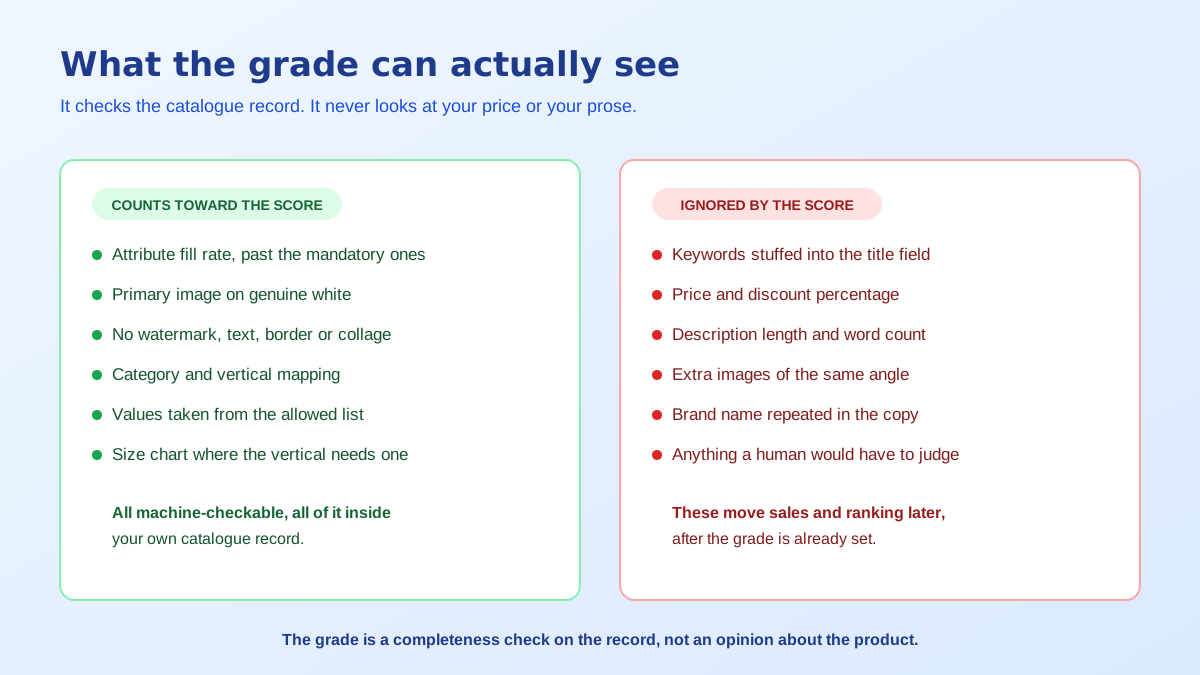
Every vertical on Flipkart has an attribute set attached to it, and that set is larger than the handful of fields the upload form insists on. A footwear listing wants outer material, sole material, closure type, occasion, pattern, ideal for, warranty and half a dozen more. A mixer grinder wants wattage, jar count, jar material, speed settings, warranty type and power requirement. The mandatory subset is what gets you published. The full set is what gets you graded.
That distinction explains the most common complaint in seller forums, which is a listing with every required field filled sitting on a poor grade. Nothing is wrong with the listing in the sense of being broken. It is simply thin, because the optional attributes that make up most of the set were left blank, and each blank is a filter your product silently drops out of. A buyer narrowing a category by material or capacity never sees you, and no amount of price movement changes that.
The second half of the grade is image compliance, and it is binary rather than gradual. The primary image needs a genuine white background with the product occupying most of the frame, no watermark, no logo overlay, no border, no promotional badge and no collage. The floor is 500 by 500 pixels, though shooting for 1500 or more on the short side is the real target because zoom depends on it. These checks are close cousins of the Amazon product image requirements, and a seller working both marketplaces can usually satisfy the stricter of the two once.
Titles come first on almost everyone's list, and in many verticals they are the least productive place to spend an hour. Flipkart composes the displayed title from your attribute values in a fixed pattern for those categories, so a carefully stuffed string you typed gets rebuilt into brand plus model plus key attributes regardless. The way to influence the title in that situation is to fill the attributes it draws from, correctly and in the platform's own vocabulary rather than yours.
Price is second, and it belongs to a different system entirely. Price competitiveness affects whether you win the buy box and how the ranking algorithm treats you, both of which are commercial signals measured after a shopper sees the product. Content quality is measured before that, on the catalogue record itself. Discounting a listing that is invisible on filtered browse pages just lowers the margin on the traffic you were already getting. The order of operations matters here: make the record complete first, then compete on price against the sellers you are finally appearing beside.
Description length is the third false lead. A longer paragraph does not register as higher quality, and a description padded with repeated brand mentions can read as spam to the review layer. What the description should carry is the specifics that do not fit into attributes: what is in the box, compatibility notes, care instructions, dimensions in the units your buyer thinks in. Writing that once per product family rather than per SKU is where a Flipkart listing content generator saves the most time.
Image rejection is the single most frequent reason a listing that looks finished carries a bad grade, and the reasons are dull rather than dramatic. Off-white backgrounds from shooting on a sheet of paper under a warm bulb. Product too small in the frame because nobody cropped. Props that are not part of the order sitting in the shot. Text or size badges burned into the corner. A lifestyle image submitted as the primary because it looked better on the seller's screen.
The fix is a template rather than a case-by-case correction. Decide the frame ratio, the background value, the product margin and the image order once, then apply it to everything you upload. A square frame with the product occupying roughly 85 percent of the width, on genuinely neutral white, is compliant on Flipkart and portable to every other marketplace you might list on later. Cleaning up an off-white or cluttered background afterwards takes seconds with a free background remover tool.
Secondary images have quieter rules and more upside. They are where scale, texture, in-use context and packaging live, and unlike the primary they are allowed to breathe. Most Indian marketplace listings stop at three near-identical angles, which wastes the slots that answer the questions the description never gets read for. Deciding the sequence deliberately matters as much as the count, and it is the same decision covered in the wider Flipkart versus Amazon comparison when a catalogue has to serve both.
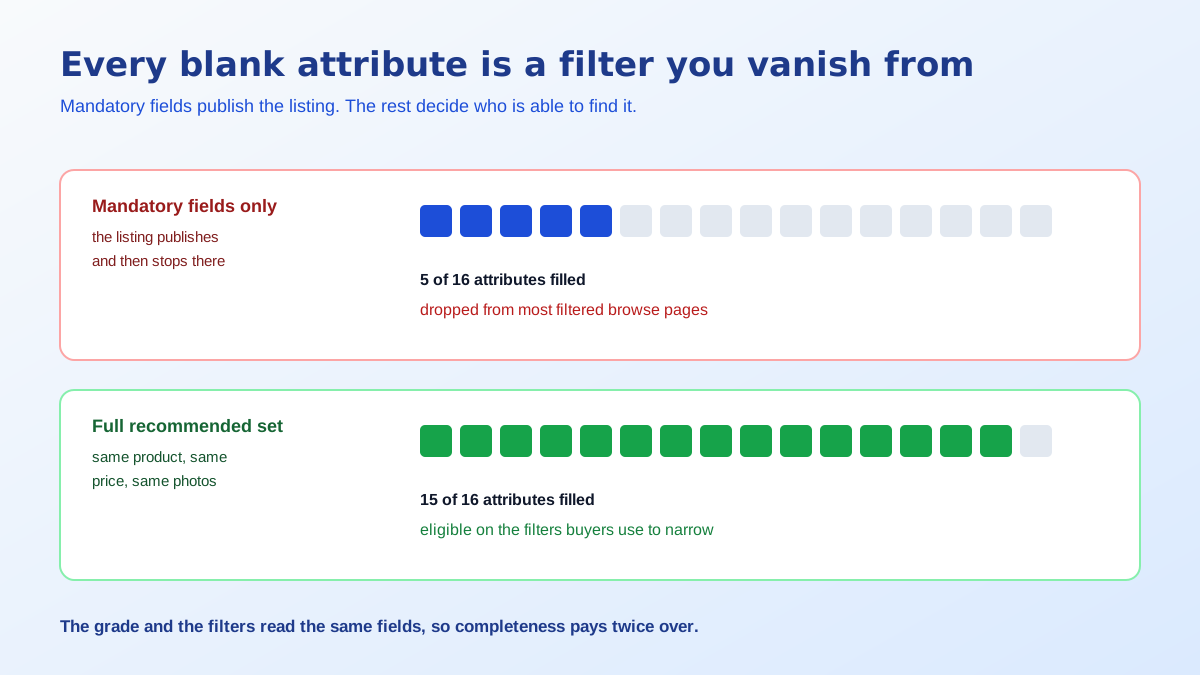
If you only do one thing, export the attribute template for your vertical and fill the columns you skipped. This is unglamorous work and it outperforms everything else, because attributes do three jobs at once: they feed the grade, they populate the filters buyers use to narrow a category, and in many verticals they compose the title and the specification table that shoppers actually read before buying.
Fill them in Flipkart's vocabulary rather than your own. If the allowed values for material include stainless steel, do not type SS or Steel, because a value outside the controlled list is treated as unfilled even though the cell is not empty. Use the units the template asks for. Keep model numbers consistent across variants of the same product family so they group properly. Structured, machine-readable values are also what AI shopping surfaces read now, which is the argument running through this guide to product data for AI search.
There is a practical order to the work when a catalogue is already large. Start with the products that already get traffic, because a filter exclusion costs you most where demand exists. Within those, fill the attributes buyers actually filter on in that category before the descriptive ones nobody selects: size, capacity, material and colour before occasion or pattern. Then work outward to the long tail. Sellers who do it the other way round, alphabetically or by upload date, spend the same hours and see far less movement in either the grade or the sessions.
Doing this listing by listing is how sellers burn a week and improve forty products. The leverage is in fixing the source, so the next hundred uploads are compliant before they ever reach Seller Hub. Build the catalogue template properly and the flipkart listing quality score becomes a thing you pass by default instead of a thing you chase after each upload.
Run a listing through that and the grade takes care of itself, because there is nothing left for the checker to mark down. It also removes the loop most sellers get stuck in, where a rejection is fixed on one SKU and reappears on the next twenty, since the defect lived in the template rather than in the product. The flipkart listing quality score is a report on your catalogue process, and process is a much easier thing to fix than a hundred individual listings.
It is a grade Seller Hub applies to how complete and compliant a listing is, not a judgement of how good the product is. It looks at things a machine can verify: whether mandatory and recommended attributes are filled, whether the images meet the format rules, whether the category is right, and whether required content like a size chart exists for that vertical.
Because mandatory fields only get a listing published. The score keeps counting past that point, into the recommended and optional attributes for the vertical, which are often the majority of the attribute set. A listing with every mandatory field filled and every optional one blank is a published listing with a poor score, and that is the single most common version of this complaint.
Not directly. Ranking is driven by sales velocity, conversion, ratings, price competitiveness and fulfilment reliability. What the score does is decide whether your product is eligible to appear at all for a given filter or query, because unfilled attributes remove you from filtered browse pages. It gates visibility rather than granting position.
The floor is 500 by 500 pixels, and shooting for at least 1500 pixels on the shorter side is the practical target because that is what makes zoom usable. The primary image needs a clean white background with the product filling most of the frame, and no watermark, logo, border, promotional text or collage anywhere in it.
Less than sellers expect, because in many verticals Flipkart composes the displayed title from your attribute values rather than using your typed string verbatim. Stuffing keywords into a title field that gets rebuilt is wasted effort. Filling the attributes that feed the title correctly is the version of the same work that actually lands.
Not at the moment you save. The catalogue update has to be processed and the images have to clear the quality check before the grade is recalculated, so a listing can show the old score for a while after the fix. Check back once Seller Hub reports the update as processed rather than refreshing the page immediately.
ListingRVA AI now works inside Claude. Connect your workspace and ask Claude to generate listing copy and publish product images to your store, without leaving your editor. See the Claude connector →
Comments
No comments yet, be the first.
Leave a comment