
Flipkart Catalog Rejected? Decode the Reason and Fix It Once
August 18, 2026 · 8 min read · by Aashirvad Kumar
Your credits refresh every month for as long as ListingRVA AI exists. No renewals, no annual increases, nothing to cancel.
Available on select plans. No renewals, ever.
August 18, 2026 · 8 min read · by Aashirvad Kumar
You upload 180 SKUs, wait for processing, and download an error report that marks the Flipkart catalog rejected against ninety of them. The reasons are terse. Image quality check failed. Mandatory attribute missing. Invalid value. Duplicate product. None of them tell you which image, which attribute or which of the four near-identical variants triggered the match, so the obvious response is to open the rows one by one and start guessing.
That approach works and it does not scale, because the same errors come back on the next batch. Rejections are not random events attached to individual products, they are symptoms of a defect that lives in the file you generated the upload from. Sort them into families first, repair the source of each family once, and the report on your next upload is mostly empty rather than mostly red.
Think about where the rejected data was actually produced. The images came out of one shoot with one background and one crop habit. The attribute columns came out of one spreadsheet that was built by copying last quarter's file. The description came out of one block of text that gets reused across a product family with the model number swapped. Three sources, and every rejected row is downstream of one of them.
Fix a listing and you have fixed an output. The recipe that produced it is untouched, so the next twenty products shot on the same paper background under the same warm bulb fail the same check, and the next batch of rows inherits the same unit mismatch in the same column. This is why sellers describe the process as whack-a-mole. The mole is upstream and nobody is looking at it.
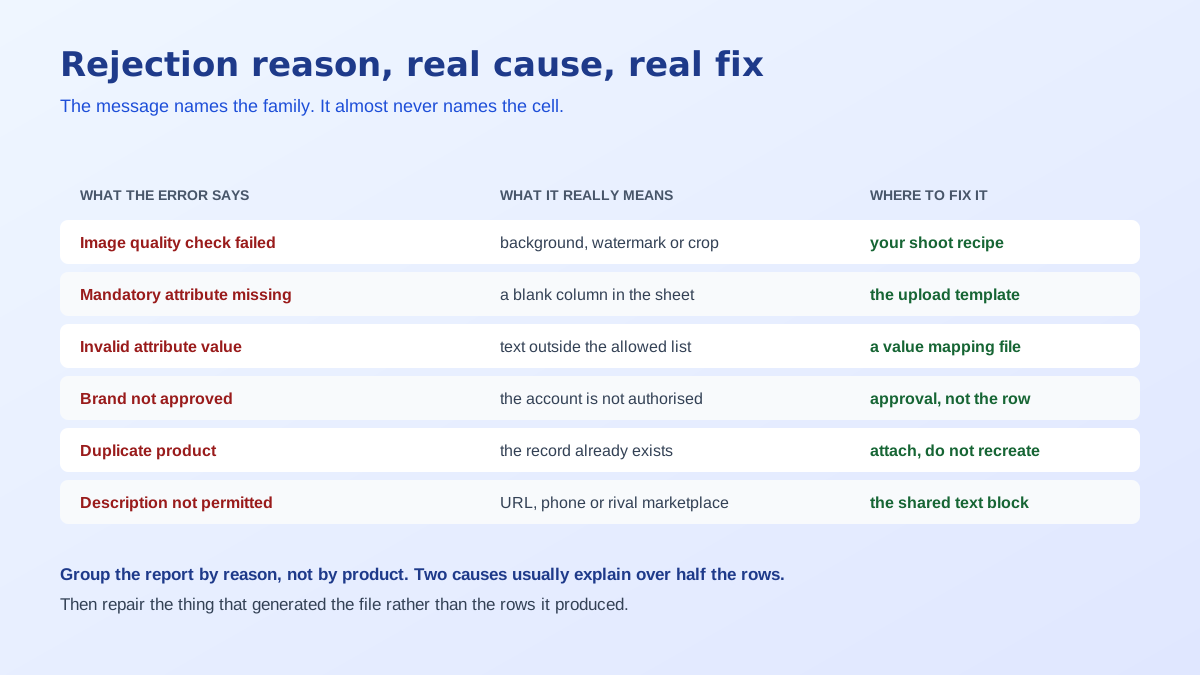
The practical method is to take the error report, group the rows by reason rather than by product, and count. Six or seven distinct causes will explain nearly all of it, and usually two of them explain more than half. Work those two first. Grouping this way also stops you treating a Flipkart catalog rejected row as an emergency, because the row is only ever an instance of a pattern you have already seen. That is also the point at which a repeatable content process starts paying for itself, which is the argument behind treating listings as generated artefacts rather than hand-written ones, as the Flipkart product listing guide sets out.
Image quality check failure is the largest family for most sellers, and it is mechanical rather than aesthetic. The check looks for a background that is not genuinely white, a watermark or logo or size badge burned into the frame, resolution below the floor of 500 by 500 pixels, a product that occupies too little of the frame, props or a second product in the shot, and visible blur. A photograph can be lovely and still fail every one of these, which is why the rejection feels arbitrary the first time.
Attribute errors are the second family and split into two very different problems. A missing mandatory attribute is simple: the column was blank. An invalid value is subtler, because the cell is full and still wrong. Type SS where the allowed list says Stainless Steel, or centimetres where the template wants millimetres, or a colour name outside the controlled vocabulary, and the value is treated as unusable. Sellers lose hours to this one because the spreadsheet looks complete.
Brand approval is the third and it is not a content error at all. If the brand on the listing is not authorised against your seller account, no amount of editing will clear it, because the block sits on the account and brand pairing rather than on the row. Either you get authorisation on file, or you list under a brand you own, or you use the generic option where the category allows it. Recognising this family early saves a day of pointless resubmissions.
Duplicate rejections come from Flipkart mapping a product identity once and expecting subsequent sellers to attach to the existing record. If your submission matches an existing product on identifiers or key attributes, it is refused rather than merged. The correct move is to list against the existing product. Sellers who instead reword the title until the match check stops firing end up with a second record for the same item, which splits reviews and hurts both listings.
Category mapping errors are quieter and more damaging. Put a product in the wrong vertical and you inherit that vertical's attribute set, so the mandatory columns you are being asked for do not describe what you sell, and the listing fails validation for fields that should never have applied. If the required attributes look absurd for your product, suspect the category before you suspect the template. Compliance fields sit alongside this: country of origin, manufacturer or importer details and net quantity are required for Indian ecommerce listings, and a blank in any of them fails the row on its own.
The last family is content. Descriptions are rejected for contact details, web addresses, names of other marketplaces, promotional claims about discounts or delivery, and unverifiable superlatives. Because a description block is normally reused across a product family, one banned phrase in the shared text fails every product that inherits it. Writing that block to the platform's rules once, in the structure buyers actually read, is covered in this listing copy SEO guide.
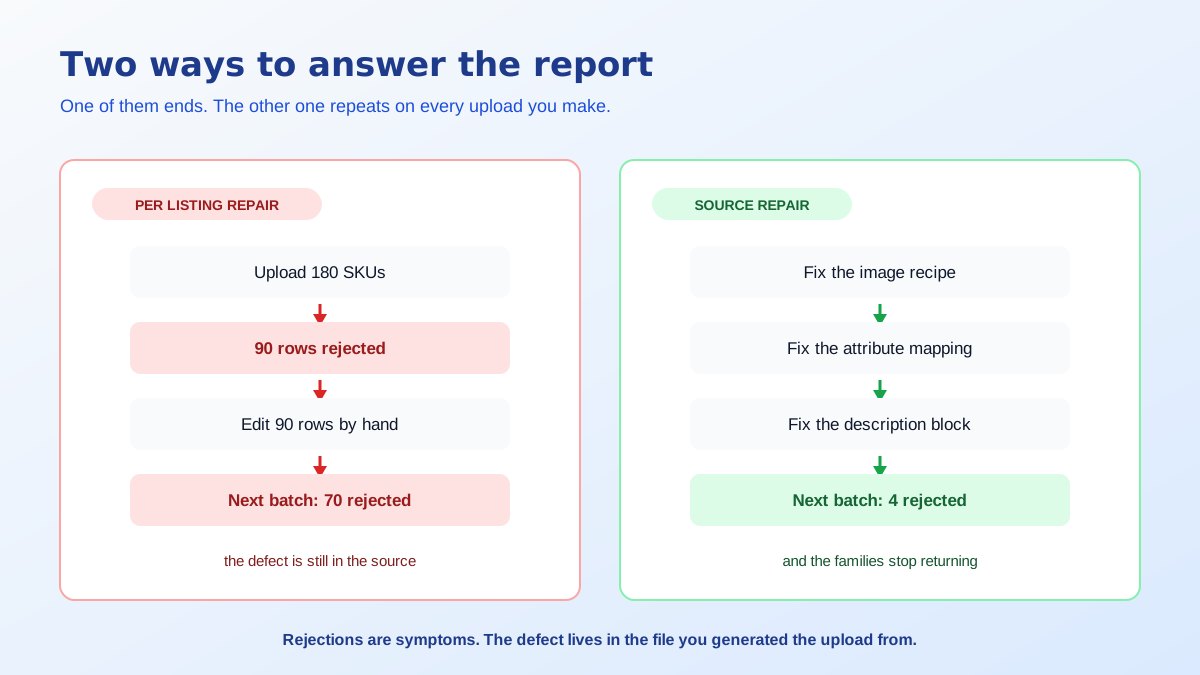
Images are the easiest family to fix permanently because the defect is a recipe rather than a judgement. Set the frame ratio, the background value, the product margin and the export size once, and apply that recipe to everything. Square frame, product at roughly 85 percent of the width, genuine white behind it, at least 1500 pixels on the short side so zoom works. Off-white paper and cluttered edges are cheap to correct after the fact with a background remover for listings.
Attributes need a mapping file rather than more careful typing. Keep one sheet per vertical that maps your internal values to Flipkart's allowed values, so stainless steel always exports as the exact string the platform expects and units are converted before upload rather than after rejection. Descriptions need a template with the banned patterns stripped at generation time. That combination is where a Flipkart listing generator earns its place, because the compliance rules live in the generator instead of in somebody's memory.
There is one more source worth auditing, which is the handoff between whoever shoots and whoever uploads. A surprising share of a Flipkart catalog rejected batch traces back to the wrong file being picked: the retouched version that never got exported, a lifestyle frame promoted to primary because it looked better in the folder, or last season's spreadsheet reused with two columns still holding the previous product's values. Naming files by SKU and locking the primary image slot to a single fixed filename removes an entire class of error that has nothing to do with Flipkart's rules and everything to do with yours.
Everything above is cheaper to catch before submission than after, since a rejected batch costs you the processing time twice and delays the listings going live by days. Run the file through a short check before it leaves your machine and most of the report disappears.
Sellers who add that step usually find the failure rate drops from most of the batch to a handful of genuine edge cases, and the edge cases are the interesting ones worth a human minute each. The image family in particular has its own set of measurable thresholds that are worth learning properly, and the Flipkart image QC gate is where most of that detail sits.
A Flipkart catalog rejected report is not a verdict on your products. It is a diagnostic on the process that produced the file, and it is unusually honest feedback because it is generated mechanically and arrives in bulk. Read it as a grouped list of causes rather than a queue of tasks, fix the three sources that generate almost all of it, and the next upload behaves completely differently.
Almost every rejection falls into one of six families: an image that fails the quality check, a missing or invalid attribute value, a brand that is not approved for your seller account, a duplicate of an existing product, a category or compliance field problem, or content in the description that is not permitted. The wording on the error tells you the family, rarely the specific cell.
It means an automated check found something measurable that breaks the format rules: a background that is not white, a watermark or text burned into the frame, resolution under the floor, a product that fills too little of the frame, props or a second product in the shot, or visible blur. It is not a judgement about whether the photo looks good.
Because the fix was applied to the output rather than the source. If the defect lives in your image recipe, your attribute template or your description block, correcting one listing leaves it intact for the next batch. Repair the template that generated the file and the whole family of errors stops returning on the following upload.
Only with authorisation on file for your seller account. Brand-related rejections are not content errors and cannot be fixed by editing a field, because the block is on the account and the brand pairing rather than on the listing. You need brand approval, or you list under a brand you own, or you list as generic where the category permits it.
Flipkart maps a product identity once and expects other sellers to attach to the existing record rather than create a second one. If your submission matches an existing product closely on identifiers or key attributes, it is refused as a duplicate. The correct move is to list against the existing product, not to change your title until the match check stops firing.
Contact details of any kind, web addresses, the names of other marketplaces, unverifiable superlatives, and promotional lines about discounts or delivery timelines. These are rejected consistently, and because most sellers reuse one description block across a family of products, a single banned phrase can fail an entire batch at once.
ListingRVA AI now works inside Claude. Connect your workspace and ask Claude to generate listing copy and publish product images to your store, without leaving your editor. See the Claude connector →
Comments
No comments yet, be the first.
Leave a comment