
Electronics Product Photography: Ports, Finish and Cable Clutter
July 7, 2026 · 8 min read · by Aashirvad Kumar
Your credits refresh every month for as long as ListingRVA AI exists. No renewals, no annual increases, nothing to cancel.
Available on select plans. No renewals, ever.
July 7, 2026 · 8 min read · by Aashirvad Kumar
Electronics is a category buyers scrutinise before they trust. They zoom into the port layout, read the finish on the aluminium, hunt for a scale reference, and want to see the gadget on a real desk or wrist before they commit. A floating packshot sells the shape and hides everything that closes the sale. The photos are the demo.
AI product photography gives you that demo without renting a studio. You photograph the device once, then generate a clean white-background hero, styled desk scenes, port and finish macros and in-use shots in minutes, on a tool that preserves your real finish and ports instead of inventing hardware the product does not have.
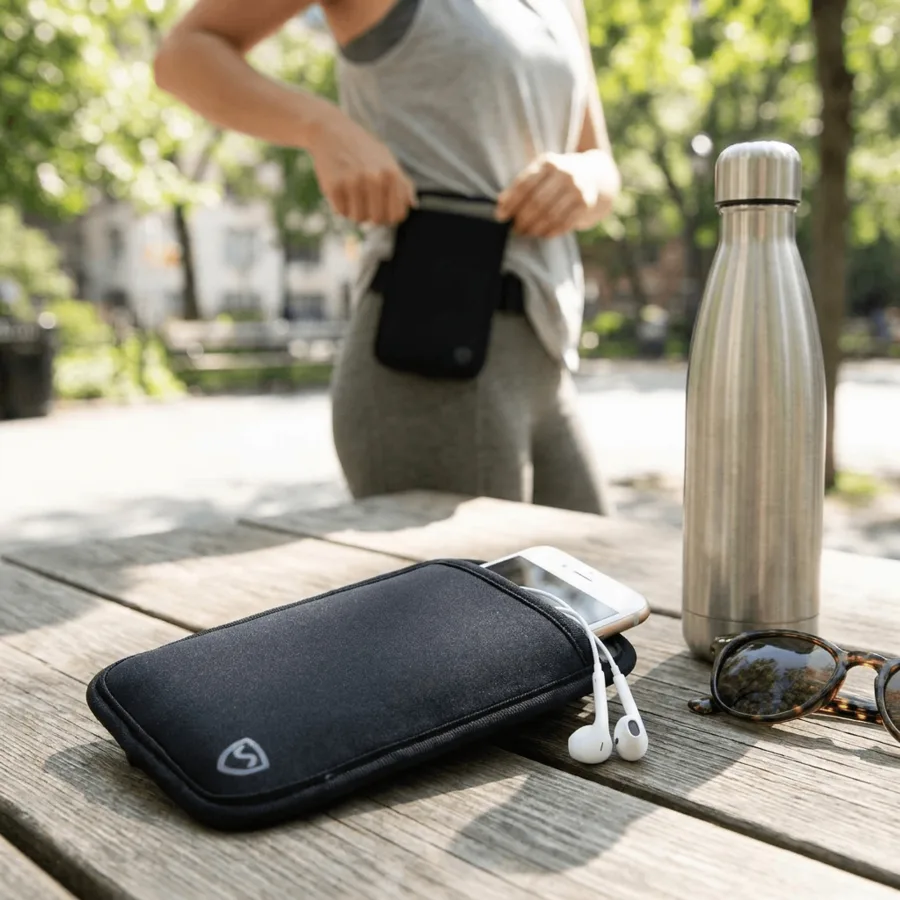
Two things make gadgets their own problem. First, detail truth. Tech is bought on the hardware: the port layout, the buttons, the brushed aluminium or matte finish, the exact colorway. If an image flattens those or hides a port, the buyer assumes the worst and moves on, or buys and returns when the real unit does not match. Good electronics product photography keeps the hardware honest while making it look precise and premium.
Second, glossy surfaces and reflections. Screens, glass and polished metal are the hardest things to light. A studio spends real time killing glare and controlling reflections; a phone snapshot fills the screen with the room. On top of that, small gadgets need a scale reference, because a buyer cannot judge the size of earbuds or a charger floating on white.
A strong tech listing is never one photo. It is a small set, each answering a different buyer question:

Most underperforming electronics listings share the same gaps. Fixing them is usually faster than a reshoot:
Before the creative choices, the main image has hard rules, and electronics listings break them more than most. On Amazon the main image must be the product alone on a pure white background, filling most of the frame, with no props, no inset text, no badges and no packaging. Plenty of tech sellers upload a busy hero full of callouts as the main image and quietly lose appeal in search or get the listing flagged. Save the desk scene, the callouts and the in-use shot for the secondary slots, where they do their real work.
The practical fix is to separate the jobs. The main image proves the product cleanly and passes the rule; the secondary images sell it with scale, ports, in-use and bundle shots. Generating both from one photo means you never have to choose between a compliant main image and a persuasive gallery. You get the full set and place each shot where it belongs, then check the exact pixel sizes against the Amazon image requirements before you upload.
Glossy screens and polished metal are what make tech hard to shoot at home. In a studio a photographer surrounds the product with diffused light and flags to control what the surface mirrors; on a kitchen table the screen reflects the ceiling, the window and the phone taking the picture. That one problem is why so many electronics listings look amateur next to the brands they compete with. Generating the scene instead of shooting it sidesteps it entirely: the tool renders clean, controlled light and a believable reflection without a tent, a boom or an hour of retouching, so the glass reads as glass and the metal reads as metal, not as a picture of your room.
The workflow is simple: upload one clear photo of the device, and the tool generates the full set. Because it reads your real product first, the aluminium, the ports, the buttons and the color stay exactly as they ship, so the catalog matches the unit in the box. From that one photo you get the white-background hero, the styled desk scene, the macro and the in-use shot, each exported at the right size for Amazon, Shopify and Etsy.
It also keeps a colorway range consistent. Generate every finish in the same light and angle so the lineup reads as one brand, then flow the images straight into AI product photography software with SEO listing copy and one-click publishing. Need help with the words too? Tighten the main image title with the free Amazon title generator and stack your listing against a competitor with the comparison chart generator. The one rule that never changes: the AI never invents specs or on-device text, and you should always review every image before you publish.
50 free credits, no credit card. White background, desk scene, macro and in-use styles included. Built for electronics and tech brands.
Start free →Yes. The AI reads your real product photo and preserves the exact aluminium, matte plastic, glass, port layout, buttons and color, then places the device on a clean background or a styled desk scene. Your real product stays the hero, never a generic stand-in.
A clean white-background hero for the marketplace main image, a styled desk or setup scene for context, a port and finish macro that answers the build-quality question, an in-use or on-device shot, and a what-is-in-the-box or bundle image so buyers see the full package before they buy.
Show the device in a hand, on a wrist, on a desk beside a laptop or plugged into a phone. A scale and in-use shot answers the size question that a floating packshot leaves open, which is the single biggest driver of size-related returns on tech.
A clean electronics shoot with controlled lighting, reflection management and retouching runs into the hundreds per SKU. AI brings the same set of images to a few dollars per SKU and minutes per product, with new colorways generated on demand. See pricing.
No. The AI never fabricates specs, model numbers or on-image text; it keeps your real device and finish. You add accurate copy yourself, and you should always review every image before publishing.
ListingRVA AI now works inside Claude. Connect your workspace and ask Claude to generate listing copy and publish product images to your store, without leaving your editor. See the Claude connector →
Comments
No comments yet, be the first.
Leave a comment