
Amazon Rewrote My Title: Why It Happens and How to Get It Back
July 30, 2026 · 8 min read · by Aashirvad Kumar
Your credits refresh every month for as long as ListingRVA AI exists. No renewals, no annual increases, nothing to cancel.
Available on select plans. No renewals, ever.
July 30, 2026 · 8 min read · by Aashirvad Kumar
You spent an afternoon on the title. You submitted it, the feed processed cleanly, and Manage Inventory showed the new value. Two days later the detail page is showing something else: your brand name, a chopped product type, and none of the qualifiers you were relying on. Amazon rewrote my title is one of the most common complaints in seller forums, and it is followed almost every time by the same discovery, which is that resubmitting the original value does not make it stick.
The reason resubmission fails is that this is not a bug. The title on a detail page is not a field you own outright, it is an output that Amazon assembles from several inputs, and your submission is only one of them. Once you know which input is beating yours, the fix is usually one specific change, and running the title back through amazon listing optimization software catches the same input conflicts before they reach the live page, rather than another round of edits.
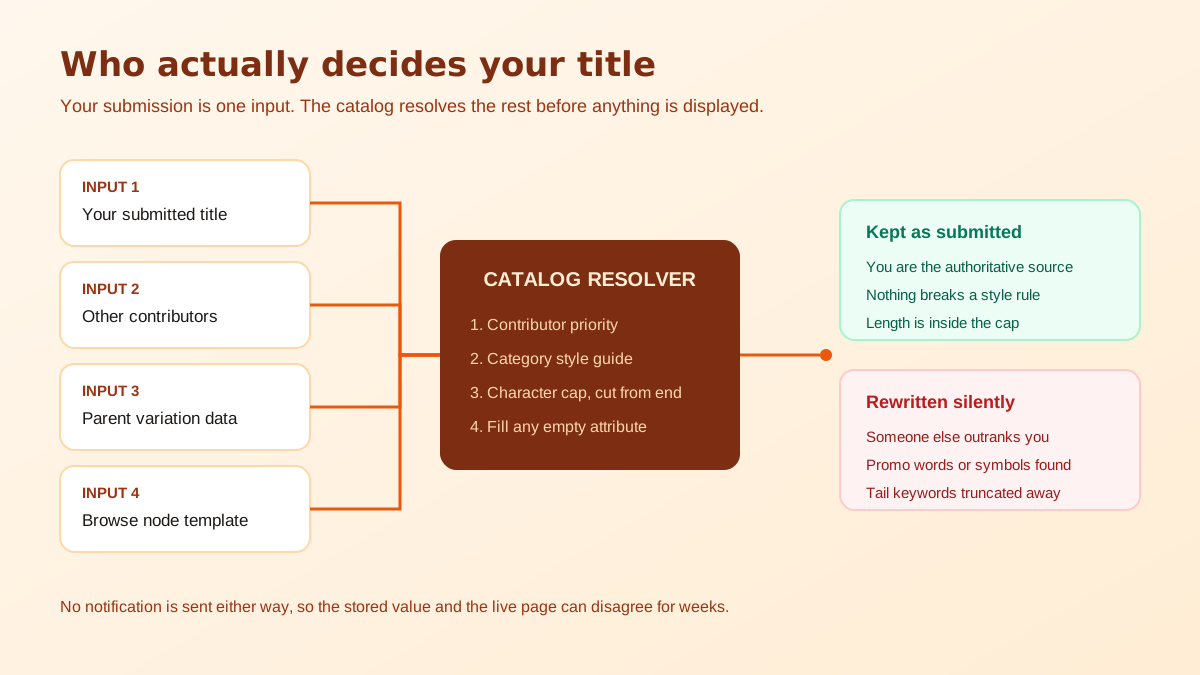
Amazon runs a single catalog, not a set of independent seller pages. An ASIN is a shared record, and several parties can contribute data to it: the brand owner, every merchant offering the item, and Amazon's own automated systems that normalise category data at scale. When two contributions disagree about the same attribute, the catalog does not show both. It resolves the conflict using an internal priority order and displays the winner, silently.
That is why the value in your seller account and the value on the storefront can disagree for weeks. Your submission was accepted, it is sitting in the record, and it simply is not the one being rendered. Before you change anything else, open the listing in Manage Inventory and compare the stored title against the live page character by character. Almost every seller who reports that Amazon rewrote my title finds the answer in that one comparison. If they differ, you have a contribution conflict. If they match and the page still looks wrong, you are looking at truncation or at a browse-node template, which are different problems with different fixes.
Contribution priority is the single biggest cause. A brand enrolled in Brand Registry generally outranks an unenrolled seller on the same ASIN, a vendor feed can outrank a third-party merchant, and where neither party has authority the catalog falls back on its own heuristics. If you are selling on an ASIN you did not create, or if your brand is not registered, your title is competing against someone else's and losing on a rule you cannot see.
The test is simple. Change one harmless word, wait for the feed to process, and watch the live page. If the page never moves, another source owns the field and no amount of editing on your side will change it. The route out is Brand Registry enrolment, which is also what gives you control over the images, the bullet points and the A+ modules, so the effort pays for itself well beyond this one field. Titles are the first thing to fix once you have that control, and the wider order of operations is laid out in the Amazon listing optimization playbook.
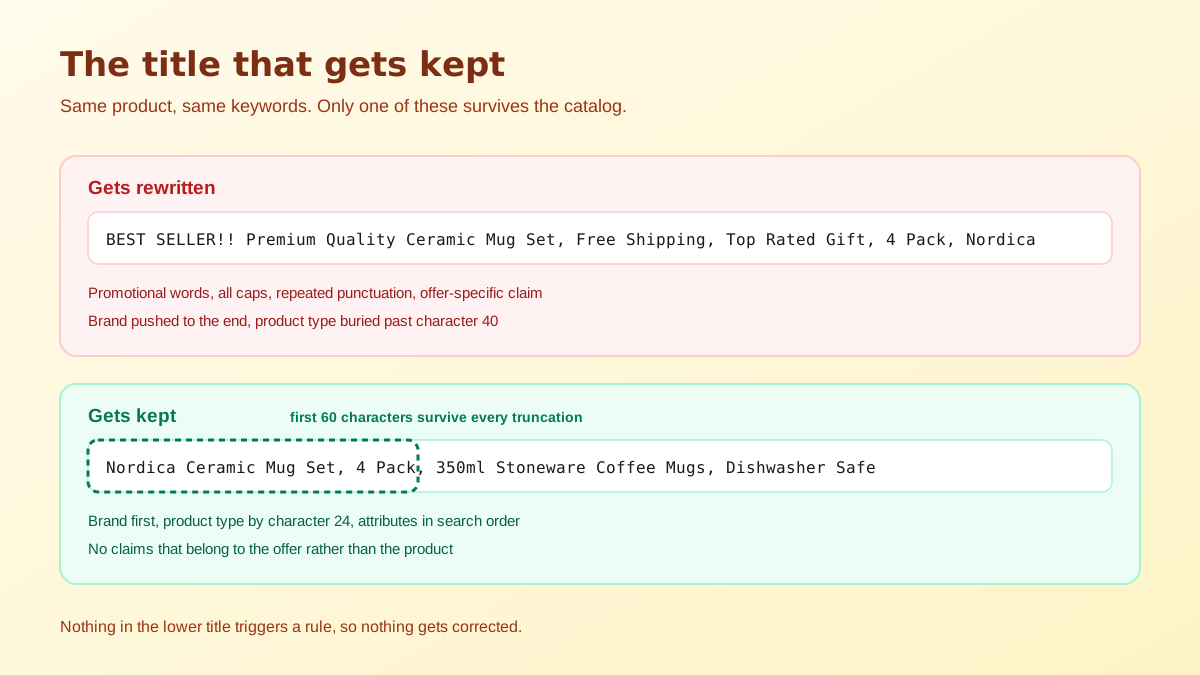
Every category has a style guide, and the automated systems enforce parts of it without asking. Promotional and subjective language is the classic trigger: best seller, top rated, free shipping, sale, hot deal, number one. Decorative symbols, emoji, all-caps words and repeated punctuation are treated the same way. So are seller-specific claims that cannot be true for every offer on a shared ASIN, such as shipping speed or warranty terms. If any of those appear in your submission, expect a correction and expect it to remove more than the offending phrase.
Length limits are category-specific, and they have tightened. A title that was accepted a year ago can be truncated today without any action from you, because the enforcement changed rather than the data. Truncation is not a neutral trim either: it cuts from the end, which is exactly where most sellers park their secondary keywords. Anything the catalog cuts stops being displayed, and the terms living in that tail lose their strongest signal. The current rules and the enforcement date are covered in the Amazon title character limit breakdown.
In a variation family, several attributes are inherited. If the parent record carries a title pattern and your child ASIN submits something structurally different, the family can normalise the child back towards the parent, appending or substituting the variation theme values such as size and colour. Sellers usually notice this as a title that is almost right but has a colour name bolted onto the end that they did not write, or a product type that matches a sibling rather than the item in hand.
When required attributes are missing, Amazon's systems will complete the record from whatever data they can find, including the product type, the brand field and the browse node template. A sparse listing invites that. The generated result is grammatically fine and commercially useless, because it describes a category rather than a product. This is the version of the problem that most often gets reported as a listing that is indexed but going nowhere, which the indexed but not ranking guide takes apart in more detail.
The titles that never produce the complaint that Amazon rewrote my title share a shape. They lead with the brand exactly as it appears in the brand field, then the core product type in the words a buyer would actually type, then two or three qualifying attributes in descending order of how often they appear in search, then the pack size or measurement if the category expects one. No promotional language, no symbols beyond a hyphen or a comma, no claims that belong to your offer rather than to the product. Front-load ruthlessly, because the first sixty characters are the part that survives every truncation rule and every mobile layout.
The second discipline is not repeating yourself. A term that is already in the title does not need to be in the backend search terms, and a term that is in neither is not indexed at all. Sellers who lose a title to a rewrite often respond by stuffing the replacement, which increases the chance of another correction and wastes the field. Build the term list first, decide what has to be in the title and what can live elsewhere, and use a free Amazon keyword generator to see the phrases you are missing before you commit to a structure.
Once you have established that Amazon rewrote my title rather than that the feed failed, work in this order, because each step rules out the next. First, compare the stored value against the live page. Second, check whether you are the authoritative contributor, and if you are not, treat Brand Registry as the actual task rather than the title. Third, read your own title against the category style guide line by line and delete anything that is promotional, subjective, decorative or offer-specific. Fourth, count characters against the current category cap rather than the one you remember.
Only when all four are clean is a support case worth opening, and it should be short: this is the value I submitted, this is the value displaying, this is the style guide rule my version satisfies. Cases that ask for a non-compliant title to be reinstated get closed, which is why most sellers report that support did nothing. The case is not the fix, the compliant title is, and the case only exists to break a contribution tie. If you want the structure generated for you against the category rules, the Amazon listing title generator builds one from your product data.
Run that list before every submission and the rewrite stops being a recurring event. It is worth saying plainly that the title is the cheapest field on the page to get right and the most expensive to get wrong, because it is the only text that appears in search results, in the cart, in order confirmations and in the review widget. The image next to it carries the click, and the pair are judged together, which is why the Amazon image requirements guide is the natural companion to this one.
Because the title you see on the detail page is not your field, it is the catalog's field. Amazon assembles the displayed title from contributed data, style-guide rules and category templates, and it does not send a notification when an automated rule wins over your submission. Check the current value in Manage Inventory rather than on the storefront page, because the two can disagree.
Enrol the brand in Brand Registry so your submissions outrank other contributors, then submit a title that already obeys every category rule. A compliant title has nothing for the automated systems to correct, so nothing gets corrected. Titles that survive are the ones that never trigger a rule in the first place.
That pattern almost always means another data source is still feeding the catalog. A second seller on the ASIN, an old flat file, an integration that pushes on a schedule, or a vendor feed can resubmit the previous value after your edit lands. Find and stop the competing source or the edit will keep reverting.
It can, because the title carries indexing weight and a rewrite usually drops terms rather than adding them. If Amazon truncates or reorders your title, the keywords that fall off the end can stop being associated with the listing. Move the terms you cannot lose into the first sixty characters where truncation never reaches.
No. Amazon's style guides prohibit promotional and subjective language such as best seller, free shipping, sale and top rated, and they restrict decorative symbols. Those elements are among the most reliable triggers for an automated correction, and removing them costs you nothing because they were never searchable terms.
Only after you have checked that your own submitted value is compliant and that no other contributor is feeding the ASIN. Support cases that ask for a non-compliant title to be restored are closed. A case works best when you can show the compliant value you submitted, the value now displaying, and the category style guide rule that supports yours.
ListingRVA AI now works inside Claude. Connect your workspace and ask Claude to generate listing copy and publish product images to your store, without leaving your editor. See the Claude connector →
Comments
No comments yet, be the first.
Leave a comment