
Amazon Main Image Check: What "Fix Later" Really Does
Oct 19, 2026 · 8 min read · by Aashirvad Kumar
Your credits refresh every month for as long as ListingRVA AI exists. No renewals, no annual increases, nothing to cancel.
Available on select plans. No renewals, ever.
Oct 19, 2026 · 8 min read · by Aashirvad Kumar
The Amazon main image check is a new step in Seller Central that scans your main image while you're creating a listing, and flags a non-white background or any text, logos, graphics or watermarks before you submit. If it flags you, there's a "Fix later" button. Don't treat it as a pause. Amazon's own announcement, dated 28 Sep 2026, says that option sends the listing in with the defective image still on it. Here's what the check catches, what Fix later really costs you, and how to fix your image so the warning never shows up.
Sellers are uneasy because of one post. On 29 Sep 2026, a thread on the Sellers Ask Sellers forum shared Amazon's news item, and the first reply it pointed to came from a seller who said the check didn't warn them at all. Their detail page was gone. Seller Central still showed the listing as Active. They called it "shadow-banned". That's one seller's report, and nobody in the thread confirmed it. But if you've ever had a listing go quiet, you'll know the feeling: no email, no error code, orders fading for no reason you can see, and you opening your own ASIN every morning to check it's still there.
Key takeaways
It looks for two things on your main image: a background that isn't white, and anything added on top, like text, logos, graphics or watermarks. Per Amazon's 28 Sep news item, as quoted on the forum, it runs when you upload a main image on desktop or mobile while creating a listing one product at a time. If your image fails, you'll see an "Issue detected" error on the main image tile. It's still rolling out. Your account may not have it yet. The steps sit on Amazon's add one product at a time help page.
None of the rules are new. Amazon's product image requirements already say your main image needs a pure white background, RGB 255, 255, 255, with the product filling about 85% of the frame and no text, logos or watermarks. Only the timing changed. You used to find out from a suppression notice, or from a sales report weeks after launch. Now you find out at the upload step, while the fix is still cheap. Want every rule in one place? Our full Amazon image requirements guide goes through them slot by slot.
You acknowledge the defect, you carry on, and the listing goes in with the defective image. Here's the flow as Amazon describes it. You click "Fix image". You accept a disclaimer. Then you get 3 choices: use a corrected image if Amazon has one, upload your own compliant file, or click Fix later. If Amazon can't generate a correction, you're down to 2: upload your own, or "Fix later and save". You can't submit until the issue's resolved or acknowledged.
One line in the same announcement is easy to skim past. Amazon says images that miss its requirements may get the listing suppressed from search results. Put those two together. Fix later doesn't park your listing. It ships it, with a defect Amazon has already spotted, into a catalogue where a bad main image is one of the most common reasons a listing drops out of search.
Most people who click it aren't careless. You're on SKU 14 of 20, the photographer's final files aren't back, and the button looks like a sensible way to keep going. We get it. It's also the click that turns into a quiet problem a few weeks later, when nobody remembers which listings went in with a placeholder.
Because your inventory status and what shoppers can see don't always agree, and the forum report describes exactly that gap. The seller said the listing still read Active in Seller Central, the detail page was gone, and the check hadn't flagged anything first. Amazon hasn't explained that case publicly. So treat it as one seller's experience, not a confirmed bug. The lesson holds anyway. Active describes your offer. It doesn't prove a buyer can find your page.
This is the part that wears you down. A suppression you can see is a to-do item. One you can't see is lost sales with no note attached. Impressions drop, orders slow, and your first instinct is to blame your PPC bids, your price or the season. The main image is usually the last thing anyone checks, and by then the listing may have been hidden for days. Our guide to diagnose a suppressed listing shows where Amazon tucks the reason away.
Check it from the shopper's side, not from Manage Inventory. It takes a couple of minutes per ASIN. Do it for every listing you've created since 28 Sep, warning or not.
If the page loads and you show up in search, you're fine. If the page is missing, or you only appear for your exact title, look at the main image first. It's the most common image cause of a hidden listing. It's also the easiest to fix.
Check 5 things in order before you upload, so the Amazon main image check has nothing to flag. Stop at the first failure. Fix it. Then keep going.
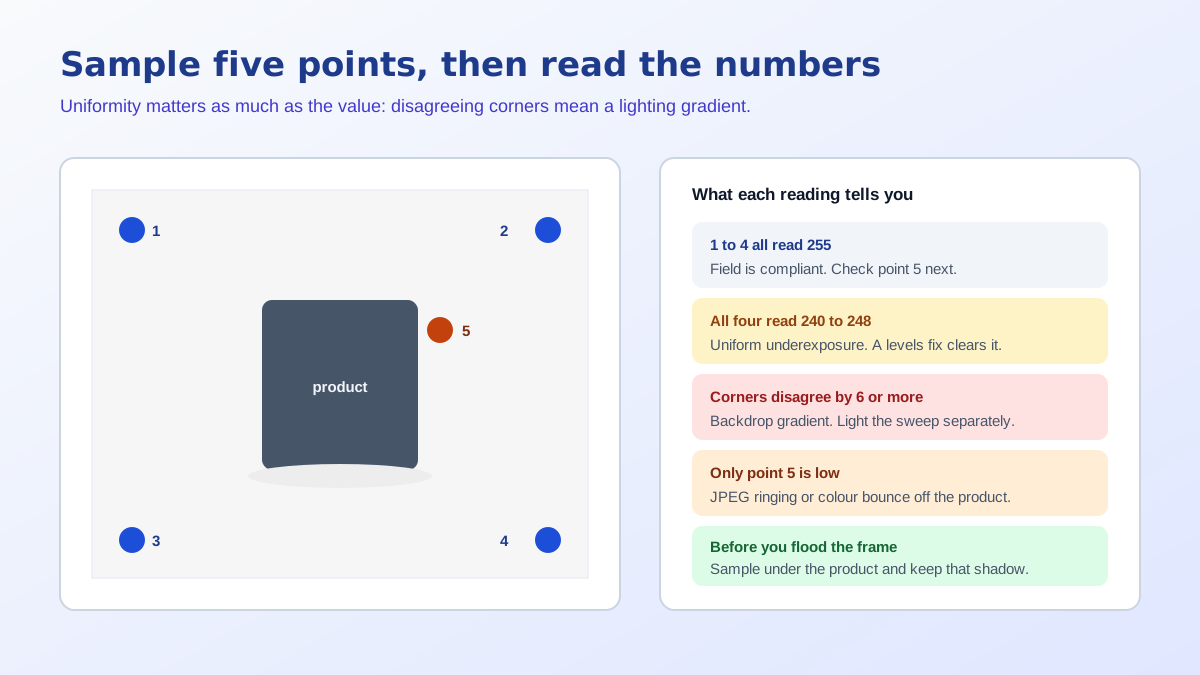
If the background's the only problem, you don't need a reshoot. Cut the product out, drop it on a true 255, 255, 255 canvas, and you're done. Our free background remover tool does that in seconds. When we make a main image in our White BG style, we snap the backdrop to exactly 255, 255, 255 before you ever see it. If the photo's weak in other ways too, say flat light or a bad angle on that steel water bottle, it's often quicker to make a fresh main image from 1 photo with Amazon product photography with AI. And if Amazon offers its own corrected image, open it at full size first. Make sure the colour, shape and parts still match what your buyer will get. Once your main image passes, give the rest of the listing the same care: our A+ content image sizes cheat sheet covers every module, and if you sell on Flipkart too, its Flipkart image quality check works differently.
Go back to them today. Swap each main image for a compliant file, then run the shopper side check above. Start with your best sellers and anything running Sponsored Products ads, because a hidden page with a live campaign costs you twice. If a VA or teammate creates listings in your account, ask who clicked Fix later and when. Nothing in the flow reminds anyone afterwards.
Here's a small habit that stops a repeat. Add a column to your launch sheet called "main image checked", and only tick it once the shopper side check passes. While you've got each listing open, run the title and bullets through our free listing quality checker too. It's a good moment to catch weak copy.
We think the new Amazon main image check is good news, on balance. It moves the warning to the one moment when fixing your image costs almost nothing. The risk is one button. Treat Fix later as a promise you keep the same day. Check every new ASIN from the shopper's side. Then you can stop opening your own listing each morning with that knot in your stomach.
Here's what we found building our own White BG style. AI-made studio backdrops rarely come out truly white. Ours often sat around 240 at the corners, not 255, which looks white on most laptops and still isn't. That's exactly the gap a main image check catches.
So we changed two things. The style now snaps the backdrop to exactly 255, 255, 255 before you see the image. And when you pick Amazon, our quality check marks any image whose corners read darker than 240 as failed.
Source: ListingRVA AI image pipeline and quality checks, October 2026. Engineering observations only, no customer data.
Pure white backgrounds, a well filled frame and no added text, made from 1 product photo. 50 free credits, no credit card.
Start free →Amazon's announcement, as quoted on the Sellers Ask Sellers forum, describes the check for listings created one product at a time in Seller Central, on desktop and mobile, and says the feature was still rolling out. It does not say the check covers bulk uploads, so do not rely on it for spreadsheet or feed listings.
Only if you will replace the image straight away. According to Amazon's announcement, choosing Fix later submits the listing with the defective image, and Amazon warns that images which miss its requirements may lead to the listing being suppressed from search results.
The announcement says you can use a corrected image if one is available. If Amazon offers one, open it at full size before accepting it, and check that the product itself is accurate, with the right colour, shape and parts, because the main image is what the buyer expects to receive.
Aim for at least 1000 pixels on the longest side so zoom works, and 1600 pixels or more where you can, which Amazon staff have recommended. Replies from Amazon staff have not agreed on a single hard minimum, so working above 1600 pixels removes the question.
Check it the way a shopper would: open the detail page by ASIN in a private browser window and search for the product. Then look at the suppressed listings view in Seller Central. If the main image is the likely cause, replace it with a compliant file and check again a day later.
Branding that is physically printed on the product is generally treated as part of the product. The rule is about text, logos, badges and watermarks added on top of the photo in an editor. If you are unsure, compare your image with the examples on Amazon's product image requirements page.
ListingRVA AI now works inside Claude. Connect your workspace and ask Claude to generate listing copy and publish product images to your store, without leaving your editor. See the Claude connector →


Comments
No comments yet, be the first.
Leave a comment