
Amazon Listing Suppressed and No Reason Given? Find the Image at Fault
July 26, 2026 · 8 min read · by Aashirvad Kumar
Your credits refresh every month for as long as ListingRVA AI exists. No renewals, no annual increases, nothing to cancel.
Available on select plans. No renewals, ever.
July 26, 2026 · 8 min read · by Aashirvad Kumar
The ASIN still exists. The inventory still shows units. But a search for the exact product name returns nothing, the buy box is gone, and the row in Manage Inventory reads inactive with a reason column that tells you almost nothing. An Amazon listing suppressed in this way is usually still reachable at its direct address, and that is exactly what makes it so easy to miss: you open the page yourself, it looks completely normal, and you go looking for the problem somewhere else while the ASIN quietly earns nothing.
Images are the most common trigger and the hardest to diagnose, because Amazon rarely names the slot that failed or the rule it broke. The error text is generic, the fix queue is generic, and the listing looks fine to you because you are looking at a rendered page rather than at the file sitting behind it. Working out which of nine images is at fault is a process of elimination, and it goes much faster if you run the checks in the right order.
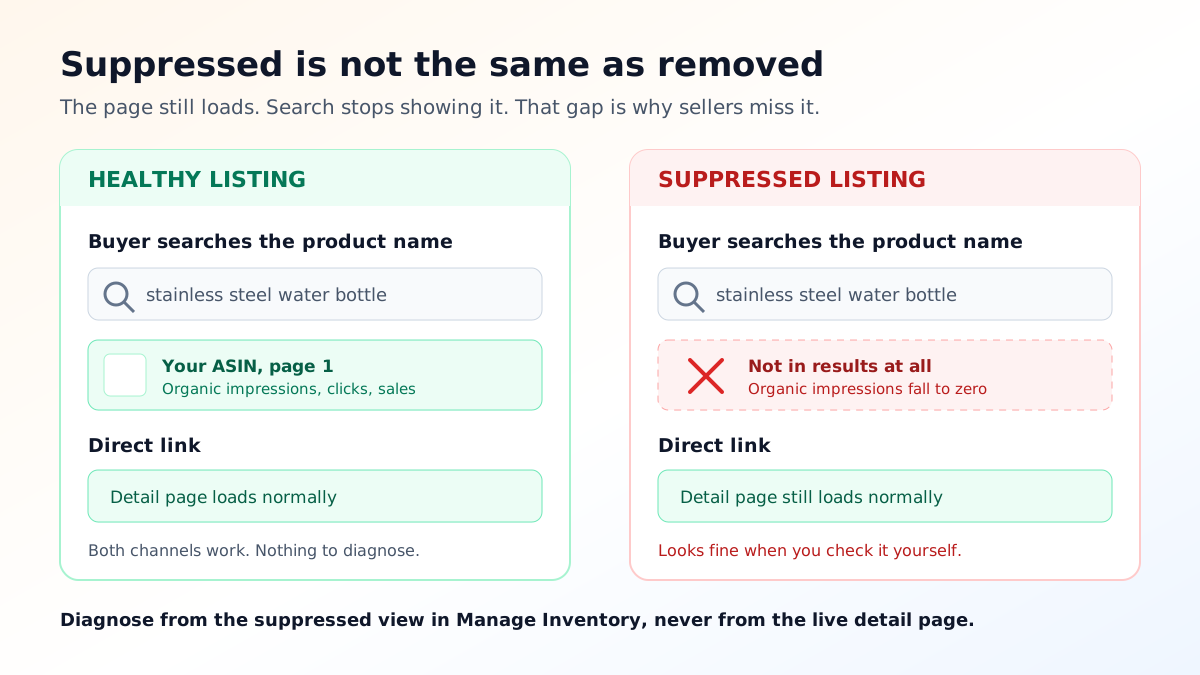
Sellers use these words interchangeably and then chase the wrong fix for days. Suppression means the listing has been pulled out of search results because it fails a catalogue requirement, while the detail page itself continues to exist and can still be bought from by anyone holding the link. Inactive normally points at something commercial or operational, such as out of stock, a pricing error flag, or a closed listing. Stranded means the inventory exists in a fulfilment centre but has lost its connection to a valid listing record.
Only the first of those is worth hunting through your image files for, because an Amazon listing suppressed on a catalogue rule is the only one of the three that a photograph can cause or cure. The distinction matters because the recovery paths are completely different: a stranded unit needs a catalogue relationship rebuilt, a pricing flag needs a price change, and a suppression needs the specific failing attribute corrected. Start by confirming which state you are actually in, using the suppressed view inside Manage Inventory rather than the impression you get from loading the page in a browser.
The commercial damage is also different in kind. A listing that is out of stock stops selling and everyone understands why. A suppressed listing keeps taking direct traffic from your own ads and your own links, which produces just enough sales to look survivable on a dashboard while organic discovery goes to zero. That mismatch, healthy traffic from paid sources and nothing at all from search, is often the first honest signal that something is wrong.
Amazon evaluates image compliance attribute by attribute, not as an overall impression, so suppression almost always comes down to a single condition failing on a single file. That is good news, because it means you are looking for one binary fault rather than judging whether your photography is good enough. It is also why re-shooting everything is the wrong first move: nine new images give you nine new chances to break the same rule you have not identified yet. Running the listing through an Amazon listing quality checker first tells you which fields are actually short before you spend anything on new assets.
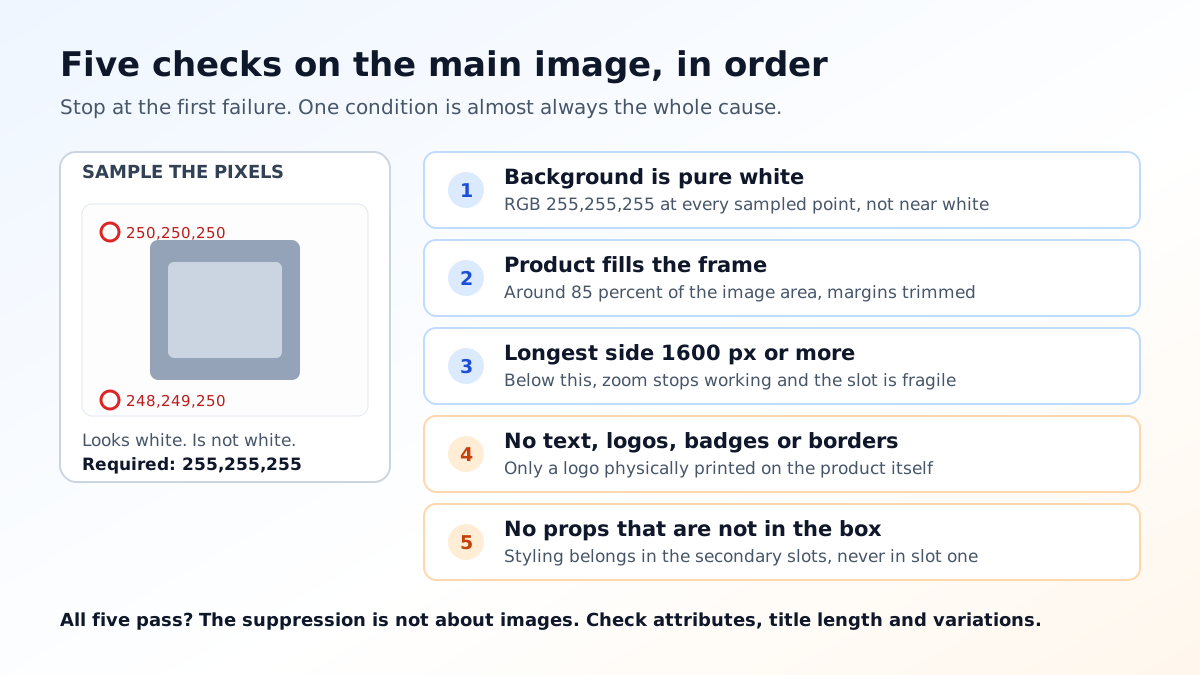
The main image carries rules that no other slot does, and it is where the overwhelming majority of suppressions originate. The background must be pure white, meaning RGB 255,255,255 rather than the near white that a lightbox and a phone camera typically produce. A backdrop that samples at 250 or 248 looks white to you on screen and reads as off white to an automated check. This single condition causes more suppressions than every creative judgement combined, and it is invisible without sampling the actual pixels.
Frame fill is the second most common. The product is expected to occupy most of the frame, around 85 percent of the image area, which means a photo shot with generous margins for cropping later will fail even though it is technically correct in every other way. Resolution is the third: the longest side needs to be at least 1000 pixels for zoom to work, and while files down to 500 pixels are accepted, a listing sitting below the zoom threshold is both weaker and more fragile.
Then there is everything the main image is not allowed to contain. No text, no logos other than the one physically on the product, no badges, no borders, no watermarks, no colour blocks or graphics behind the item, and no props that do not ship in the box. A serving suggestion, a decorative plant, a phone shown next to a case, a model wearing an accessory: all of these are legitimate secondary images and all of them are grounds for the main slot to fail.
Category rules layer on top. Apparel has its own expectations about mannequins and models depending on the sub category, some categories require the product to be shown out of packaging, and others restrict illustrations entirely. Because these are category specific, a file that has been fine for two years on one ASIN can be rejected the moment the same photo is reused on a product filed under a different browse node, which is a genuinely confusing failure mode.
Finally there are the file level faults that have nothing to do with composition. An image saved in CMYK rather than RGB, an unsupported format, a transparency layer that flattens to a grey fringe, a progressive JPEG that fails to decode, or an sRGB profile mismatch that shifts the background off pure white during processing. These are worth checking early precisely because they are invisible: the file looks correct in every preview you own, and the specific rules that govern each slot are laid out in the Amazon image requirements guide.
Work from the files Amazon is serving, not the ones on your desktop. Open the detail page, save each image at full size, and inspect them as a set. Half the time the file that is live is not the file you think you uploaded, because a previous flat file, a supplier feed or another seller contributing to the same catalogue record has replaced it. Confirming what is actually there removes the most frustrating class of wasted effort straight away.
Then sample the background. Open the main image in any editor with a colour picker, click three or four points near the corners and near the product edge, and read the RGB values. Anything other than 255,255,255 is your answer and you can stop looking. If it is pure white, check pixel dimensions next, then measure roughly how much of the frame the product occupies, then look for anything in the frame that is not the product itself.
If all nine slots pass, you are not looking at an Amazon listing suppressed for imagery at all, and you have saved yourself a photo shoot. The other frequent causes are a missing required attribute for the category, a title that breaks the character limit, or a variation relationship that has come apart. Search visibility problems that survive a clean image audit usually turn out to be indexing problems instead, and the difference between a listing that is missing and one that is present but buried is covered in the walkthrough on backend keywords not indexing.
Upload the corrected file to the specific slot that failed and change nothing else. Making six edits at once feels efficient and destroys your ability to tell what worked, which matters because you will hit this again on another ASIN. Reprocessing normally completes within a few hours, and the search index catches up after that, so give it a full day before concluding the fix did not work.
If the flag is still set after that, the correction did not satisfy the rule or a second condition is also failing. That is the point to open a case, and the case will move much faster if you name the ASIN, the image slot, the rule you believe triggered it, and what you changed. Vague requests to please reinstate my listing get vague answers; a specific claim about a specific attribute gets routed to someone who can check it.
What you should not do is delete the ASIN and start again. A fresh listing has no reviews, no sales history and no ranking signal, and you would be permanently trading away the two assets that took longest to build in order to solve a problem that clears itself the moment the file is right. Once the listing is back, the recovery is gradual rather than instant, and rebuilding the click and conversion signals is ordinary optimisation work of the kind set out in the Amazon listing optimization playbook.
Almost every Amazon listing suppressed for imagery got there the same way, which is that compliance was checked after the photo already existed rather than decided before it did. Decide the background, the crop and the pixel dimensions before anything is shot or generated, keep a master file well above the minimum resolution, and export per marketplace from that master rather than editing whatever the phone produced. A background that is genuinely 255,255,255 is a production decision, not a retouching one, and cleanly cutting the product out of whatever it was photographed on is a two second job with a free background remover tool.
This is also the strongest practical argument for generating listing imagery to a spec rather than shooting hopefully and cropping later. When the white is exact, the frame fill is deliberate and the props live only in the secondary slots, the compliance question stops being a recurring emergency and becomes a setting, which is most of the value of AI product photography for people who sell across several marketplaces with different rules each.
Search suppression and page removal are two different states. A suppressed listing is pulled out of the search index while the detail page stays reachable at its direct address, so the ASIN looks perfectly healthy when you open it yourself. That is why sellers often lose a week of sales before noticing. Check the suppressed view inside Manage Inventory rather than trusting the live page.
Download the files Amazon is actually serving rather than the ones on your desktop, then check each against the rules in order: main image on pure white, product filling most of the frame, longest side at least 1000 pixels for zoom, no text or logos or borders, no props that are not included. The main image fails far more often than the secondary slots because it carries rules the others do not.
Image reprocessing normally happens within a few hours of the upload, and the search index catches up after that. If the suppression flag is still set a full day after the corrected file is live on the detail page, the fix did not satisfy the rule that triggered it, or a second condition is also failing. Open a case at that point rather than uploading the same file again.
No. A new ASIN starts with no sales history, no reviews and no ranking signal, and you would be trading a fixable image problem for a permanent loss. Suppression is a state on the listing, not a mark against it, and it clears automatically once the failing condition is corrected. Recreating should only ever be a last resort for a genuinely broken catalogue record.
It can, but far less often. Secondary slots allow lifestyle scenes, props, text overlays and infographics, so most of the strict rules that catch people out apply only to the main image. The usual secondary failures are file level: a resolution below the minimum, an unsupported format, or a transparency layer that renders as a dark edge once Amazon flattens it.
Indirectly. The listing keeps its history, but the days it spent out of search produced no clicks, no conversions and no sales velocity, and those are the inputs that rank it. Expect a recovery period roughly proportional to how long it was down rather than an instant return to the previous position.
ListingRVA AI now works inside Claude. Connect your workspace and ask Claude to generate listing copy and publish product images to your store, without leaving your editor. See the Claude connector →
Comments
No comments yet, be the first.
Leave a comment