
Amazon Listing Not Indexed? Why ASIN Search Returns Nothing
July 28, 2026 · 8 min read · by Aashirvad Kumar
Your credits refresh every month for as long as ListingRVA AI exists. No renewals, no annual increases, nothing to cancel.
Available on select plans. No renewals, ever.
July 28, 2026 · 8 min read · by Aashirvad Kumar
You paste your own ASIN into the Amazon search box and the page comes back empty. You try the exact title in quotation marks and get four competitors and none of yours. Seller Central says Active, the images are attached, the price is set, and the detail page opens perfectly if you go to it directly. An amazon listing not indexed at that level is not a ranking problem and no amount of keyword work will touch it, because the record is being withheld from results rather than placed badly inside them.
Indexing is the step before ranking. Amazon has to accept a catalogue record as retrievable before any query can pull it back, and there are roughly a dozen states in which that acceptance never happens. Once a record is indexed, a complete amazon listing optimization pass is what decides how high it then places. Almost all of them are silent. Nothing turns red in the inventory grid, no notification arrives, and the only symptom is the one you have already found by accident.
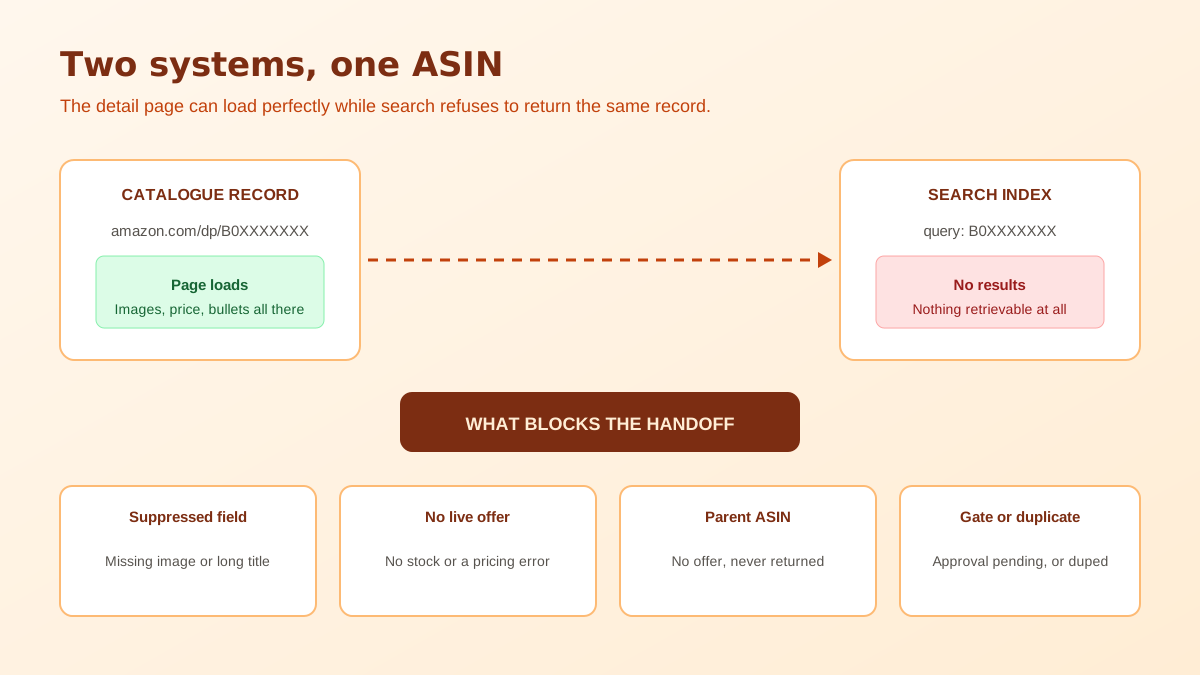
Run three checks in order and stop at the first one that succeeds. Search the raw ASIN on its own, with no brand word and no other terms. If a result appears, the listing is retrievable and your problem lives further down the funnel. If nothing appears, search the exact title inside quotation marks, which forces a phrase match against the strongest string the record owns. If that also fails, search your brand name plus one distinctive noun from the title, such as the model number or a material.
Now open the detail page directly at its slash dp slash ASIN address. If the page renders normally while all three searches come back empty, you have the classic signature: the catalogue holds the record but the index refuses to serve it. That pattern narrows the cause enormously, because it rules out a failed upload and points at listing state, offer state or a compliance block instead. Do the searches signed out, or in a private window, since a logged in seller account sometimes surfaces its own products in ways a shopper never sees. Repeat the same three searches on the mobile app before you conclude anything, because a result that appears on desktop and not on mobile points at a rendering or category filter rather than an index gap, and that is a different investigation entirely.
Suppression is the single most common answer and the easiest one to miss, because a suppressed listing still shows as Active in the main inventory grid. Manage Inventory carries a separate Suppressed view, and that view names the exact field that triggered the block. The usual triggers are a missing main image, a title that is missing or longer than the permitted length, an absent item type keyword or product type, and empty bullet points. Nothing gets emailed to you when it happens.
Image failures deserve their own mention because they are the most frequent trigger and the most fixable. A main image that arrived as a broken URL, that carries a watermark or logo, or that fails the pure white background requirement can hold an otherwise complete listing out of search entirely. Reuploading a compliant hero shot usually restores visibility within hours, and the field level rules are laid out in the Amazon product image requirements guide.
Search exists to return things a shopper can buy. A listing with zero fulfillable inventory, with all its FBA units in an inbound or unfulfillable state, or with the offer switched to inactive has nothing to sell, so it stops being returned. This one catches people after a stockout, because the listing quietly disappears while stock is at zero and then reappears when receiving completes, which makes the outage look like an algorithm change rather than a supply problem. It also catches sellers who switched a listing to inactive for a photoshoot or a price rework and never switched it back, since the inventory grid shows the row either way and the difference is a single column most people have scrolled past.
Variation parents are structural records. They hold a family of children together, they carry no offer of their own, and they are never returned by search. If the ASIN you have been pasting into the search box is the one sitting at the top of a variation family in Seller Central, the empty result is correct behaviour and there is nothing to fix. Copy a child ASIN, one with its own size or colour and its own price, and test that instead.
Restricted categories, and brand or safety gated subcategories, can leave a listing created and visible in your own account while it waits on approval. Until the gate clears, the offer is not live to shoppers and the record does not answer queries. The same applies to a listing sitting in a category that requires documentation you uploaded but that has not been reviewed, which routinely takes days rather than hours and produces no interim status you can watch. Sellers moving into supplements, cosmetics, toys or anything with a compliance document requirement hit this constantly, and the tell is that every other listing in the account behaves normally while one category refuses to surface.
Amazon deactivates offers it considers mispriced, either far above the marketplace reference or below a floor you set yourself. The listing survives, the detail page survives, the offer does not, and the ASIN behaves exactly like an unindexed one. Check the pricing health view before assuming anything more exotic is happening, since a fat finger in a bulk upload is a much likelier explanation than a catalogue fault.
Duplicate creation and catalogue merges quietly move offers. If a matching product already existed, your flat file may have attached your offer to that existing ASIN instead of creating the one you expected, so the ASIN you are searching is an empty shell you own on paper. Searching the exact title often reveals this immediately: the product appears, under a different ASIN, sometimes with somebody else's images and copy already in place. The same thing happens in reverse when a duplicate is created for a product that already existed, leaving two records competing with a fraction of the sales history each, and Amazon resolving which one to show. Neither situation fixes itself, and both need a catalogue case rather than a listing edit. If your listing does show up in search but sits on page five, it is indexed and the problem is ranking, which our guide to diagnosing a stuck Amazon listing covers step by step.
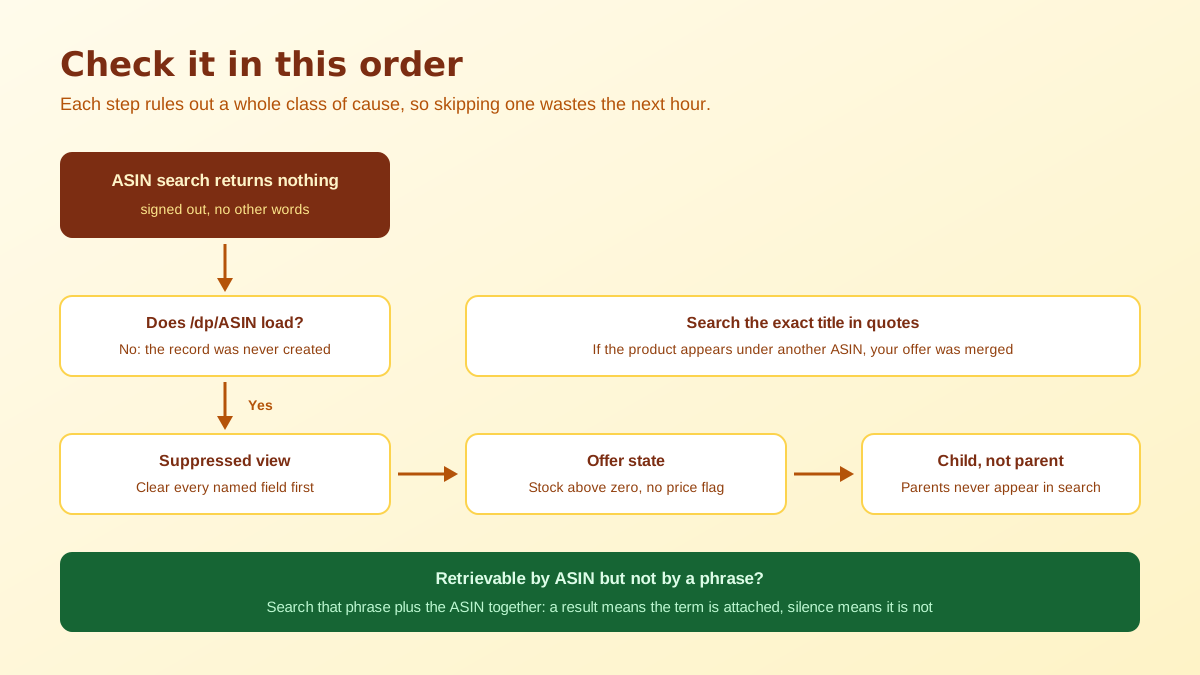
There is a second, softer version of the problem that gets confused with the first. The ASIN search works, the title search works, but the phrases you actually care about return nothing of yours even ten pages deep. An amazon listing not indexed for one phrase is a different animal from one missing entirely, because the record is retrievable while the specific string you tested is not attached to it. Test it by searching the exact phrase plus the ASIN together, which returns your listing only when Amazon associates that phrase with that record.
Term level gaps usually trace back to where a phrase was placed rather than whether it was used. Search terms stuffed with repeats of words already in the title waste the field, prohibited terms void it, and a phrase that appears only inside an image gets no credit at all. Choosing the right phrases in the first place is what the free Amazon keyword generator is for, and the failure modes specific to the hidden field are covered in the guide on why backend keywords are not indexing.
Work that list top to bottom and most amazon listing not indexed cases resolve on the second or third step. What matters is the order, because every hour spent rewriting bullets while the main image is non compliant is an hour that changes nothing measurable. Once the record is genuinely retrievable, the work shifts from catalogue hygiene to competition, and the priorities there are different again, which the Amazon listing optimization playbook sets out step by step.
One preventative habit is worth more than any of this diagnosis. Suppression triggers cluster around assets and required attributes, so a listing that ships with a compliant white background hero, a full set of secondary images, a title inside the current character limit and every category attribute filled almost never becomes an amazon listing not indexed case in the first place. Producing that asset set is exactly the job that AI product photography now removes from the launch critical path, and the tightening rules on length are worth reading before your next upload in the Amazon title character limit breakdown.
Usually minutes, and reliably within twenty four hours of the listing going Active with stock against it. If a full day has passed and an ASIN search still returns nothing, stop waiting. Time is not the variable, because a listing that is going to index does so quickly and a listing that is blocked stays blocked indefinitely until you change the condition blocking it.
The detail page and the search index are two separate systems. A direct /dp/ URL renders the catalogue record whether or not that record is retrievable by a query, so a page that loads while search returns nothing is the clearest possible signal that the listing is being deliberately withheld from results rather than missing from the catalogue.
In practice yes. A listing with no sellable inventory and no active offer has nothing to return a shopper to, so it drops out of results and reappears when stock is replenished. Sales history is not deleted, but a long stockout is one of the most common reasons a previously visible ASIN suddenly answers nothing.
Parent ASINs are organisational records, not buyable ones. They hold the variation family together and carry no offer of their own, so they are not returned by search. Only child ASINs with live offers are retrievable, and the correct test is to search a child ASIN rather than the parent you see at the top of the family in Seller Central.
Inside Manage Inventory there is a Suppressed view that lists affected ASINs along with the specific field that triggered it, most often a missing main image, a missing or over-length title, or a missing item type keyword. Nothing is emailed to you and the main inventory grid can still show the listing as Active, which is why the tab goes unchecked for weeks.
No, and the distinction decides what you should work on. Not indexed means the record cannot be retrieved by any query at all, which is a catalogue or compliance issue. Ranking badly means the record is retrievable but placed below competitors, which is a relevance, conversion and review issue. Optimising copy on an unindexed listing changes nothing.
ListingRVA AI now works inside Claude. Connect your workspace and ask Claude to generate listing copy and publish product images to your store, without leaving your editor. See the Claude connector →
Comments
No comments yet, be the first.
Leave a comment