
The Amazon Listing Audit: Five Passes Instead of Random Tweaking
August 9, 2026 · 8 min read · by Aashirvad Kumar
Your credits refresh every month for as long as ListingRVA AI exists. No renewals, no annual increases, nothing to cancel.
Available on select plans. No renewals, ever.
August 9, 2026 · 8 min read · by Aashirvad Kumar
Most sellers do not audit listings, they poke at them. A bullet gets rewritten on Monday, the main image gets swapped on Thursday, the price moves at the weekend, and by the time the numbers change nobody can say which edit caused it. Three months later the listing is different but not measurably better, and the same questions come back around. An Amazon listing audit is the alternative: a fixed sequence, run in the same order every time, where each stage has a pass or fail answer rather than an opinion.
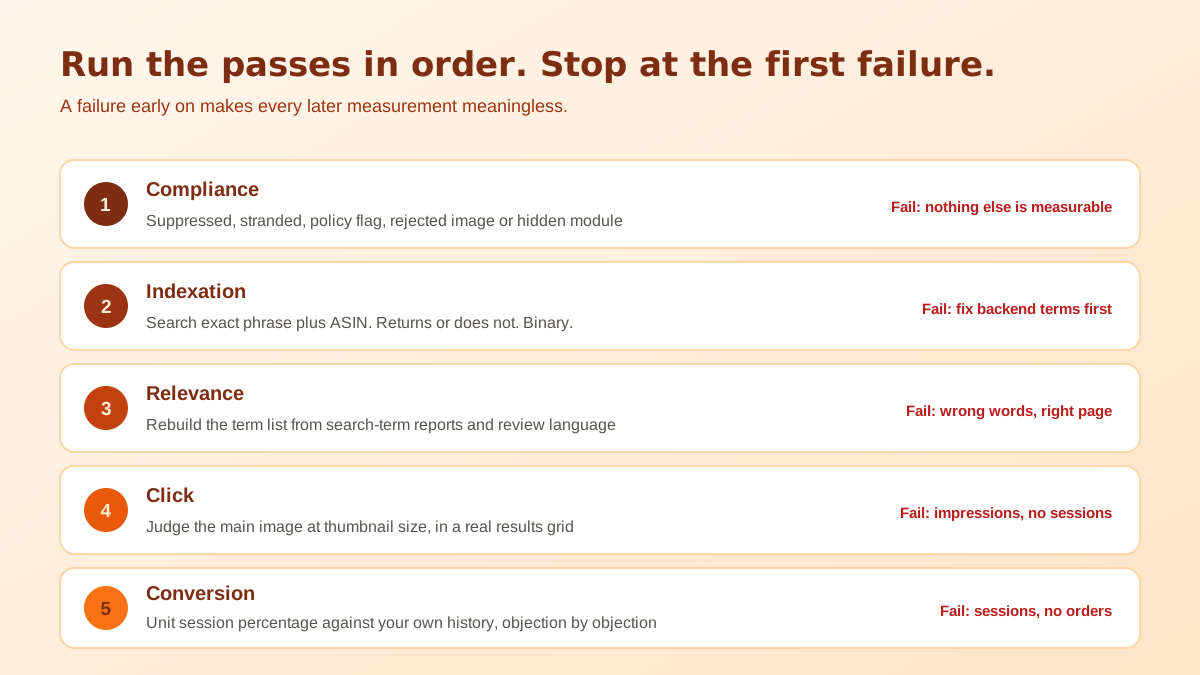
The sequence matters more than any individual check. The stages follow the funnel, so a failure early on makes everything downstream unmeasurable. There is no point rewriting bullet points for a listing that is not indexed for its own core term, and no point testing a new hero image on a listing that is suppressed. Run the passes in order and stop at the first genuine failure.
An Amazon listing audit is a measurement exercise, and measurement fails if the thing being measured keeps moving. Pull the last ninety days from the Business Reports detail page view and write down three numbers per ASIN: sessions, unit session percentage, and units ordered. Note any date on which you changed the page, changed the price, started or stopped advertising, or ran a deal. Those dates are the boundaries of every conclusion you are about to draw.
Then commit to one change at a time with a fourteen-day observation window, longer if daily sessions are in single figures. This is the discipline that separates an audit from tweaking, and it is the part people abandon first because it feels slow. It is not slow. Six changes made blindly over three months teach you nothing, while six changes made one at a time teach you six things and are usually finished sooner because you stop repeating the ones that did not work.
Open the listing quality dashboard and the account health page before you look at the listing itself. A suppressed or stranded listing, a policy warning on the ASIN, or an attribute flagged as non-compliant will invalidate every other measurement you take, because the page is either not being shown or is being shown with parts removed. Fix these using the exact reason string Amazon gives rather than guessing, then restart the clock.
The quieter version of this failure is partial. Bullets that vanish on mobile, a hidden A+ module, an image rejected for a compliance reason while the others stayed live: none of these produce an alert, and all of them look like a content problem when they are actually an enforcement problem. If part of your page is missing rather than weak, the case of disappearing Amazon bullet points covers what triggers it and what brings them back.
Indexation is binary and takes two minutes to test, which is why it belongs this early in an Amazon listing audit. Search the exact phrase from your title along with the ASIN in the Amazon search bar. If the listing returns, that phrase is indexed. Repeat for your five most important non-title terms. Anything that does not return is not a ranking problem, it is an absence, and no amount of copy work on other fields will change it.
Failures here usually trace back to the backend search term field: over the byte limit so the tail is silently dropped, filled with duplicates of words already in the title, padded with commas, or containing brand names and prohibited terms that cause the whole field to be ignored. Each of those has a different fix, and the diagnostics are collected in the backend keywords not indexing breakdown. To rebuild that field from scratch, our free backend keyword extractor outputs a clean, ready-to-paste 250-character search terms string.
Being indexed is not the same as being relevant. In this pass you rebuild the keyword list from scratch rather than reviewing the one you already have, because reviewing an existing list mostly confirms it. Pull the actual customer search terms from your advertising reports, add the phrasing used in your own review text, and compare that vocabulary against what the page currently says. Buyers routinely describe products in words no seller would write.
Then check placement. The title carries the most weight and truncates from the end, so anything you cannot afford to lose belongs in the opening stretch. Bullets carry the qualifying attributes. The backend field carries synonyms, misspellings and regional variants that would read badly in visible copy. Terms that appear in none of these are invisible regardless of how obviously relevant they are, and terms duplicated across all of them waste space that could have been a new phrase. Rebuilding the title around that priority order is what the Amazon title generator tool is designed to do from your existing product data.
A listing that passes both indexation and relevance but still gets no traffic is usually competing above its weight rather than misconfigured. That is a different problem with a different answer, and it is worked through in the indexed but not ranking guide rather than in an audit pass.
Everything so far only earns an impression. The click is decided in the search results by three elements: the main image, the title, and the price and review block. Open your category on a phone, find your listing in a results grid next to its real competitors, and look at it at that size. This is the only honest way to evaluate a main image, because judging it at full resolution on a desktop screen tells you almost nothing about how it performs as a thumbnail.
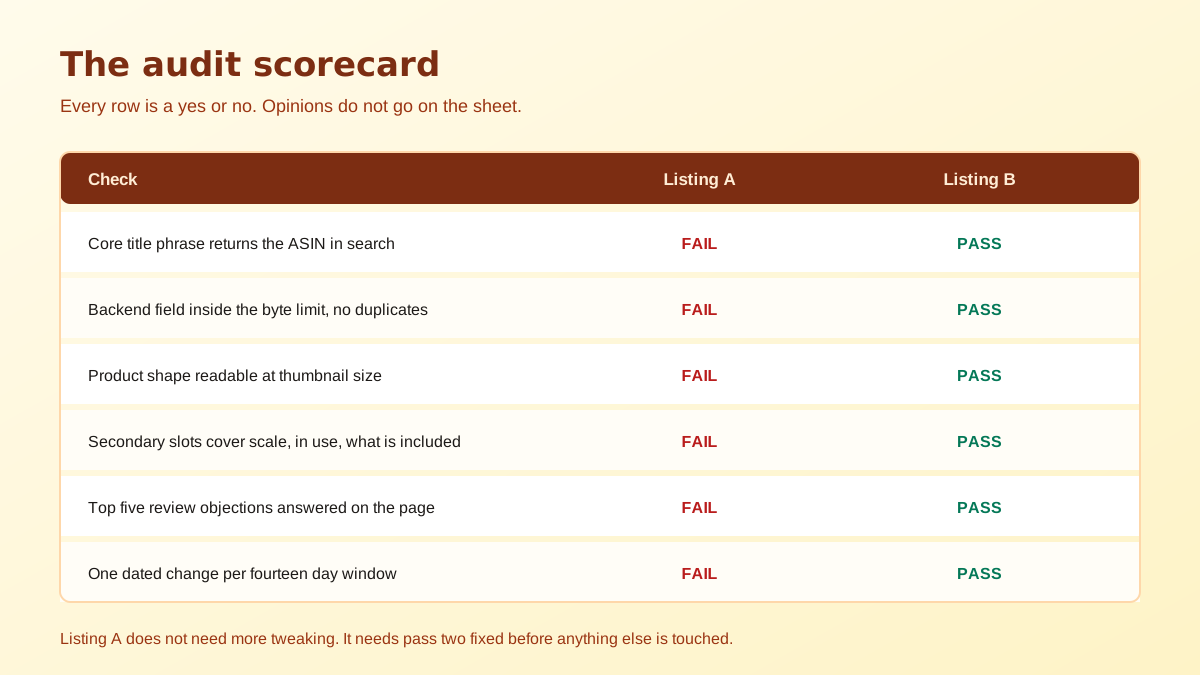
Score the main image on three things: does the product fill the frame, is the shape readable in half a second, and does it look like it belongs in the same catalogue as the top four results. Then audit the secondary slots for coverage rather than quality, because most listings repeat the same angle in four slots and leave scale, in-use context and what is in the box entirely unshown. The technical constraints on all of these are in the Amazon image requirements checklist.
Once the visitor arrives, unit session percentage is the number that answers the question. Compare it against your own history on the same ASIN rather than against a category benchmark, because benchmarks vary too widely by price band to be useful. A conversion rate that has fallen while sessions held steady points at the page, the price, the reviews, or the delivery promise, and those four can usually be separated by checking which of them changed most recently.
The content side of this pass is about objections rather than features. Read the questions section and the two-star and three-star reviews, list every recurring doubt, and check whether the page answers each one before a buyer has to ask. Sizing, compatibility, material, what is included, and what happens if it is wrong are the five that come up in almost every category. A+ modules are the right place for the long answers, and whether yours are actually working is measurable through the A+ content quality score.
Price deserves its own line in this pass because it is the variable most likely to be moving without your involvement. Repricing rules, a competitor undercutting you, a coupon that expired, a change in the delivery estimate: any of these can move conversion by more than a rewrite ever will, and all of them are invisible in the content of the page. Before you conclude that the copy is at fault, confirm that the offer a buyer sees today is the same offer they saw during the period you are comparing against. Half of the conversion problems that get treated as content problems are not.
The value of running an Amazon listing audit this way is not that any single check is clever. Each one is obvious in isolation. The value is that a fixed order stops you from spending a month on images for a listing that was never indexed, and a dated log stops you from repeating a change that already failed. If you want the underlying improvements rather than the diagnostic sequence, the ten step optimization playbook covers what to actually change once an audit has told you where the problem is.
Run the full sequence quarterly on your top listings and immediately after any event that changes the page, such as a category style guide update, a variation merge, or a suppression notice. Between full audits, only the indexation pass is worth repeating monthly, because that is the check most likely to fail silently without anything visibly changing on the page.
Indexation, before anything else. Search your own exact title phrase together with the ASIN and confirm the listing still returns. A listing that has stopped being indexed for its core terms produces a sudden traffic drop with unchanged conversion, which looks nothing like a copy or pricing problem and will not respond to copy or pricing fixes.
Compare sessions against unit session percentage in the Business Reports detail page report. Falling sessions with steady conversion is a traffic problem and lives in the indexation and relevance passes. Steady sessions with falling conversion is a page problem and lives in the images, price, reviews and content passes. Fixing the wrong one wastes a full test cycle.
At least fourteen days for most categories, and longer for low-volume listings where daily sessions are in single digits. Change one variable at a time and record the date, because the most common reason sellers cannot tell whether an edit worked is that three edits landed in the same week and the results are now impossible to separate.
A suppression is the compliance pass failing, and it outranks everything else because no other improvement can be measured while the listing is not being shown. Clear the suppression first using the exact reason given in the listing quality dashboard, then start the audit sequence from the beginning as if the listing were new.
Copy first, but only because copy controls whether you appear at all. Images control whether anyone clicks once you do appear, so they are the higher-leverage fix on a listing that already ranks and gets impressions. Sequence follows the funnel: be findable, then be clickable, then be convincing.
ListingRVA AI now works inside Claude. Connect your workspace and ask Claude to generate listing copy and publish product images to your store, without leaving your editor. See the Claude connector →
Comments
No comments yet, be the first.
Leave a comment