
Watch Product Photography: Keeping the Dial Legible at Thumbnail Size
June 28, 2026 · 8 min read · by Aashirvad Kumar
Your credits refresh every month for as long as ListingRVA AI exists. No renewals, no annual increases, nothing to cancel.
Available on select plans. No renewals, ever.
June 28, 2026 · 8 min read · by Aashirvad Kumar
Watches are the hardest thing in ecommerce to photograph well. The dial is tiny and detailed, the crystal throws reflections, polished steel catches every light in the room, and a buyer spending real money zooms in to read the text and judge the finish. Get the lighting wrong and a premium watch looks cheap. That is why a watch shoot is slow, technical and expensive.
AI product photography removes the studio without losing the precision. You photograph the watch once, then generate a dial-sharp white-background hero, macro detail, an on-wrist lifestyle shot and a premium editorial scene in minutes, on a tool that preserves your real dial text and bracelet instead of inventing a watch that does not exist.
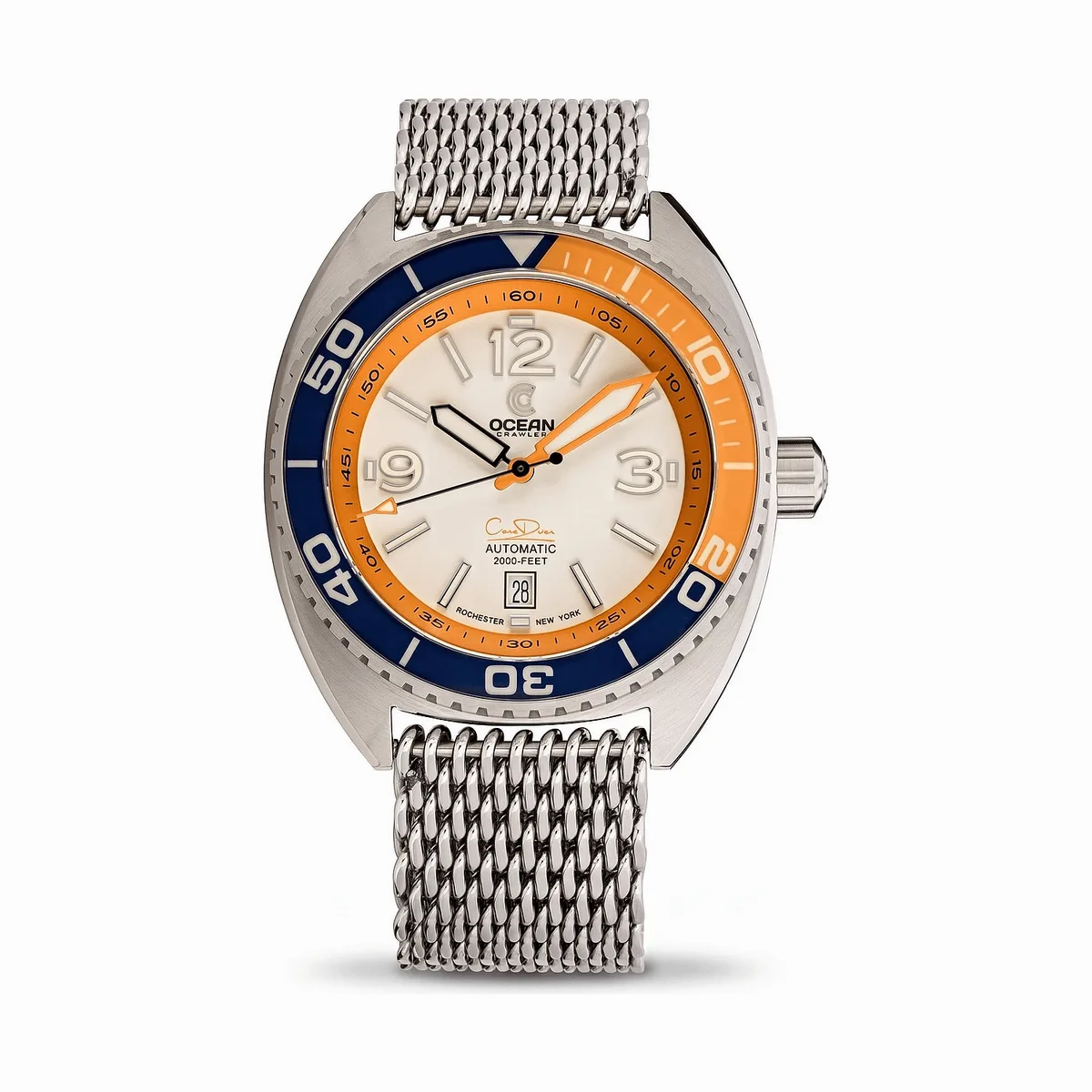
Two things make watches their own problem. First, the dial is the product. Buyers read the text, the markers, the date window, the lume; if any of it is soft or warped, trust collapses. Second, the materials fight the camera. Sapphire crystal reflects, polished cases create hotspots, and a clean even light on a watch is one of the toughest setups in product photography. If the argument needs evidence, the product image conversion statistics cover what actually shifts buyer behaviour.
So a strong watch image does two jobs at once: it keeps the dial crisp and legible, and it lights the case and bracelet cleanly without the glare that makes a real shoot so slow.
A strong watch listing is never one photo. It is a small set, each answering a different buyer question:
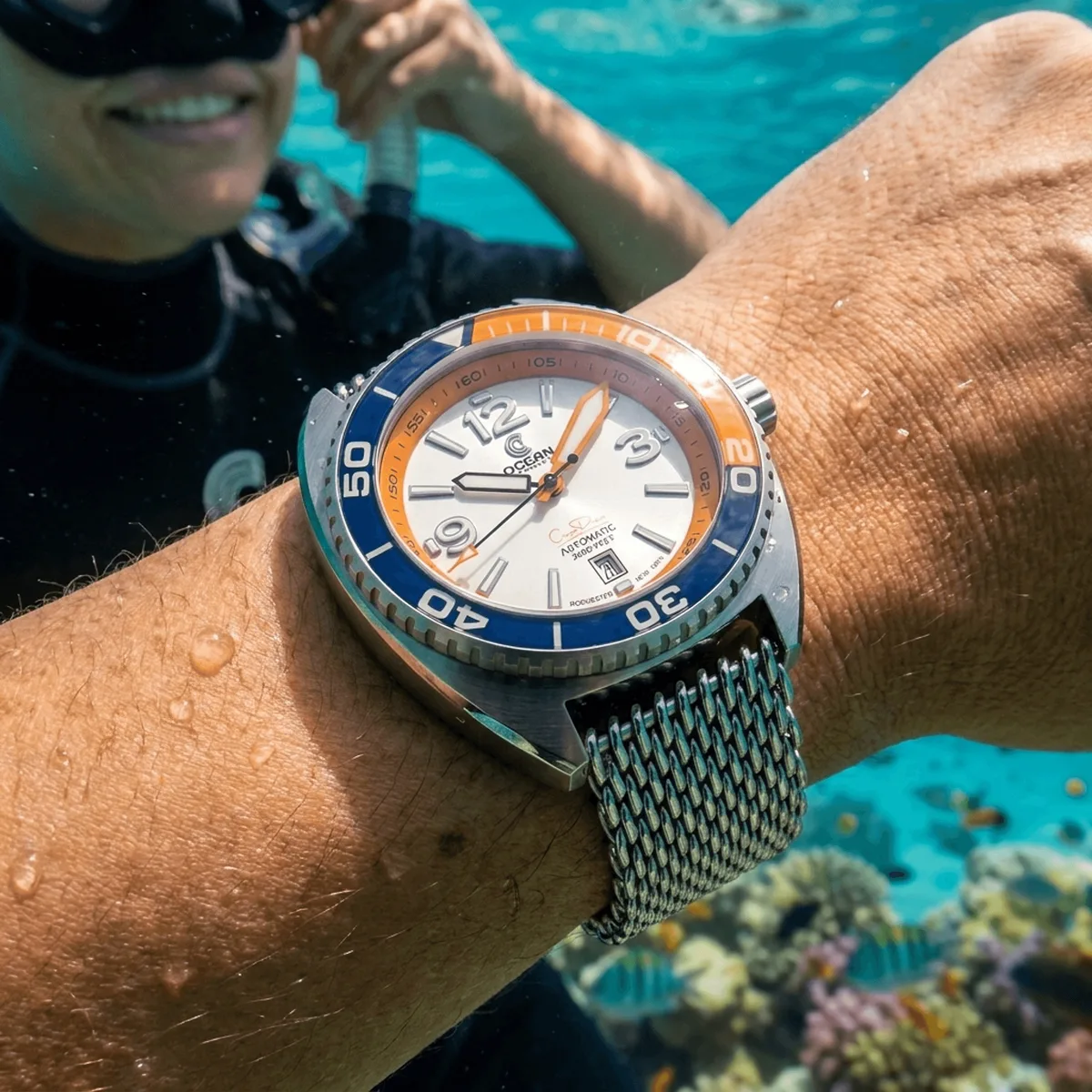
The image that closes a watch sale is rarely a flat packshot. Buyers want to know how the case sits on a wrist and how the dial, lume and finish read up close, the two things a single hero cannot show. An on-wrist shot settles the size question that text never quite answers, and a macro frame proves the build that justifies the price. The image half of the same listing is covered by the Amazon product photography software.
ListingRVA AI generates both from your watch photo, preserving the exact dial, hands and bracelet. The on-wrist scene below was generated end to end from a single product image, with no studio and no model:
The traditional path to a watch catalog is brutal: a macro setup, diffused lighting, a tripod, careful retouching to kill reflections, then repeat for every reference and every dial color. For a brand with dozens of references it is weeks of studio time and a heavy budget before a single listing goes live. The equivalent rules on the other marketplace are collected in the Amazon image requirements guide, and they are not identical.
The AI path starts from a single clear photo of each watch. From there you generate the white-background hero, the macro detail, the on-wrist shot and the premium editorial scene, and you keep them consistent across the whole collection. When you add a dial color, you generate the variant rather than rebooking the studio. See AI Product Photography Pricing for the plan math, or the full AI Product Photography Software feature set. See the full lineup on the AI watch product photography page.
A hero that looks perfect full screen can turn into a grey disc in a search grid. Before you publish, shrink the main image to the size it appears in a phone search result. The hands, the hour markers and the dial color should still read clearly. The fine print on the dial will not, and does not need to, because the macro shot carries that detail. If the hands blur into the markers, the hero needs fixing.
Two fixes cover most failures. Set the hands at roughly ten past ten, the long-standing watch convention, so they frame the logo and stay clear of the markers and date window. Then let the case fill the frame rather than the full strap or bracelet, so the dial takes up as much of the thumbnail as possible.
The fastest way to earn returns is an image that oversells. Keep these in mind so the picture matches the watch that arrives:
ListingRVA AI is built around this. It reads your real watch, preserves the dial and never invents on-image text, so the catalog stays true to the product. You can publish the finished images straight to your channels through our ecommerce marketplace integrations.
50 free credits, no credit card. White background, macro, on-wrist and editorial styles included.
Start free →Yes. The AI reads your real product photo and preserves the exact case, dial text, hands, bezel and bracelet, then places the watch on a clean background, on a wrist or in a scene. Your real product stays the hero, never a generic stand-in.
A clean white-background hero with the dial legible, a macro detail of the dial and bezel, an on-wrist lifestyle shot for scale, a caseback or bracelet shot, and a premium editorial or on-wrist scene that shows the watch at its best.
Yes. Generate on-wrist lifestyle shots from your watch photo so buyers can judge the case size and how it sits, the question a flat packshot never answers and a common cause of returns.
A studio watch shoot with macro lighting and a retoucher runs into the hundreds per reference, and reflections make it slow. AI brings the full set, including macro and on-wrist shots, to a few dollars per watch and minutes per product.
Yes. The generation produces clean, evenly lit dials without the harsh reflections and hotspots that make watches one of the hardest categories to light in a real studio, while keeping the dial text and markers crisp.
ListingRVA AI now works inside Claude. Connect your workspace and ask Claude to generate listing copy and publish product images to your store, without leaving your editor. See the Claude connector →
Comments
No comments yet, be the first.
Leave a comment