
Amazon Variation Listing Errors That Split Your Reviews
August 1, 2026 · 8 min read · by Aashirvad Kumar
Your credits refresh every month for as long as ListingRVA AI exists. No renewals, no annual increases, nothing to cancel.
Available on select plans. No renewals, ever.
August 1, 2026 · 8 min read · by Aashirvad Kumar
You had one listing with 340 reviews. You added three new colours, something in the feed did not take, and now you have four listings: the original with 340 reviews and three orphans with none. Sessions drop, the new colours never get discovered, and the original stops converting because the colour a shopper wanted is on a page they will never see. Most amazon variation listing errors look exactly like this, and the damage is done before any error message appears.
A variation family is a fragile structure held together by a few fields that have to agree with each other. When they agree, one detail page pools the reviews, the sessions and the ranking signals of every child. When they disagree, the family silently splits into standalone listings that compete with each other. This is what breaks, in the order it usually breaks.
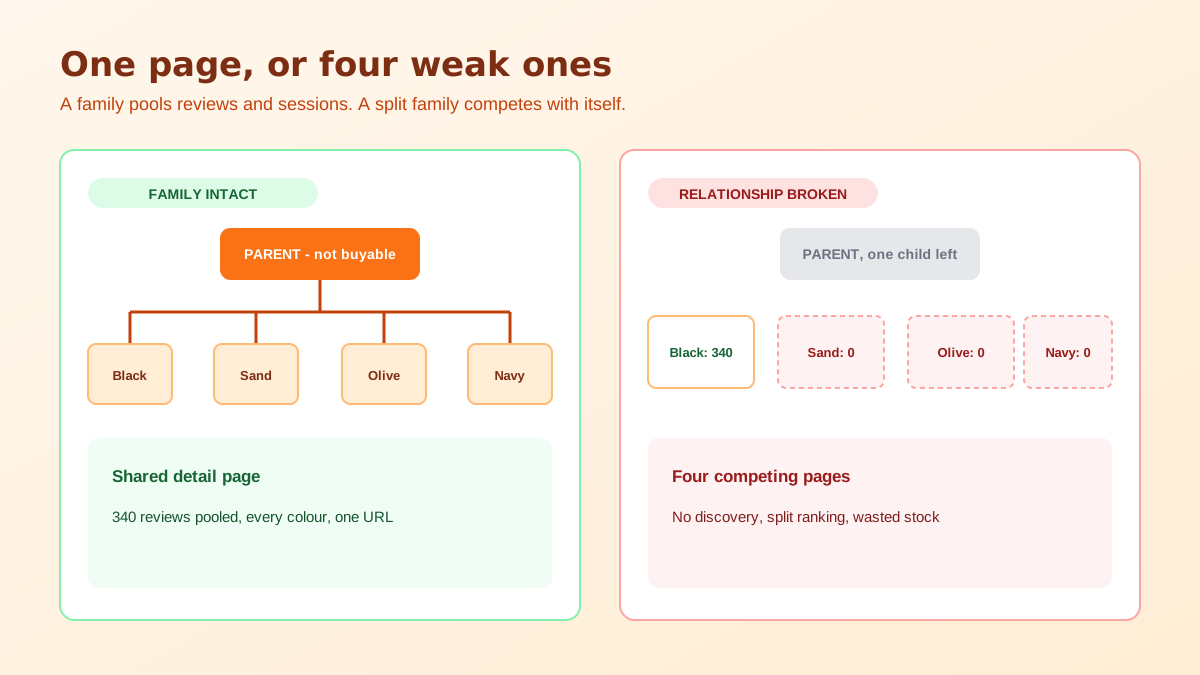
The parent ASIN is not a product. It is a container that cannot be bought, holds no price and no quantity, and exists only to define the family and the variation theme. Every buyable unit is a child. Sellers who treat the parent as the real listing end up trying to give it stock, a price or a buy box, and the feed rejects it in ways that read as unrelated problems.
The variation theme lives on the parent and decides which attributes children are permitted to differ on, whether that is size, colour, or a combination such as size and colour together. Everything downstream depends on that one value being correct before any child is created, because changing it later means dissolving the family and rebuilding it. Choosing it casually is the root cause of a surprising share of amazon variation listing errors.
This distinction matters more than any other. A review belongs permanently to the child ASIN that earned it. What a family does is display the combined reviews of all its children on the shared detail page, which is why a merge feels like a gift and a split feels like a theft. Nothing was actually moved in either direction, the page just started or stopped aggregating.
The practical consequence is that a split is recoverable if the children still exist. Repair the relationships and the pooled count comes back. What is not recoverable is a child that was closed and recreated under a new ASIN, because the history stayed with the ASIN you deleted. Never solve a bad attribute by deleting the listing.
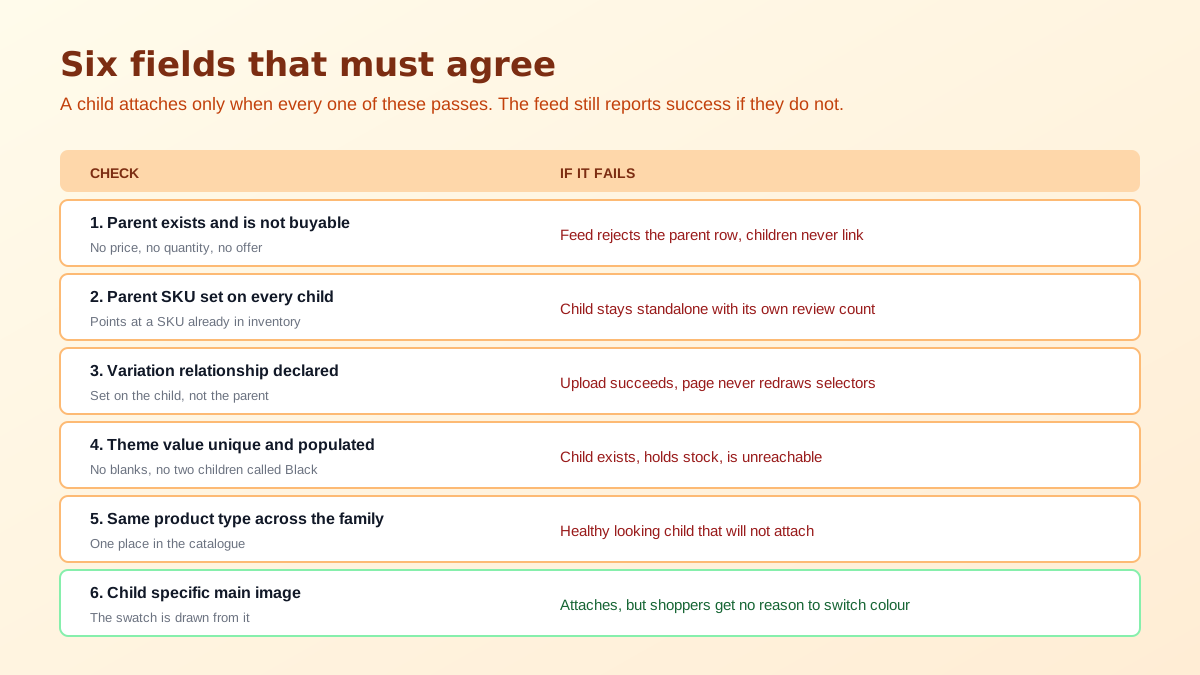
First, listing children as standalone products and merging afterwards. This works, but only if every child carries a populated variation value that matches the parent's theme, a matching browse category, and a parent SKU pointing at a parent that already exists in your inventory. Miss any one of those and the child stays outside the family while the feed reports success, because the upload itself did not fail.
Second, blank or duplicated variation values. A child with no colour value has nothing for a selector to attach to. Two children that both say Black leave the page able to surface only one of them, and the other becomes a listing that exists, holds stock, and is effectively unreachable from search or from the family page. Audit this by listing every child's theme attributes side by side and looking for empties and repeats.
Third, mismatched categories or product types between children. The family has to sit in one place in the catalogue. A child created under a different product type will not attach, and the failure is easy to miss because the child looks perfectly healthy on its own. This one is common when a range was built over two years by different people using different templates.
Fourth, resubmitting the same relationship repeatedly while the first feed is still processing. Relationship changes take time to redraw on the detail page, and impatience produces conflicting instructions that leave half the range attached and half orphaned. Submit once, wait, then check the live page rather than the feed report, because the feed report only tells you the file was accepted.
Fifth, grouping products that are not variations of each other. Putting a phone case and a screen protector under one parent to share a review pool is variation abuse under Amazon's relationship policy, and the outcome is usually suppression of the entire family rather than of the offending child. Whatever the reviews were worth, they were not worth the range going dark. If a range keeps failing for reasons that are not obvious, run the family through an Amazon listing quality checker before you resubmit again.
A split family does more than lose a review count. Sessions that would have concentrated on one page spread across four, so every child looks weaker than the range really is. Conversion rate on each orphan is measured against its own small traffic, and the page that would have converted a colour seeker never gets the chance because that colour is not selectable from the page they landed on.
There is a second effect that gets misdiagnosed as a keyword problem. Sellers see a range that used to rank slide down for its head term, check indexing, find the term indexed, and conclude the copy needs work. The copy is fine. The signals that supported that ranking were distributed across children that no longer share a page. The symptom pattern is close enough to a genuine relevance problem that the piece on being indexed but not ranking is worth reading alongside a variation audit.
Advertising compounds it. Campaigns built at the range level suddenly point at ASINs that no longer share a landing experience, so a click on a sponsored placement for the black version lands a shopper on a page where the sand version they wanted cannot be selected. Spend continues at the old rate while conversion falls, and because the cost per click did not move, the campaign report looks like a bidding problem rather than a catalogue one. Pausing the campaign to investigate then removes the traffic that was propping the range up, which is how a two week variation fault turns into a two month recovery.
There is also a slow version of this failure that never involves an error at all. A range grows one colour at a time over two years, and each new child is created from whichever template was to hand, so the theme attributes drift: one child says Charcoal, another says Charcoal Grey, a third says Dark Grey. Nothing breaks, the family holds, and the selector fills up with values that read as three different colours to a shopper looking at three nearly identical swatches. Standardising those values is unglamorous work with a measurable effect on how many people pick a second option.
Images make the split worse than it needs to be. Each child should carry its own main image showing that specific colour or size, because the swatch is generated from the child's image and a family where three children share the parent's photograph gives a shopper no reason to click the other options. Amazon is also strict about what a main image may contain, which the Amazon product image requirements guide sets out in detail.
Worked in that order, most amazon variation listing errors resolve without any listing being closed, which is the whole objective. Every shortcut that involves creating a fresh SKU trades a two hour fix for a permanent loss of review history, and that trade never looks good six months later. Once the family is whole again, the rest of the detail page is worth revisiting with the Amazon listing optimization playbook so the recovered traffic lands on a page that converts.
One last thing worth checking while you have the export open. Backend search terms are set per child, and a range built over time usually has three different people's ideas of what the product is called sitting in that field, with duplication that wastes the byte limit. That is a separate problem with its own symptoms, and the write up on backend keywords not indexing explains why the field so often does nothing at all.
Reviews stay attached to the child ASIN that earned them, but a variation family displays the pooled reviews of every child on the shared detail page. That is why merging feels like a transfer and why breaking a family feels like a loss. Nothing moves, the page simply stops aggregating and each child falls back to its own count.
The variation theme is set on the parent and governs which attributes the children are allowed to differ on, so changing it invalidates every relationship underneath. In practice you break the children out of the family, correct the theme on the parent, then rebuild the relationships. Plan the theme before you create anything, because retrofitting it is the slowest fix in the process.
Usually the child has a blank or duplicated variation value. If two children are both listed as Black, the page can only surface one of them, and a child with no colour or size value has nothing to attach to a selector. Check that every child carries a unique, populated value for each attribute named in the variation theme.
No. Amazon's variation relationship policy expects children to be genuine variations of the same product, differing only on the attributes in the theme. Grouping unrelated items to inherit a review pool is treated as variation abuse and the usual outcome is suppression of the whole family, which costs far more than the reviews were worth.
If the relist creates a new ASIN, then yes, the sales history and reviews stay with the old one. This is the most avoidable mistake in the whole process. Fix the offending attribute on the existing ASIN through a partial update instead of closing the listing and creating a replacement SKU with a slightly different identifier.
Feed processing usually returns a result within minutes, but the detail page can take several hours to redraw the selectors, and search may lag longer. Do not resubmit repeatedly during that window, because conflicting feeds are a common cause of half built families where some children attach and others sit orphaned.
ListingRVA AI now works inside Claude. Connect your workspace and ask Claude to generate listing copy and publish product images to your store, without leaving your editor. See the Claude connector →
Comments
No comments yet, be the first.
Leave a comment